
Participant
September 8, 2017
Answered

Problems with CC Illustrator Transform Panel

  • September 8, 2017
  • 3 replies
  • 1800 views

Just got the free trial of CC and there are things that are different that I am not liking. Why doesn't the transform panel with width and height stay on the menu on the top of the page? Is this a resolution thing? Something to do with my small 13" screen? Also, I want the up/down arrows next to width and height so size can be adjusted easily. Where did they go and how do I get them back?
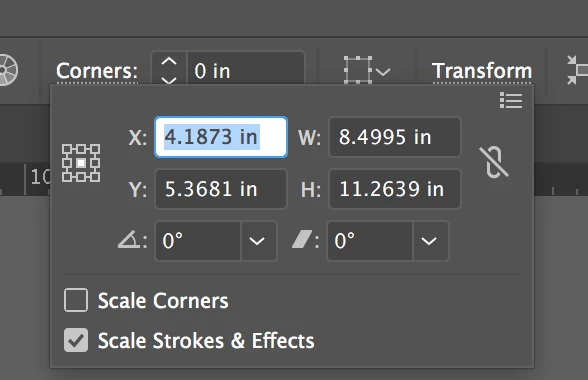
I have to click transform for the width and height to show up. This is not ideal.

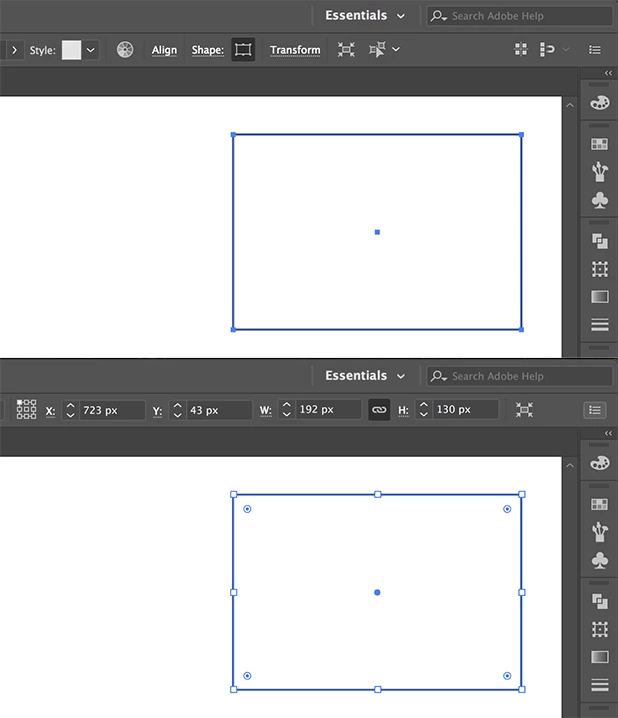
These are the arrows I want back that used to be to the left of the width & height.
    This topic has been closed for replies.
    Correct answer Ton Frederiks

    It is caused by the resolution of your monitor/screen.

    There is just not enough space to show the Transform options in the control panel.

    Remove some options from the fly out menu of the Control panel and they will appear (together with the up/down arrows).

    I had to remove Snap to Pixel, Align, Object Type, Recolor Artwork, Select Same and Shapes to make them appear without changing the screen resolution.

    3 replies

    Ton Frederiks
    Community Expert
    Ton FrederiksCommunity ExpertCorrect answer
    Community Expert
    September 8, 2017

    It is caused by the resolution of your monitor/screen.

    There is just not enough space to show the Transform options in the control panel.

    Remove some options from the fly out menu of the Control panel and they will appear (together with the up/down arrows).

    I had to remove Snap to Pixel, Align, Object Type, Recolor Artwork, Select Same and Shapes to make them appear without changing the screen resolution.

    angie_taylor
    Legend
    September 8, 2017

    An additional tip for you. In Adobe applications you can change values by clicking on the value to make it active, then using the up and down arrow keys on your keyboard to adjust the value. This will change the value by one increment per click. You can keep the up or down key held down to change the value continuously. Hold down the Shift key when you click on the arrow keys to multiply the result by 10, hold down the Command key to go up or down by fractions of increments (i.e. .1 of an increment)

    Hope this helps

    Inspiring
    September 8, 2017

    No it is just the transform panel. (a quick view and not a replacement of the full panel) 

    If you have a group you will see the W & H as you like it! But you do not need the arrows since you can use the keyboard arrows to get bigger and smaller values when you are in the field for width or height.

    If you like the visual of the arrows just bring up the transform palette found under Window>Transform.

    Hope this helps answer your question.