
problems with pattern maker in AI
Hello all. I posted this on the adobe account on twitter, and I was pointed to this community. I am going to repost it here, I hope to get some solutions.
________________________________________________________
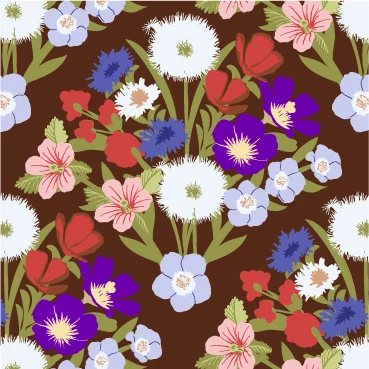
hello, so, my problems with Illustrator:
I am running AI 29.8.2 64bit on a windows 11 laptop, with 64gb ram. I am trying to make patterns using the pattern tool, and I am running into problems. I will attach screenshots as I explain. This above is the original pattern motif. It has an empty box on the bottom layer, a 5x5 In repeat pattern, see the repeat in the attachment, and the background is a box on the layer above the empty box, same size of the empty box and artboard. The motif is clipped by a clip mask, but the whole motif is repeated under the clip mask. I save it as a pattern using the pattern tool and it's in the swatches drop down menu. I have been using this series of steps on many patterns, I am a pattern designer, and I have been making several patterns this way. Most times it works fine, but other times it doesn't and this is one of them.
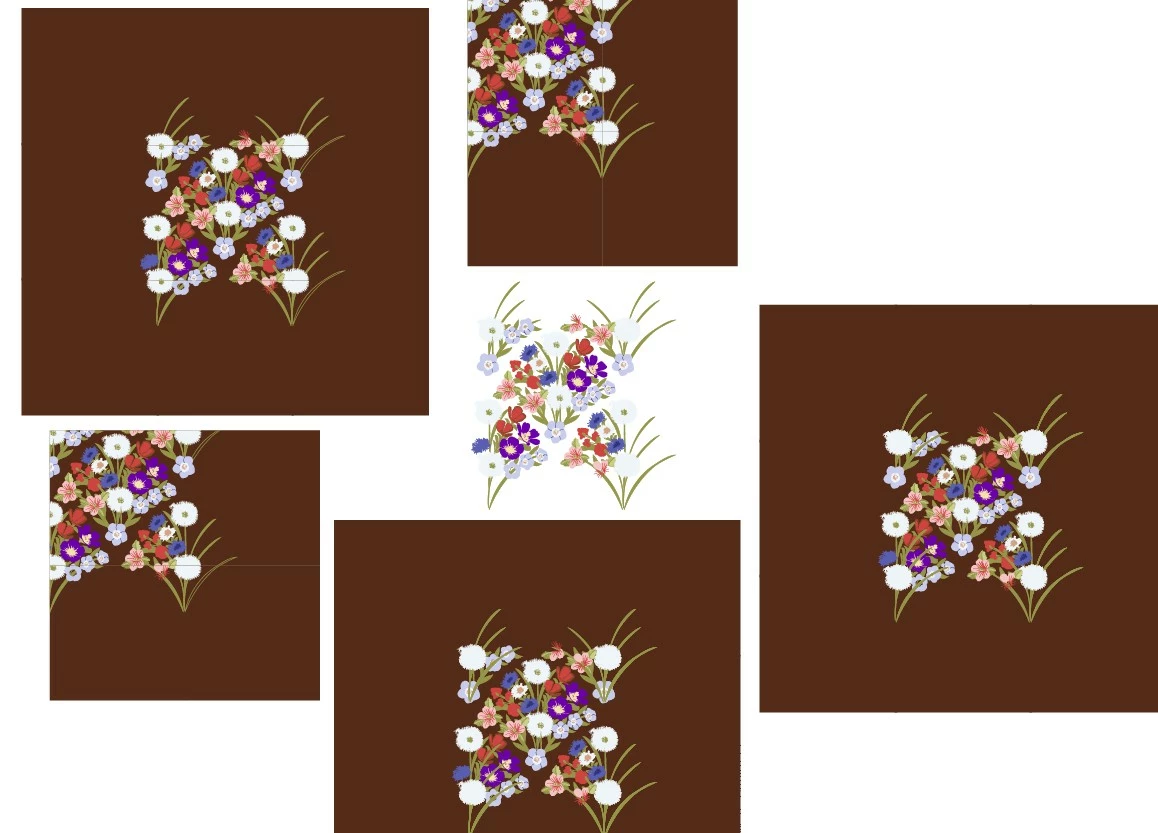
So, when I drag the pattern from the swatch menu to edit or include the original pattern in the file, I have been getting these variations of the problem (see below): The center motif is without the background, and you can see the repeated elements, but they are all messed up. Elements are missing, and it doesn't look like the original motif used for the pattern. The ones with the background are from the pattern with the background included in the repeat. Each pattern has been made following the same steps, but each one looks different. The extra brown boxes are not supposed to be there, some of them have 3 extra boxes, while others have 8. The layers stacking order is messed up, in some you can see the stems on top of the flowers, and parts of the flowers are missing. These patterns were made the same way as the previous one, the only difference is the size of the colored background box, they go from the same size to slightly larger than the empty box on the bottom layer, and same thing with the clip mask on top. I was experimenting ways to get rid of the problem I was getting, which is the thin white line. In any event, this is not the right and professional way to display the patterns.
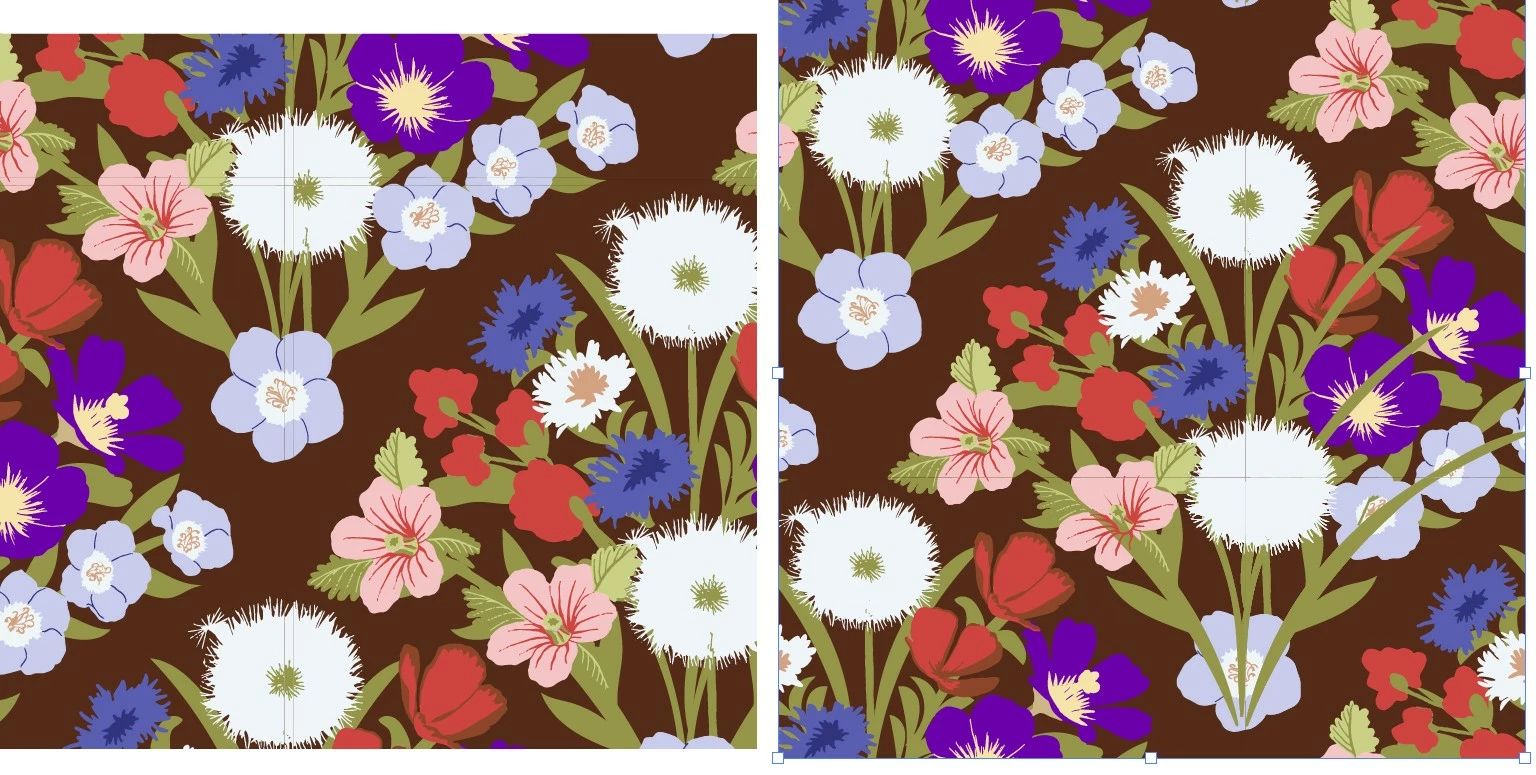
the problem I was getting, and the reason I generated to many copies of the pattern, is the fine lines that show up when I apply the pattern to a box. In the attached image you can zoom in and see fine lines in the pattern, the one on the left has 2 sets of fine lines, and I cannot get rid of them! I have tried all that I was advised to do: make sure there is an empty box on the bottom layer, no fill no outline; change the size of the background box to few pixels bigger than the empty box on the bottom; use pixels instead of inches; use even numbers pixels measurement; make sure the boxes line up perfectly; use the clip mask to clip out the extra elements; make sure groups are grouped logically; expand the outlines and elements etc. I have done everything except for standing on my head. You can see in the previous message's attachment the variations of these implementations. Each is a different attempt. These attachments are a synthesis of the results. The image on the right has the layers messed up again, with the stems on top of the flowers and parts of the flowers missing from the pattern.
Support on Twittter suggested I change the preview from GPU to CPUor viceversa, but that option is grayed out on my computer, so no solution there.
On my older computer it was available, but as I recall it didn't solve the problem.
so, this doesn't happen all the time, some patterns work fine. But the fact that it happens is unacceptable for a number of reasons.
First of all the randomness of the problem makes it hard to notice and diagnose. I have not been able to figure out what the problem is and how to deal with it, and most of the times I am not aware the problem is even there until I drag the swatch off the panel or fill a box with the pattern.
Second, as a pattern designer, this is my bread and butter and the ability to present to clients patterns that are consistent and professionally presented is vital.
I cannot give a client a pattern that operates like this when it's dropped from the swatch menu, and cannot be used for printing. I lost already one opportunity for a project because the pattern I sent the client looked like it was put together by somebody who didn't know what they were doing...
I cannot upload patterns to print on demand sites because of the lines that show up when the patterns are uploaded on their site. I cannot use them for my portfolio because they look like that.
Third: I have recently participated in a master class for pattern designers and I know several people have the same problem with Illustrator, they are called the evil lines. And the solutions that are provided are the ones I implemented in the troubleshooting and I have attached screenshots of.
None of them worked.
So, adobe is a massive company that has provided massive solutions to artists and creatives for years and years, and Illustrator is an amazing program that does amazing things, and quite costly too.
Pattern making is very important for Pattern and textile designers and it's important that it works flawlessly.
I was told that this latest version of AI is buggy and older versions were not as bad. Well, I downgrade it and I got the same problem.
So, what I would like is this: Adobe Illustrator Developers, please fix this problem once and for all. It looks like a tiny bug in the coding, but it creates massive problems for pattern designers. And while you are at it, fix the problem with the extra elements showing up in the dropped swatch .
And while you fix the underlying problem at the root, please tell me what to do to fix it in my patterns. I will be sharing the solution with the many designers who struggle with this issue in the master class I took, and there will be much rejoicing! Thanks for your help, Daniela
 AdChoices