
Participant
March 15, 2025
Answered

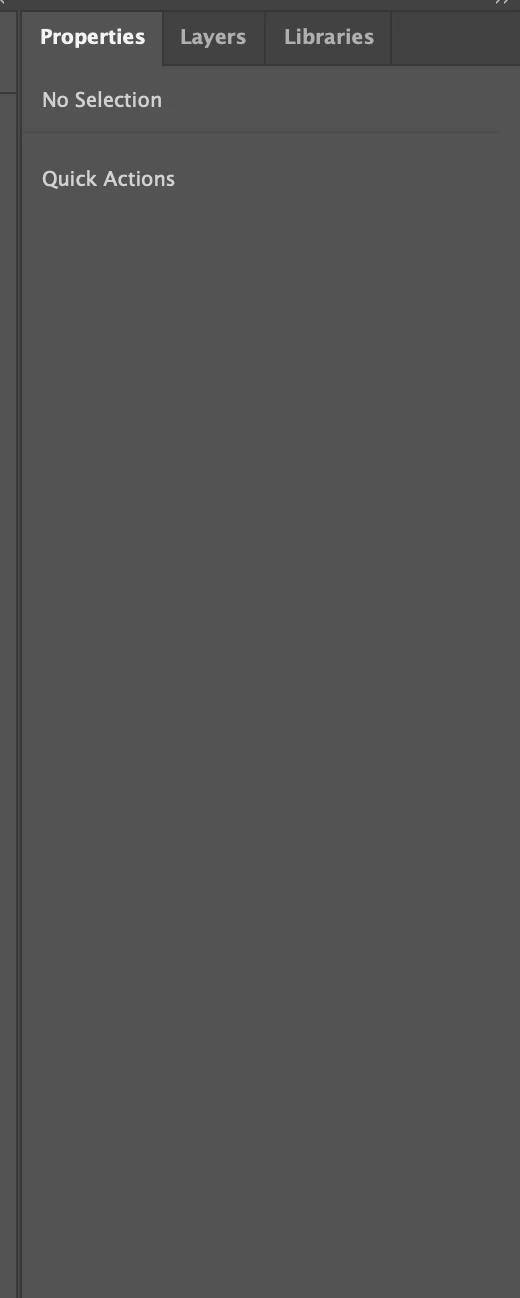
Properties panel is blank Illustrator 29.3.1
  • March 15, 2025
  • 1 reply
  • 696 views

Yesterday is was fine, but today out of nowhere my Properties panel is empty.
I tried to:
—Restart Illustrator
—Restart my computer
—Drag this panel left and than back
—Open Properties from the Discover panel
—Reset workspace preferences
—Delete Illustrator preferences and delete my OOBE files (following a long piece of advice that Bill Silbert  usually gives)
—Delete Illustrator (with clicking REMOVE when it asks about what to do with preferences) and then installing it back
—Install Illustrator Beta just in case it works — and it has THE SAME mistake from the very beginnig!!

So nothing has worked for me so far. What should I do?
I really need help.

Correct answer Srishti Bali

Hi @easygoing_fun5CDA 


I'm sorry to hear you're experiencing this issue. Several users from the China and Russia regions have reported the same problem. Our team is actively investigating, and you can track the progress on this UserVoice page. Please upvote to receive notifications on updates. In the meantime, you can install the older version, 29.2.1, to continue working. Thank you for your patience and understanding.


Regards,

Srishti

1 reply

Srishti Bali
Community Manager
Srishti BaliCommunity ManagerCorrect answer
Community Manager
March 17, 2025

Hi @easygoing_fun5CDA 


I'm sorry to hear you're experiencing this issue. Several users from the China and Russia regions have reported the same problem. Our team is actively investigating, and you can track the progress on this UserVoice page. Please upvote to receive notifications on updates. In the meantime, you can install the older version, 29.2.1, to continue working. Thank you for your patience and understanding.


Regards,

Srishti

Participant
March 18, 2025

Thanks's a lot, I'll be waiting for the news