


- Home
- Illustrator
- Discussions
- Re: Q: opening mac (1996) illustrator files
- Re: Q: opening mac (1996) illustrator files

Copy link to clipboard
Copied
Hi there.
I have a whole bunch of illustrator files from mid to late 90s which I am certain that they were done on a mac and probably illustrator 8 under OS9. They do not have a file extension (norm for era). When I add the .ai extension, and open them under CC, it says unknown file format. Any suggestions, short of finding an old machine? Here's hoping there is a convertor program. I checked GraphicConvertor and it doesn't do it. Thanks in advance.


 1 Correct answer

I tried opening your EPS, placing, even inserting into a Quark document and all applications reported unable to work with file due to missing information. Basicly the file is dead. Monika may be correct in that the files have been truncated and or are corrupt. It may also have something to do with a missing preview file. My guess is none of my applications could "see" the file.


Explore related tutorials & articles
 15
Replies
15
15
Replies
15


Copy link to clipboard
Copied
During that time many people used file compression to optimize disk space. Files were uncompressed automatically on demand and then compressed again when closing the file.
Copy link to clipboard
Copied
BTW thanks for all the suggestions and help.
Should CC illustrator be able to open a Illustrator 7 or 8 file done on a mac? If not does anyone know of the last illustrator version that could open files from that era? I'd hate to have to do saves in multiple versions of illustrator to get it to a version that current CC can open.
There was no file compression running. I made these files in my own mac back then.
PS: I am going to off-line for a few days, so i'll post and check when I get back on.
Copy link to clipboard
Copied
Use File > Place file. You should have no problem opening older files.
Sent from my iPhone
Copy link to clipboard
Copied
Thanks for the suggestion. How did you get it to work? When I try it, it says "the file is in format that can not be placed."
Copy link to clipboard
Copied
Thanks for the suggestion. How did you get it to work? When I try it, it says "the file is in format that can not be placed."
Older files in general shouldn't be a problem, but since nobody has seen your files yet, we can't know if they will work.
They might be corrupted or whatever. Mike kindly offered to take a look at them.
Copy link to clipboard
Copied
Thanks., I got stuck doing some other stuff. The drop box link is,,,,, Dropbox - MAN AND EAGLE.eps
Thanks in advance.
Copy link to clipboard
Copied
I should have added that the eps extension appeared when it got dropped into dropbox.

Copy link to clipboard
Copied
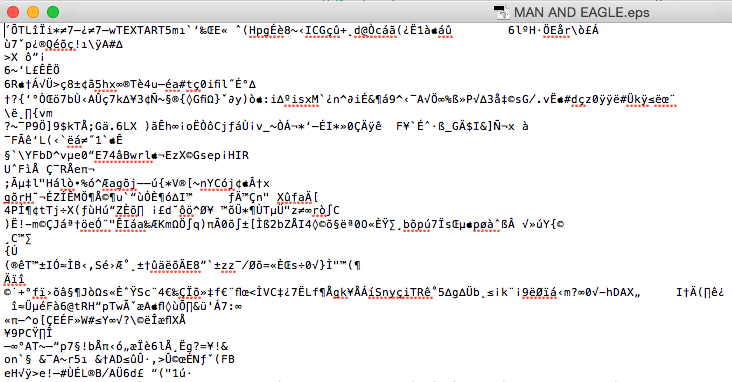
Interesting... when I open the file in TextEdit to look for clues about the file format, the first line contains the word 'TEXTART', which led me to this curiosity:
TextArt
Are you sure these were created in Illustrator (as opposed to an obscure NeXT application!)?
Copy link to clipboard
Copied
I tried opening your EPS, placing, even inserting into a Quark document and all applications reported unable to work with file due to missing information. Basicly the file is dead. Monika may be correct in that the files have been truncated and or are corrupt. It may also have something to do with a missing preview file. My guess is none of my applications could "see" the file.

Copy link to clipboard
Copied
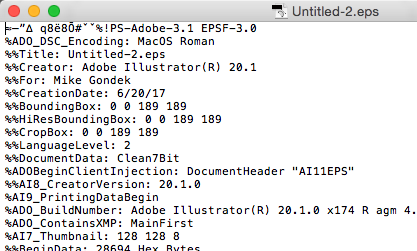
Your code looks like this.
A .ai or .eps has should have postscript headers %%
Can we please get a history of the storage medium this came from, since you were last able to open. Were any compacting utilities used such s disk doubler, network software, or was this attitude to an email without zipping?
The old type and creator tags are correct for illustrator
Type = TEXT
Creator = ART5
though they are not shown as they would be from a pre Mac OS X, so something happened to this file.
Copy link to clipboard
Copied
The mac does not make file extensions necessary, so would look at if the files were possibly compacted zipped or other. Can you please post a file using dropbox or similar? Can look at the code and see what the headers are. As long as you file is not zero k in size there essay a good chine we can get this to work.
Copy link to clipboard
Copied
I wonder if you'd be able to "Place" the file?
Copy link to clipboard
Copied
Placed? If you mean dropping them into a another document, then Illustrator refused and said unknown format again.

Copy link to clipboard
Copied
Most people in the nineties were saving Illustrator files as .eps. Have you tried that file extension?
Copy link to clipboard
Copied
These are my own files and they were not save as eps. I added the eps extension and still the same unknown format message.


Find more inspiration, events, and resources on the new Adobe Community
Explore Now
 AdChoices