


- Home
- Illustrator
- Discussions
- Re: Question: Creating artboards at different size...
- Re: Question: Creating artboards at different size...
Question: Creating artboards at different sizes from CSV file

Copy link to clipboard
Copied
Hello!
I'm not sure if this is even possible or if there's a way to create something like this but is it possible to create multiple artboards in an illustrator document at a variety of different sizes perhaps from a built-in illustrator tool or a script using a CSV file? similar to how you import variable data but using width and height data from an excel document to tell Illustrator the size to make the new artboard/artboards. I have little knowledge of how to script but if there is a way I could create one any help would be greatly appreciated.
I hope I've worded the question okay. Please and thank you for your help.
All the very best,
Ashley



Explore related tutorials & articles
 18
Replies
18
18
Replies
18




Copy link to clipboard
Copied
Sounds like a job for variable data and scripting.
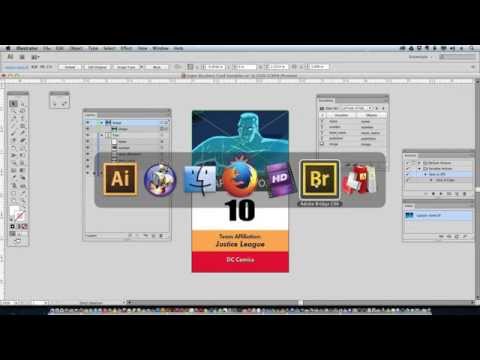
check out this tutorial
Copy link to clipboard
Copied
Hello Mike!
Thank you very much for your response,
I don't know if it quite links in with variable data and sits more so with scripting (I could be wrong as my knowledge of scripting is entry-level if that)
Rather than creating new artboards at the same size with updated data from a CVS file I was hoping more so to produce something like my screenshot below so this is something I did manually creating new artboards at different sizes but I wasn't sure if there was a way to automate this process using a CVS by telling illustrator the Height and Width you want the artboards to be

I hope this makes sense.
Ashley

Copy link to clipboard
Copied
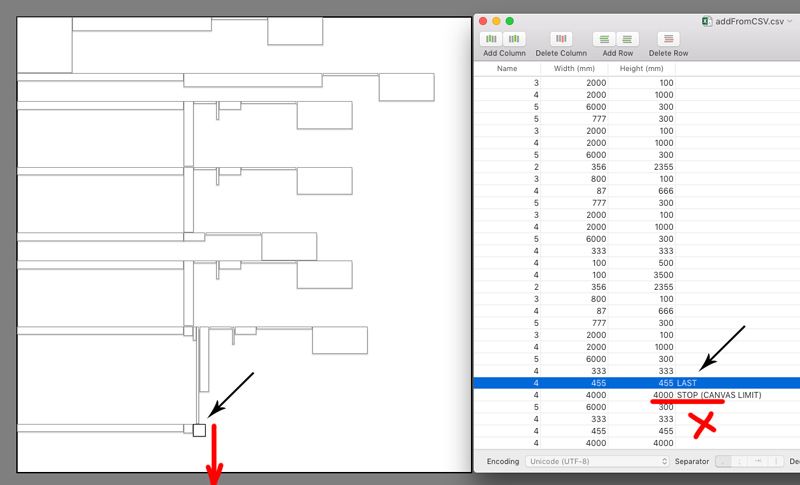
I received a similar question. It is possible to create artboards from CSV. To keep them from overlapping, you need to calculate how to spread them out as compactly as possible inside the Illustrator 16383x16383px canvas. This will require a nesting algorithm (bin packing, knapsack problem). It would help to safely determine if there are too many artboards entered into the CSV. I thought about making a paid script, but I'm busy with other work for now.
Your attached image shows a simplified version of the problem. Fill the Illustrator canvas from left to right with artboards from CSV, then step down to the height of the highest artboard and fill the next line. Definitely this version of the script will create faster. (Sorry, I'm just thinking aloud)

Copy link to clipboard
Copied
“This will require a nesting algorithm”
You may be overthinking it.
OP hasn’t said if they want the artboards to be automatically reordered or not. They may require the artboards to appear in the exact order listed in the CSV. Or the size and number of artboards may be small enough that they will all fit into a single AI document without rearrangement. Or perhaps OP prefers any overflow is moved to another document. All questions to ask when developing a production solution.
Here is a simple tiling algorithm which creates the artboards in the listed order. It assumes the ruler origin is already placed in the top-left corner of the document. I have hardcoded some artboard sizes for demonstration purposes; reading this data from a file is left as an exercise.
(function () {

var artboardSizes = [ // test data; sizes are in inches
  {w: 95, h: 10},
  {w: 10, h: 43},
  {w: 26, h: 31},
  {w: 80, h: 36},
  {w: 19, h: 12},
  {w: 30, h: 10},
];

function in2pt(n) {
  return n * 72;
}

var doc = app.activeDocument;

var oldArtboard = doc.artboards[0]; // the original artboard will be discarded later

var MAX_WIDTH = in2pt(224); // this assumes ruler origin is near top-left of document
var PAD_X = in2pt(0.1), PAD_Y = in2pt(0.1); // spacing between artboards

var x = 0, y = 0, rowHeight = 0;

for (var i = 0; i < artboardSizes.length; i++) {
  var size = artboardSizes[i];
  var w = in2pt(size.w), h = in2pt(size.h);
  if (x + w > MAX_WIDTH) { // will artboard fit on current row? if not, start a new row
    x = 0;
    y = y - rowHeight - PAD_Y;
    rowHeight = 0;
  }
  rowHeight = Math.max(rowHeight, h);
  doc.artboards.add([x, y, x + w, y - h]); // this will throw if an artboard is too large
  x += w + PAD_X;
}

oldArtboard.remove();

})();
`MAX_WIDTH` is the distance from the origin to the right side of the document, which determines when to start a new row. The script just throws an error if an artboard is too wide to fit the document or falls off the bottom, but those cases can also be handled if needed.
If reordering the artboards to fit more efficiently, quick and crude is to sort the dimensions by height:
artboardSizes.sort(function (a, b) { return a.h < b.h; });
It is not an optimal fit but may be “good enough”. Smarter packing algorithms can be found online and adapted to run on Illustrator’s ancient ExtendScript (ES3, aka JavaScript 1999) if OP requires a tighter fit.
Copy link to clipboard
Copied
I was thinking of a similar solution. For tests, I collect data from CSV and check if it exceeds the right or bottom of the canvas. But I will improve my version further to optimally fill the empty space with artboards. I have a personal interest in making the script bigger than OP might require.
Copy link to clipboard
Copied
Hi there! thank you all for your responses to my question so far I'm just digesting everything and really appreciate everyone's input and helpful direction, so just to specify based on Hhas01 response, my ideal situation would be to have these artboards produced via CSV on a singular document that I can arrange myself via the built-in "rearrange" option to place them appropriately next to each other taking into consideration the maximum size of the AI canvas the artboards I'd need to be created would be much smaller than the max canvas size so it is all possible to fit onto one document.
I hope this makes sense how I worded everything. Thank you all again for your responses!
Copy link to clipboard
Copied
Anyway, your topic has motivated me to take up drafts again, since there is a potential buyer.

Copy link to clipboard
Copied
@Sergey Osokin: Looks like you have a suitable solution well under development so I’ll let you and OP get on with it. Cheers.
Copy link to clipboard
Copied
Your participation is valuable. Maybe someone from the community will add CSV table reading based on your code. It would be good for simple cases where there are few artboards and they are small.
Copy link to clipboard
Copied
The current version of the ArtboardsFromCSV script I sell for a small price on Gumroad. There is a video with lots of examples on the script page. This script may be something that will work for many.


Copy link to clipboard
Copied
here's a script to create artboards from csv data
https://creator-hey.com/systems-engineering/make-artboards-from-csv1
Copy link to clipboard
Copied
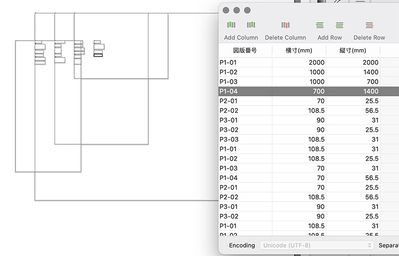
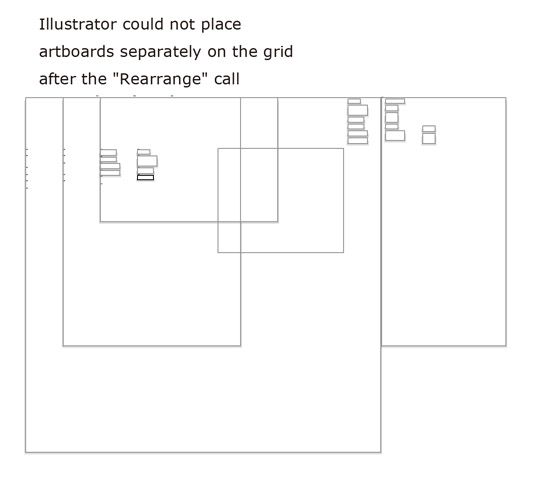
I remember this script. Unfortunately, it is written for specific conditions and cannot correctly arrange many artboards of different sizes on the canvas. There is still a problem in Adobe Illustrator that if the artboards are inside another artboard, the "Rearrange" command won't separate them. That's why I'm thinking about writing a universal script that takes these problems into account.

Copy link to clipboard
Copied
Hi, any news on this?
Anyone now where I can find a script that is creating artboards from excel or text editor. to purchase or for free.
Copy link to clipboard
Copied
As for my version of the script, I will continue it after I finish another project. There are a few days left.
Copy link to clipboard
Copied
ok, good, have you got a script for XD aswell?
Copy link to clipboard
Copied
Nope. Only Adobe Illustrator.

Copy link to clipboard
Copied
Hi Ashley!
You could also try the Multiple Artboard Generator for Adobe Illustrator script I created:
https://iamharm.gumroad.com/l/MultipleArtboardsFromCSV
This script generates multiple artboards in Adobe Illustrator for you from a csv file. You specify the names for the artboards and their dimensions in the csv file and the script will do the rest. When you run the script there is a dialogue box that will allow you to specify the units (pt, px, mm, in) as well as the spacing between the artboards.
I also made a video showing how it works:
Multiple Artboard Generator for Adobe Illustrator
Copy link to clipboard
Copied
The Multiple Artboard Generator for Adobe Illustrator extension has moved to aescripts at the link below:
https://aescripts.com/multiple-artboard-generator-for-illustrator/


Get ready! An upgraded Adobe Community experience is coming in January.
Learn more
 AdChoices