Inspiring
December 27, 2023
Question

questions about circles

  • December 27, 2023
  • 6 replies
  • 1127 views

Hello,

How to create a circle at the middle between the outer circle and the inner circle (see red lines) ?
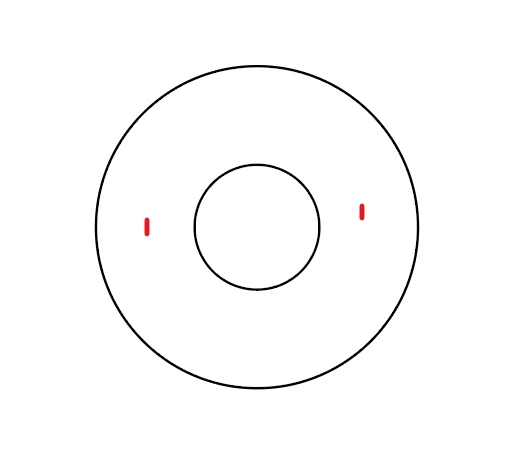

This topic has been closed for replies.

6 replies

Inspiring
December 29, 2023

I thank you very much Femke and Kurt for the script !

But I think I will use the existing polar grid tool that is perfect for my use.

CarlosCanto
Community Expert
Community Expert
December 29, 2023

are we missing the obvious? 🙂


Use Polar Grid, three circles in one go

Inspiring
December 28, 2023

Now, if I have a single circle and would like to divide it in equal circles, by example create two inner circles of equal parts.

I have tried to use the object/blend tool but it does not works.

Monika Gause
Community Expert
Community Expert
December 28, 2023

What do you mean with equal parts?

All these circle jobs - are those for automatization?

Is it acceptable to draw a new shape?

Is it acceptable to draw that from the other direction and begin with the smaller ones?


Is that an assignment and could you perhaps post the exact wording of the assignment?

Inspiring
December 28, 2023

Hi monika,

All these circle jobs are to make a technical book.

By example here, between the center and the outer circle, I need to create 2 inner circle with the same distance between them (equal part).

What is the best to do that : begin with a single smaller circle or begin with a single outer circle (like here) ?

With this single circle I have tried to use the Object/blend tool, but it did not worked.

Inspiring
December 27, 2023

In order to have one circle into another :  I have the outer circle, and would like to create the inner circle by begining by the center of the outer circle. 

Because actually, for the inner circle, I create a circle that is not immediately centered :

How to have the inner circle immediately centered ?

Jacob Bugge
Community Expert
Community Expert
December 27, 2023

Pierre,


To get the inner circle concentric with the outer one, you can:


1) Select both circles,

2) Click the outer circle to make it the key object that stays in place.

3) In the Align = Alignement panel use both Alignement horizontal au centre and Alignement vertical au centre.


That will move the inner circle into the right place, and the outer circle will stay where it is.


Inspiring
December 27, 2023

In fact, I was remembering a video where it was possible to click on the center of the outer circle, and move the mouse towards the outer circle in order to create the inner circle. But I am not sure it was from Illustrator.

Inspiring
December 27, 2023

Hi Jacob,

Here is my workflow :

1) I select the two circles 

2) object/blend/options and choose "step" = "1"


3) object/blend/make 


And here is the result :

PS : I have not seen object/blend/expand : where is it ?

Ton Frederiks
Community Expert
Community Expert
December 27, 2023

Décomposer?

Inspiring
December 27, 2023

Hi Ton,

I have tried to do object/blend/"décomposer" :


And here is the result (the created circle is now in blue color instead of black) :

Jacob Bugge
Community Expert
Community Expert
December 27, 2023

Pierre,


You can use an expanded blend:


1) Select both circles,

2) In Object>Blend Options, set Specing to 1 Step, then Object>Blend Make, then Object>Blend>Expand;

3) Ungroup unless you wish to keep the three circles as a Group.