
Known Participant
March 10, 2025
Answered

Questions

  • March 10, 2025
  • 1 reply
  • 1438 views

Hello all,
I am new to this software and trying to work my way through it.
Couple issue that I would like to address.
1) 16:23 into the video, he say to highlight the star, press alt and it is supposed to change the number of points on said star. After several tries, I can get the star to do about anything, except add more points
What am I missing?

2) I have looked in documents for "File Exercises" to follow along with that is mentioned at the 22:53 minute mark. Where would I find those at? 

TIA

Alan
Correct answer Doug A Roberts

I must still be missing something, because it just moves the star when I drag it.
Up/down arrows do nothing.


Is this when you initially create the star, or subsequently?

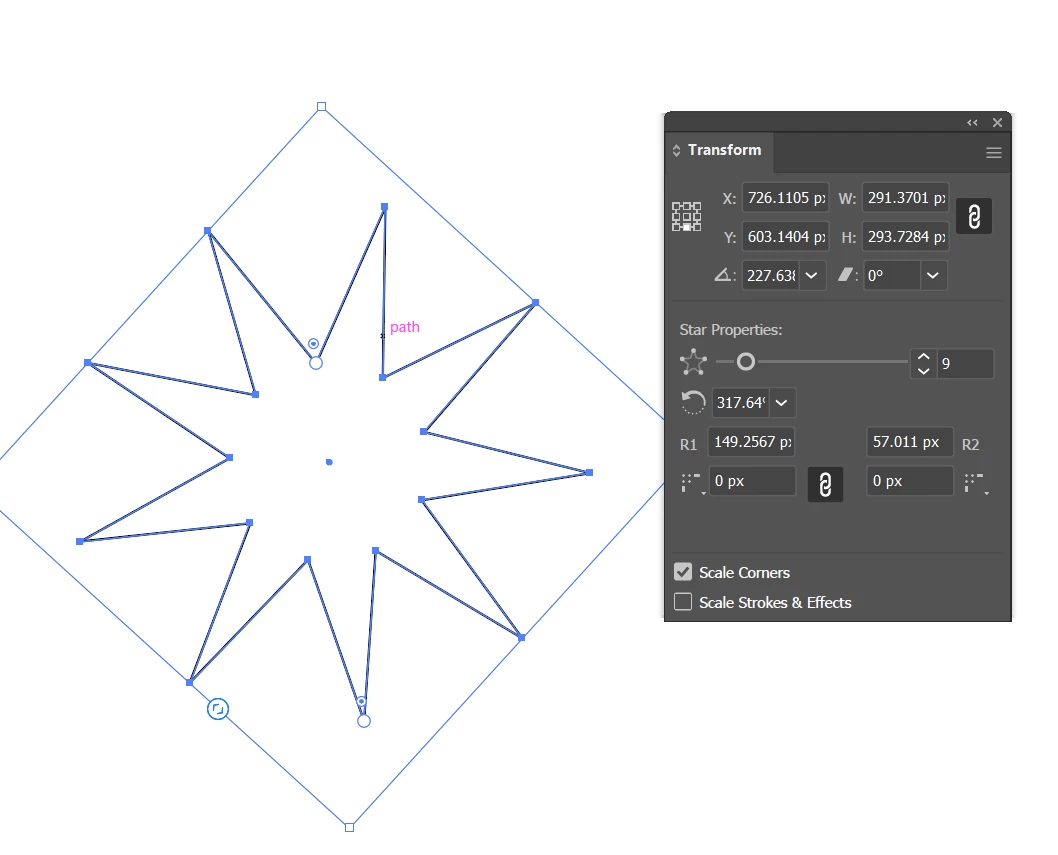
It only uses the arrow keys when you initially create the star. If you want to edit it after, use the slider in the transform panel:


1 reply

Doug A Roberts
Community Expert
Community Expert
March 10, 2025

What video are we talking about?

Known Participant
March 10, 2025

Yes, that would probably help.
YouTube video Adobe Illustrator Crash Course 2023 (for complete begineers.) From Flu Academy

Known Participant
March 10, 2025

FLUX Academy****