


Inspiring
September 8, 2025
Answered

•  "All Caps" option turn "ON" by default when (Java)scripting a textfield… Why? How to avoid?

  • September 8, 2025
  • 1 reply
  • 314 views

Hello -


I made an Adobe Illustrator Javascript,
To summarize it, it "copy-paste" some values/data from a .csv file.
With one of the textfield, I don't know why but the "All Caps" option/setting (from the "Character" palette is turn on.
I don't know only why that specific textfield. 
 tried already a lot of thinngs… But I dn't understand why.
Would it be possible to avoid it by turnning "off" that option via Javascript?
Can this option (so from the "Character" palette be "reach" via Javascript?
Below in this message I saw already some stuff, but nothing seems to work.
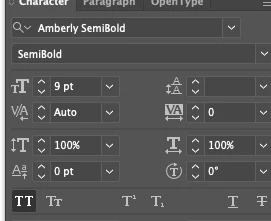
 

I tried it via:

            var textRange_DC = textFrame_DC.textRange;
            textRange_DC.characterAttributes.allCaps = false;
            textRange_DC.characterAttributes.capitalization = Capitalization.NORMAL;


but it doesn't work,
After I tried something like:

        // Try to turn off All Caps using the menu command
        app.executeMenuCommand("allCaps");
        
        // Try to change to lowercase and then back to original case
        // First, store the original content
        var originalContent_DC = textFrame_DC.contents;
        
        // Change to lowercase
        app.executeMenuCommand("lowercase");


But it didn't work neither…

May be via a temporary "action" ceated on the fly.
But then the question, which "parameter" is "All Caps"? Since they are 18 parameters (in a "handmade" action when I clic that option)


Stuff that I have found, but it doesn't seem toi help.


FontCapsOption.ALLCAPS

All Caps

FontCapsOption.ALLSMALLCAPS

All Smallcaps

FontCapsOption.NORMALCAPS

Normal Caps

FontCapsOption.SMALLCAPS

Small Caps

EDIT:

Wanted to also add. The above is a display change to the text. The text may internally be set as "Lorem Ipsum" but changed to display setting as All Caps would display as "LOREM IPSUM" while maintaining the internal text as "Lorem Ipsum". To access the Change case functionality you can either do a heavier coding approach to change the text contents or use the executeMenuCommand to access those commands.

https://ten-artai.com/illustrator-ccver-22-menu-commands-list/

app.executeMenuCommand("UpperCase Change Case Item")
app.executeMenuCommand("LowerCase Change Case Item")
app.executeMenuCommand("Title Case Change Case Item")
app.executeMenuCommand("Sentence case Change Case Item")


Correct answer sttk3

The reasons your initial code did not work are as follows:


  1. The name of FontCapsOption was not specified correctly
  2. Due to Illustrator's behavior of ignoring new capitalization settings when they match an applied character style, the new value is ineffective


Similar topics:


Here is the code to set the capitalization to its normal state.

/**
  * @File set capitalization sample
  * https://community.adobe.com/t5/illustrator-discussions/quot-all-caps-quot-option-turn-quot-on-quot-by-default-when-java-scripting-a-textfield-why-how-to/td-p/15495039
  * @3653945.0.0
  * @7111211 sttk3.com
*/

(function() {
  if(app.documents.length <= 0) {return ;}
  var doc = app.documents[0] ;
  var sel = doc.selection ;
  if(sel.length <= 0) {return ;}
  
  var textFrame_DC = sel[0] ;

  var textRange_DC = textFrame_DC.textRange ;
  setCapitalization(textRange_DC, FontCapsOption.NORMALCAPS) ;
})() ;


/**
  * set capitalization to text range
  * @9397041 {TextRange} textRange - target TextRange
  * @9397041 {FontCapsOption} dstCapitalization - Justification to apply
  * @Returns {void} 
*/
function setCapitalization(textRange, dstCapitalization) {
  var appliedCharacterStyle = textRange.characterStyles[0] ;
  var targetPropName = 'capitalization' ;
  var styleCapitalization = appliedCharacterStyle[targetPropName] ;

  var swapTable = {
    'FontCapsOption.ALLCAPS': FontCapsOption.NORMALCAPS, 
    'FontCapsOption.NORMALCAPS': FontCapsOption.ALLCAPS, 
    'FontCapsOption.ALLSMALLCAPS': FontCapsOption.SMALLCAPS, 
    'FontCapsOption.SMALLCAPS': FontCapsOption.ALLSMALLCAPS
  } ;

  if(styleCapitalization === dstCapitalization) {
    appliedCharacterStyle[targetPropName] = swapTable[dstCapitalization.toString()] ;
    textRange[targetPropName] = dstCapitalization ;
    appliedCharacterStyle[targetPropName] = styleCapitalization ;
  } else {
    textRange[targetPropName] = dstCapitalization ;
  }
}


1 reply

sttk3Correct answer
Legend
September 8, 2025

The reasons your initial code did not work are as follows:


  1. The name of FontCapsOption was not specified correctly
  2. Due to Illustrator's behavior of ignoring new capitalization settings when they match an applied character style, the new value is ineffective


Similar topics:


Here is the code to set the capitalization to its normal state.

/**
  * @File set capitalization sample
  * https://community.adobe.com/t5/illustrator-discussions/quot-all-caps-quot-option-turn-quot-on-quot-by-default-when-java-scripting-a-textfield-why-how-to/td-p/15495039
  * @3653945.0.0
  * @7111211 sttk3.com
*/

(function() {
  if(app.documents.length <= 0) {return ;}
  var doc = app.documents[0] ;
  var sel = doc.selection ;
  if(sel.length <= 0) {return ;}
  
  var textFrame_DC = sel[0] ;

  var textRange_DC = textFrame_DC.textRange ;
  setCapitalization(textRange_DC, FontCapsOption.NORMALCAPS) ;
})() ;


/**
  * set capitalization to text range
  * @9397041 {TextRange} textRange - target TextRange
  * @9397041 {FontCapsOption} dstCapitalization - Justification to apply
  * @Returns {void} 
*/
function setCapitalization(textRange, dstCapitalization) {
  var appliedCharacterStyle = textRange.characterStyles[0] ;
  var targetPropName = 'capitalization' ;
  var styleCapitalization = appliedCharacterStyle[targetPropName] ;

  var swapTable = {
    'FontCapsOption.ALLCAPS': FontCapsOption.NORMALCAPS, 
    'FontCapsOption.NORMALCAPS': FontCapsOption.ALLCAPS, 
    'FontCapsOption.ALLSMALLCAPS': FontCapsOption.SMALLCAPS, 
    'FontCapsOption.SMALLCAPS': FontCapsOption.ALLSMALLCAPS
  } ;

  if(styleCapitalization === dstCapitalization) {
    appliedCharacterStyle[targetPropName] = swapTable[dstCapitalization.toString()] ;
    textRange[targetPropName] = dstCapitalization ;
    appliedCharacterStyle[targetPropName] = styleCapitalization ;
  } else {
    textRange[targetPropName] = dstCapitalization ;
  }
}


Inspiring
September 8, 2025

Hi sttk3 -


Super thx.
I managed to make it work w/ your help (of course).
Top, super thx.


enjoy your day 


 - Dimitri 


Legend
September 8, 2025

Thank you for notifying, please select it as the Correct Answer once it's resolved.