
Participant
May 13, 2024
Answered

Raster Image not cropping to clipping mask?

  • May 13, 2024
  • 8 replies
  • 2830 views

I've done this a bunch of times where I make a clipping mask over a rasterized image, then rasterizing it as a whole so it takes up less memory. But for some reason today when I try to rasterize it, it crops to the original dimensions of the image?? Using this photo as an example 
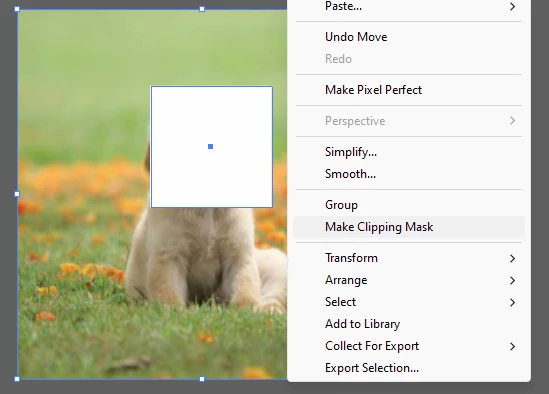
1. Make a clipping Mask
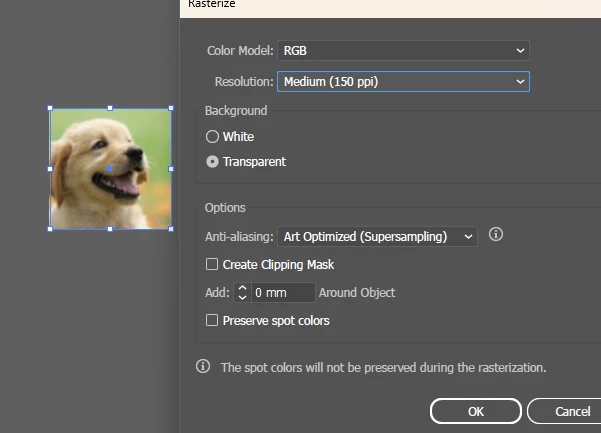
2. Rasterized the Masked image
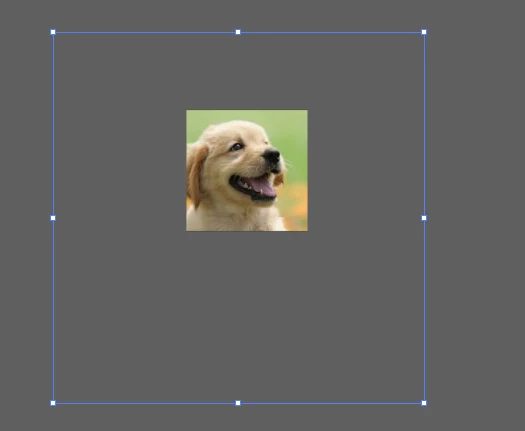
3. Doesn't crop to the shape of the image? This is now a full raster photo with a massive border that I have to manually crop (has to be cropped for what I'm doing at work)


Any ideas? Couldn't find a way to word this online or find any answers. I've played with all the Rasterize settings too

This topic has been closed for replies.
Correct answer Ton Frederiks

Looks fixed in beta and prerelease versions

8 replies

Participant
July 18, 2024

Having this problem too - any fixes?

Doug A Roberts
Community Expert
Community Expert
July 18, 2024

It's fixed in the beta and prerelease versions.

Inspiring
June 12, 2024

I'm having this issue too. Please help to fix it.

Ton Frederiks
Community Expert
Ton FrederiksCommunity ExpertCorrect answer
Community Expert
June 12, 2024

Looks fixed in beta and prerelease versions

Kurt Gold
Community Expert
Community Expert
May 15, 2024

Pretty odd. It took about two decades to introduce the right behaviour, but it took only a couple of years or months to reintroduce the wrong behaviour.


However, as far as I can see the temporary workaround in AI 28.5 is to first convert the clipped objects into a static symbol and then use the Object menu > Rasterize command.

Participant
May 15, 2024

Hi, I was also surprised to see this change and rolled back to the previous version, which resolved the issue. Unfortunately, my presets weren't kept which meant I had to import actions and rearrange my workspace, so just warning anyone else that this will happen. Hopefully the next update will revert back to rasterizing to the size of the clipping mask. 

Ton Frederiks
Community Expert
Community Expert
May 15, 2024
Ton Frederiks
Community Expert
Community Expert
May 15, 2024

Looks like a bug, tried it in the 2023 version and there it only rasterizes the part inside the clipping mask.

softdogsAuthor
Participant
May 15, 2024

Dang alright! At least we have a workaround for the time being. thanks for the help

Participant
May 14, 2024

This is happening to me too! It's completely ignoring the clipmask whenever I'm rasterizing, and I end up having to crop the rastered images to what I need them to be


softdogsAuthor
Participant
May 14, 2024

Huh! I wonder if it's a bug if you just started experiencing it as well! Wonder if rolling back a version would fix the problem haha

Monika Gause
Community Expert
Community Expert
May 14, 2024

Does the crop function not work for that?

softdogsAuthor
Participant
May 14, 2024

no I don't believe it works if one of them is a raster img. I tried haha 

Doug A Roberts
Community Expert
Community Expert
May 14, 2024

Not Pathfinder Crop -- this: