


Participant
May 13, 2024 11:14 PM UTC
Answered

Raster Image not cropping to clipping mask?

I've done this a bunch of times where I make a clipping mask over a rasterized image, then rasterizing it as a whole so it takes up less memory. But for some reason today when I try to rasterize it, it crops to the original dimensions of the image?? Using this photo as an example 
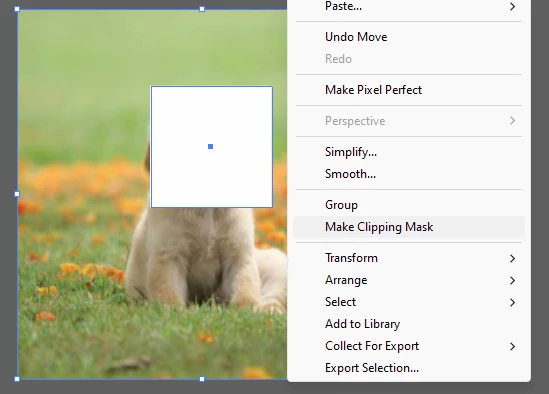
1. Make a clipping Mask
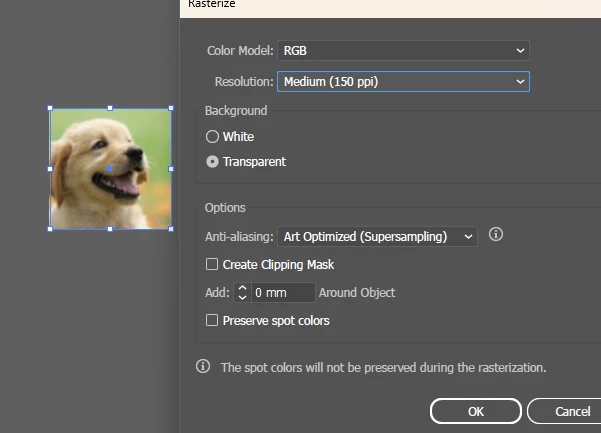
2. Rasterized the Masked image
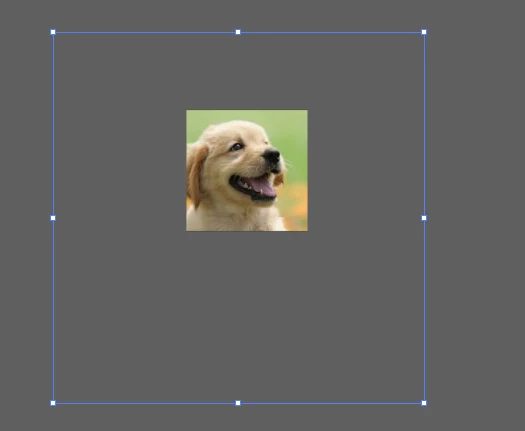
3. Doesn't crop to the shape of the image? This is now a full raster photo with a massive border that I have to manually crop (has to be cropped for what I'm doing at work)


Any ideas? Couldn't find a way to word this online or find any answers. I've played with all the Rasterize settings too

This topic is closed to new replies. Start a new post to keep the conversation going.
Ton Frederiks
Ton FrederiksCorrect answer
Community Expert
Jun 12, 2024 7:25 PM UTC

Looks fixed in beta and prerelease versions

16 replies

Participant
Jul 18, 2024 2:13 AM UTC

Having this problem too - any fixes?

Translate
Doug A Roberts
Community Expert
Community Expert
Jul 18, 2024 7:49 AM UTC

It's fixed in the beta and prerelease versions.

Translate
Inspiring
Jun 12, 2024 3:49 PM UTC

I'm having this issue too. Please help to fix it.

Translate
Ton Frederiks
Community Expert
Ton FrederiksCommunity ExpertCorrect answer
Community Expert
Jun 12, 2024 7:25 PM UTC

Looks fixed in beta and prerelease versions

Translate
Kurt Gold
Community Expert
Community Expert
May 15, 2024 7:40 PM UTC

Pretty odd. It took about two decades to introduce the right behaviour, but it took only a couple of years or months to reintroduce the wrong behaviour.


However, as far as I can see the temporary workaround in AI 28.5 is to first convert the clipped objects into a static symbol and then use the Object menu > Rasterize command.

Translate
Participant
May 15, 2024 2:13 PM UTC

Hi, I was also surprised to see this change and rolled back to the previous version, which resolved the issue. Unfortunately, my presets weren't kept which meant I had to import actions and rearrange my workspace, so just warning anyone else that this will happen. Hopefully the next update will revert back to rasterizing to the size of the clipping mask. 

Translate
Ton Frederiks
Community Expert
Community Expert
May 15, 2024 7:44 AM UTC

Looks like a bug, tried it in the 2023 version and there it only rasterizes the part inside the clipping mask.

Translate
softdogsAuthor
Participant
May 15, 2024 2:51 PM UTC

Dang alright! At least we have a workaround for the time being. thanks for the help

Translate
Participant
May 14, 2024 3:52 PM UTC

This is happening to me too! It's completely ignoring the clipmask whenever I'm rasterizing, and I end up having to crop the rastered images to what I need them to be


Translate
Participant
May 15, 2024 5:18 AM UTC

It stopped working for me too after installing the latest update. It worked fine yesterday with the older version.

Translate
Monika Gause
Community Expert
Community Expert
May 14, 2024 12:00 AM UTC

Does the crop function not work for that?

Translate
softdogsAuthor
Participant
May 14, 2024 2:46 PM UTC

no I don't believe it works if one of them is a raster img. I tried haha 

Translate
Doug A Roberts
Community Expert
Community Expert
May 14, 2024 3:10 PM UTC

Not Pathfinder Crop -- this:


Translate