/t5/illustrator-discussions/re-syncing-a-workspace/td-p/12607808Dec 20, 2021
Dec 20, 2021
Copy link to clipboard
Copied
I just installed the latest CC updates and cannot locate any sync preferences. There is no "sync" option in the preferences of Illustrator or InDesign. How do I save my workspaces so they don't disappear after each update?
[Moderator note: as this post seems to relate to Illustrator and InDesign, it is moved to the appropriate forum.]
/t5/illustrator-discussions/re-syncing-a-workspace/m-p/12608737#M303241Dec 21, 2021
Dec 21, 2021
Copy link to clipboard
Copied
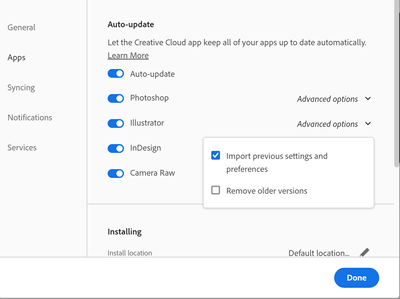
If you select 'Import previous settings and preferences' in the CC app when updating, everything in your user preferences folder (including workspaces) should be transferred.
I don't know of a way to do it retrospectively if you have already updated, apart from moving the individual files.
I just verified that all of my app preferences are set up this way--see screenshot below. I haven't had this problem in the past so I'm quite perplexed. When opening, InDesign is defaulting to having no tools open whatsoever. I've finally reset everythign but it took a long time to do so.





 2
Replies
2
Replies




 AdChoices