
Participant
November 10, 2021
Question

Read-only error on Mac Monterey, Illustrator 2022

  • November 10, 2021
  • 1 reply
  • 530 views

Hi, Illustrator still gives me this error after I changed my preferences. After changing everything to Read & Write, I have to select the gear button, but I don't have it. Please see image attached.
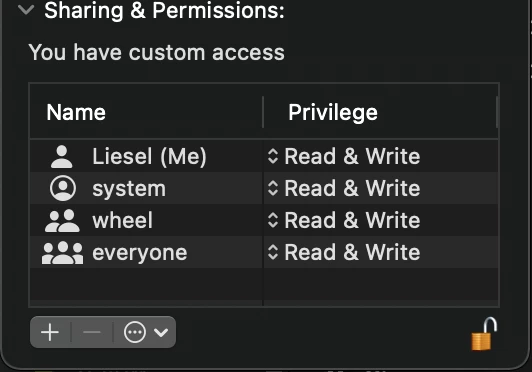
 

Illustrator file also doesn't show in the Application support folder. Although the rest of the Adobe Suite shows.


Will appreciate any help. Thanks


This topic has been closed for replies.

1 reply

Anshul_Saini
Community Manager
Community Manager
November 10, 2021

Hi there,


Sorry about the trouble. Could you please share a few more details like:

  • Did you test the beta version of macOS Monterey before the official release?
  • Please confirm the exact version of Illustrator 2022 installed on your Mac device.
  • Are there any recent changes made to your system? For example, any antivirus, plugins, or web extensions installed recently.


Also, you may go to System Preferences > Security & Privacy > Privacy > Full Disk Access > Manually add Illustrator 2022.app and see if that helps.


We'll be looking forward to your response.


Regards,

Anshul Saini

B2B TeamAuthor
Participant
November 29, 2021

Hi,


Feedback on your questions above:

Q1: No

Q2: Adobe Illustrator 2022 version 26.0.1

Q3: No other recent changes made


We tried to add it manually like you suggested - but it did not make a difference.


Will appreciate any help - thank you!

Anshul_Saini
Community Manager
Community Manager
December 1, 2021

Thanks for sharing the details and performing the steps. I would suggest you to uninstall the application using the CC Cleaner tool and reinstall it from the Creative Cloud Desktop app. Let me know how it goes.


Regards,

Anshul Saini