


Recolor 'Color Theme Picker' Eyedropper not Working
Hi everyone,
I'm trying to recolor an artwork using colors from a raster image. According to the latest official Adobe Help you can recolor from an image.
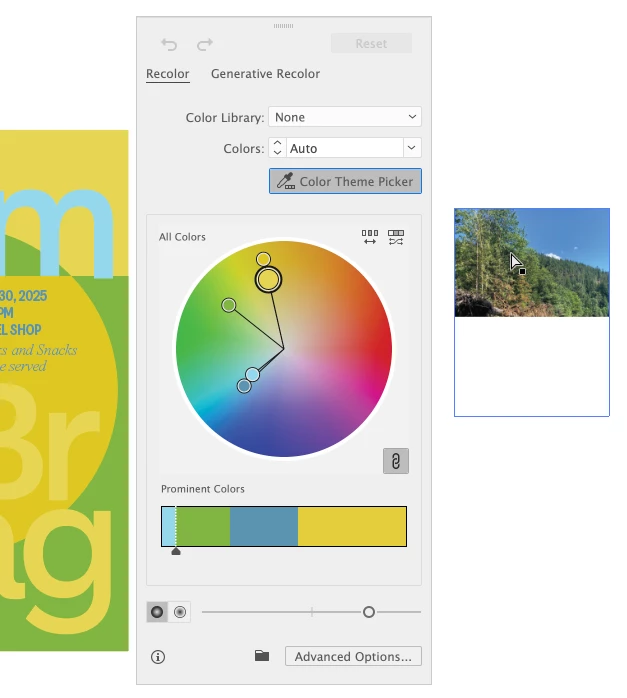
My issue is, once I've clicked the 'Color Theme Picker' button in the Recolor window, my mouse cursor should become an eyedropper, however, mine doesn't. Does anyone know what's wrong?
I've tried to eyedrop from the photo when it was embedded, when it was unembedded, made it specifically sRGB, made it FOGRA27, and also made some vector boxes with different colors to see if the image is the issue—nothing helps, my cursor just doesn't turn into the eyedropper tool. I've restarted my computer and I've restarted Illustrator.
Attached is a screenshot where you can see that the 'Color Theme Picker' button is activated, but the cursor over the image is not what it's supposed to be (and yeah, my vector graphic on the left is selected, just doesn't show up in this screenshot).
I'm running Illustrator 29.6.1, on MacOS 14.7.6 (23H626).
Any help would be appreciated!
 AdChoices