Participant
October 3, 2017
Answered

Rectangle around extents of design

  • October 3, 2017
  • 1 reply
  • 2305 views

Hi,

I'm looking for a way to put a rectangle around the extents of an existing design so I can use it in an action.

I currently create the rectangle manually and type the dimensions or create it and resize around the design.  I'm just wondering if there is a way to simplify this - something like: select the design, and then do something else that produces a rectangle around it with steps that are repeatable within an action.
This topic has been closed for replies.
Correct answer Mike_Gondek10189183

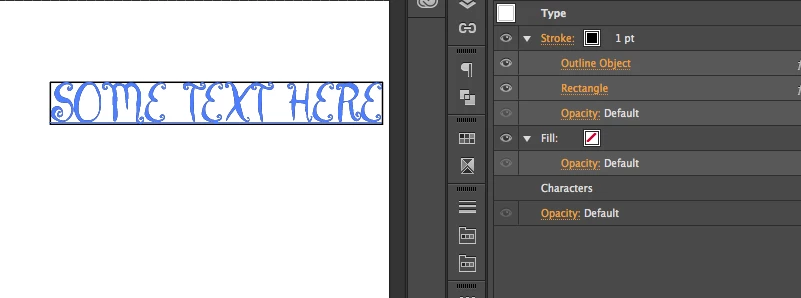
Add these items as shown in the appearance palette

  1. Switch to pointer tool
  2. Appearance palette fly out >> Add New Stroke
  3. Effect >> Path >> Outline Object
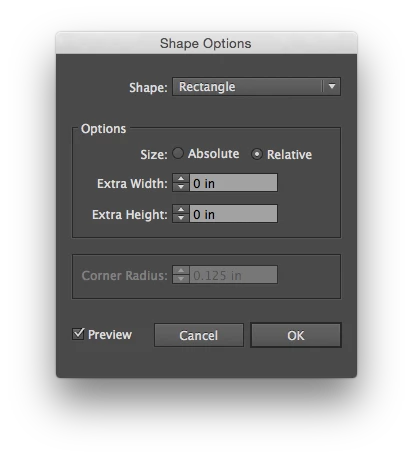
  4. Effect >> Convert to shape >> rectangle (set values to 0)

1 reply

Mike_Gondek10189183
Community Expert
Mike_Gondek10189183Community ExpertCorrect answer
Community Expert
October 3, 2017

Add these items as shown in the appearance palette

  1. Switch to pointer tool
  2. Appearance palette fly out >> Add New Stroke
  3. Effect >> Path >> Outline Object
  4. Effect >> Convert to shape >> rectangle (set values to 0)

Participant
October 3, 2017

Hi Mike,

Thankyou for that! Very useful indeed and it worked - however, how do I make that new rectangle editable instead of being a graphic style?  The next part of the action is to offset the size of that rectangle by a specific amount so it needs to be a shape.

Participant
October 3, 2017

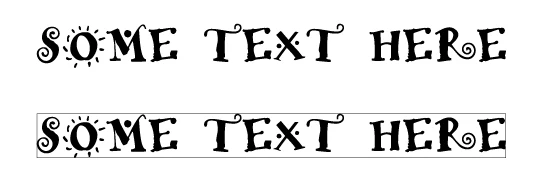
Here is another graphic showing more of I what I mean.  I need to end up like the last one - with a rectangle that is a specific amount bigger than the extents of the design (and then there are more action items that need to be applied to that rectangle further but I've got those in place already as long as it is an editable shape).