
Participating Frequently
November 5, 2015
Answered

Removing Empty Sub Layers.

  • November 5, 2015
  • 5 replies
  • 3979 views

Hi All.  I've been all over the internet and haven't seemed to find my solution.  Hoping someone on here has a solve. 

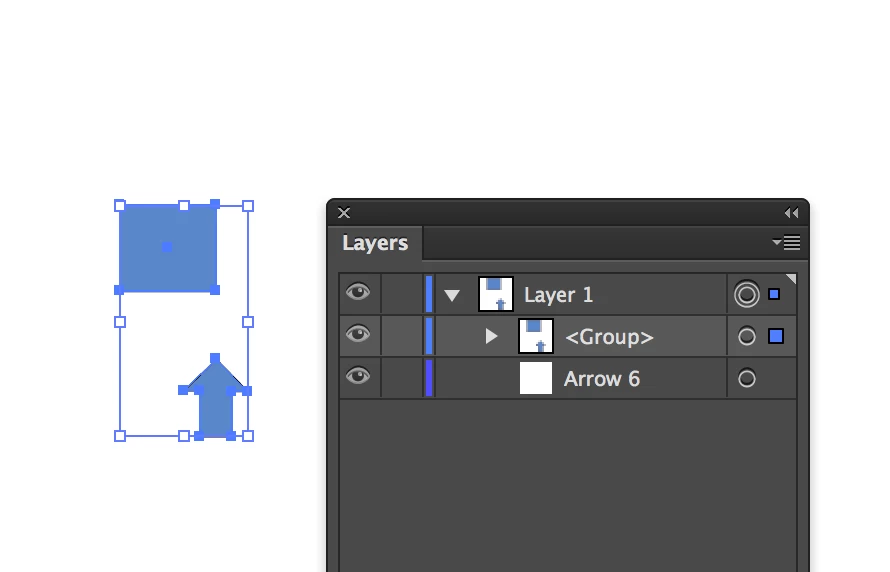
I'm looking for a script that will delete not only empty layers but will identify and delete empty sub layers. I've found the script thats floating around that is called "DeleteEmptyLayers" but unfortunately it doesn't remove empty sublayers.  In this pic it would be "Arrow 6" that needs to be deleted.

I get the sublayers every time I use a symbol then break the symbol then group that object with something else.  It leaves behind an empty sublayer and cleaning those up by hand is becoming infuriating.  Anyone out there have a fix? 
This topic has been closed for replies.
Correct answer Silly-V

Hi Kristen,

Please give this one a test- let's see if it works:

#target illustrator

function RemoveEmptySublayers(){

    function getNestLevel(layer){

        var nestLevelCounter = 0;

        function getParent(layer){

            if(layer.parent.typename == "Document"){

                return false;

            }

            nestLevelCounter++;

            return getParent(layer.parent);

        };

        getParent(layer);

        return nestLevelCounter;

    };

    function getLayersRecursive(subjectLayer){

        var thisLayer;

        for(var i=0; i<subjectLayer.layers.length; i++){

            thisLayer = subjectLayer.layers;

            allLayers.push({nestLevel : getNestLevel(thisLayer) , layer : thisLayer});

            getLayersRecursive(thisLayer);

        }

    };

    function isSublayerDevoidOfNestedArt(layer){

        // can only work backwards through a collection of layers sorted by their nested level.

        if(layer.parent.typename == "Document"){

            return false;

        }

        if(layer.pageItems.length > 0){

            return false;

        }

        if(layer.pageItems.length == 0 && layer.layers.length == 0){

            return true;

        }

        return false;

    };

    if(app.documents.length == 0){

        return;

    }

    var doc = app.activeDocument;

    var allLayers = [], nestLevel = 0;

    getLayersRecursive(doc);

    allLayers.sort(function(a, b){return a.nestLevel > b.nestLevel});

    var currentSublayer;

    for(var i=allLayers.length - 1; i > 0; i--){

        //alert(allLayers.layer.name + " " + allLayers.nestLevel);

        currentSublayer = allLayers.layer;

        if(isSublayerDevoidOfNestedArt(currentSublayer)){

            currentSublayer.remove();

        }

    };

};

RemoveEmptySublayers();

5 replies

Kurt Gold
Community Expert
Community Expert
April 6, 2021

As well as Ton I have something similar, but it starts a bit different:


// script.name = deleteEmptyLayers,jsx
// script.description = deletes empty layers and sublayers. If a sublayer is not empty, its parent empty layer will not be removed.
// script.requirement = an open illustrator
// script.parent = CarlosCanto

// script.fate = may be scrounged by rascals

// usage - open Illustrator before running the script


CarlosCanto
Community Expert
Community Expert
April 6, 2021

hahaha you're the best Kurt

pixxxelschubser
Community Expert
Community Expert
April 6, 2021

😄

Perhaps a tip for the future: when you publish scripts (from others), try to include the name of the author or the source (link). This is the only recognition we can give to the tireless scriptwriters who share their highly specialized knowledge for free.

GerssonDelgado
Inspiring
March 31, 2021

Hey @Katz.Kristen 

Following Script delete empty layers and Sublayers at the same time


function main() {
try {
var doc = app.activeDocument;
}
catch (e) {
alert ('No hay un documento activo');
return
};
var emptyLayers = [];
getEmptyLayers (doc, emptyLayers);
for (var i=0; i<emptyLayers.length; i++) {
emptyLayers[i].remove();
}
}
function getEmptyLayers(container, arr) {
var layers = container.layers;
for (var ii=0; ii<layers.length; ii++) {
try {
var ilayer = layers[ii];
ilayer.canDelete = true;
if (ilayer.layers.length>0) {
getEmptyLayers (ilayer, arr)
}
if (ilayer.pageItems.length==0 && ilayer.canDelete) {
arr.push(ilayer);
}
else {
ilayer.canDelete = false;
container.canDelete = false;
}
}
catch(e){
}
}
}
main();


Best Regards

Gersson

CarlosCanto
Community Expert
Community Expert
April 1, 2021

that script looks suspiciously familiar

pixxxelschubser
Community Expert
Community Expert
April 6, 2021

I've seen enough good scripts from a member named @CarlosCanto to recognize his "handwriting".

Silly-V
Legend
November 5, 2015

Of course, my personal way to deal with issue is grouping the symbol before breaking the link, so that a sub-layer does not appear. Grouping and pressing Break Link is a couple of separate actions, but they can be recorded as an action such as in my screenshot here:

And, if you care for the symbol name being transferred to the resulting group, a script would be needed in this case which does the same thing except remembers and writes the symbol's name.

Silly-V
Silly-VCorrect answer
Legend
November 5, 2015

Hi Kristen,

Please give this one a test- let's see if it works:

#target illustrator

function RemoveEmptySublayers(){

    function getNestLevel(layer){

        var nestLevelCounter = 0;

        function getParent(layer){

            if(layer.parent.typename == "Document"){

                return false;

            }

            nestLevelCounter++;

            return getParent(layer.parent);

        };

        getParent(layer);

        return nestLevelCounter;

    };

    function getLayersRecursive(subjectLayer){

        var thisLayer;

        for(var i=0; i<subjectLayer.layers.length; i++){

            thisLayer = subjectLayer.layers;

            allLayers.push({nestLevel : getNestLevel(thisLayer) , layer : thisLayer});

            getLayersRecursive(thisLayer);

        }

    };

    function isSublayerDevoidOfNestedArt(layer){

        // can only work backwards through a collection of layers sorted by their nested level.

        if(layer.parent.typename == "Document"){

            return false;

        }

        if(layer.pageItems.length > 0){

            return false;

        }

        if(layer.pageItems.length == 0 && layer.layers.length == 0){

            return true;

        }

        return false;

    };

    if(app.documents.length == 0){

        return;

    }

    var doc = app.activeDocument;

    var allLayers = [], nestLevel = 0;

    getLayersRecursive(doc);

    allLayers.sort(function(a, b){return a.nestLevel > b.nestLevel});

    var currentSublayer;

    for(var i=allLayers.length - 1; i > 0; i--){

        //alert(allLayers.layer.name + " " + allLayers.nestLevel);

        currentSublayer = allLayers.layer;

        if(isSublayerDevoidOfNestedArt(currentSublayer)){

            currentSublayer.remove();

        }

    };

};

RemoveEmptySublayers();

TrueHarlequin
Participant
April 3, 2017

Can I use this in Adobe Illustrator CC? Version 2017.0.2....save snip as .js and .jsx and they both do nothing when I try to open with file > Scripts > Other Scripts.

Qwertyfly___
Legend
April 4, 2017

if you have more then one version of illustrator then the target line at the top may cause issues.

try running it from the ESTK.

let me know if that means nothing...

here is another one by KELSO back in 2007.

illustrator-scripts/DeleteEmptyLayers.jsx at master · nvkelso/illustrator-scripts · GitHub