
Inspiring
October 17, 2019
Answered

removing guides doesn't seem to be working

  • October 17, 2019
  • 2 replies
  • 672 views

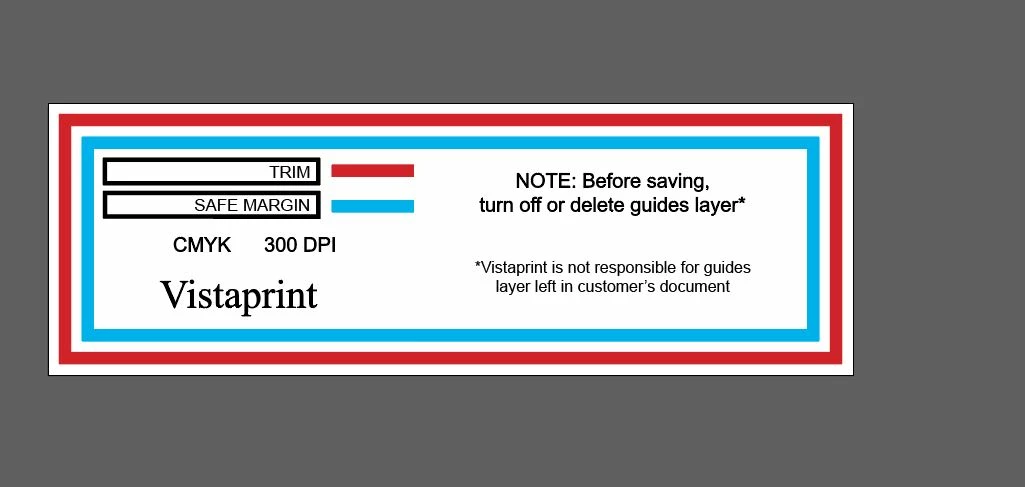
Here is a template from Vistaprint that I am trying to work with. It says to remove guides before saving. My understanding is that you remove them by going to View, Guides, Clear Guides. I have done that and I can still see the red and blue bleed and trim lines. I also tried deleting them in Layers panel.

I don't work with Illustrator much at all so perhaps I am not doing this correctly.

The reason I ask is that I sent Vistaprint something on which I thought I had removed the guides--but they showed up on the preview for the document.

Thanks!

EDIT: Here is the image.
 

    This topic has been closed for replies.
    Correct answer SJRiegel

    They are referring to the layer that contains the Vistaprint guides. These are not the same as guide lines created by Illustrator.

    2 replies

    rcraighead
    Legend
    October 17, 2019

    It doesn't look like the're "real" guides. They are just artwork on a layer named "Guides". Just hide the layer or delete it.

    Inspiring
    October 17, 2019
    Wow--OK. I think I got it. Strangely enough, even when you delete the layer, they are still there. Finally selected them one at a time, and it turns out they are paths. So I deleted them that way. Thanks for your help!
    SJRiegelCorrect answer
    Legend
    October 17, 2019

    They are referring to the layer that contains the Vistaprint guides. These are not the same as guide lines created by Illustrator.