
mikkp93989830
Participant
December 4, 2017
Question

Rename SVG / slice name

  • December 4, 2017
  • 1 reply
  • 684 views

Hello

Is there a way (script ?) to keep Illustrator CS6 slice names  and use them as the Artboards names (needed to save as SVG ) ?

1) The slice name (I use it to Export for the Web into PNG)
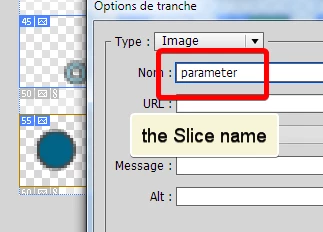
2) I need the Slice name on Artboard name too, to use for saving into SVG
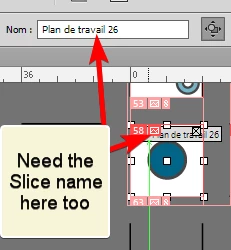
The only info I found is to rename each Artboards one by one... but I have so many icons, already named correctly with the Slices...

Thanks

This topic has been closed for replies.

1 reply

Disposition_Dev
Legend
December 5, 2017

You can compare the center point of the slice to the artboards, then when you find a match, you can apply the name of the given slice to the matching artboard.

mikkp93989830
Participant
December 5, 2017

Hi, sounds easy... but I can't write code, I design only

I can pay a little for a script, or send something from a website wishlist... someone interested ?

mikkp93989830
Participant
December 5, 2017

I checked the PDF from Adobe http://wwwimages.adobe.com/content/dam/acom/en/devnet/illustrator/pdf/Illustrator-Scripting-Reference-JavaScript-cs6.pdf  , it seems there's nothing to get a Slice name... there's no Slice Object. I hope I'm wrong....