
Participant
June 24, 2022
Question

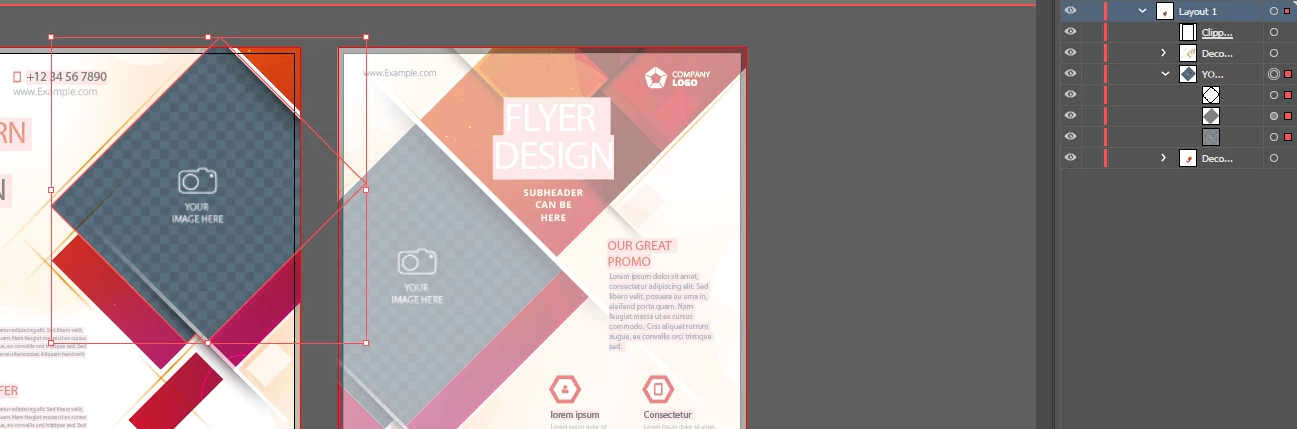
Replace "Add image here" layer ? Sorry very new

  • June 24, 2022
  • 2 replies
  • 363 views

Hi there,


Apologies, I am very new to illustrator.


I have downloaded a tempate to try and learn on, there is a layer "Add your image here" im really confused what or how Im supposed to change this layer and add an image?


Very very simple i know but I just cant figure it out.


Any help greatly appriciated.


This topic has been closed for replies.

2 replies

Monika Gause
Community Expert
Community Expert
June 24, 2022

It looks like it's a clipping mask defined for the layer.


So: You need to put your photo on that layer on top of the placeholder image. You can do that by placing your photo and arranging it. Then Edit > Cut

Then select that placeholder and Edit > Paste in front.


In the layers panel you can then just drag the placeholder into the trash.


The clipping mask should work automatically, since it's defined for the layer.

Participant
June 24, 2022

Brillaint, i will try it now.


Many thanks for your time and help, really appriciate it.

Doug A Roberts
Community Expert
Community Expert
June 24, 2022

It's not simple at all -- these attempts at templates rarely are. Was it from Adobe Stock? Can you link to the stock template?

Participant
June 24, 2022

Yes it was, i tried to upload the AI file but wouldnt have it


Business Flyer Templates – Browse 6,561 Stock Photos, Vectors, and Video | Adobe Stock