


Question
Resize object proportionaly
Hi everyone,
Here is my problem, I have a script which resize a lot of different shapes
var centerObjects = false;
function main() {
var item, center_point;
var toPixels = function (v) {
var units = {
'in': 72,
'mm': 2.8346455078125,
'px': 1,
'pt': 1,
}, re = /(\d*[.]*\d+)(mm|in|ft|cm|px|pt)/i, m, u, rep;
//derivitave
units['cm'] = units['mm'] * 10;
units['ft'] = units['in'] * 12;
while (m = v.match(re)) {
u = m[2].toLowerCase();
if (units[u]) {
rep = (m[1] * units[u]);
v = v.replace(re, rep);
}
}
return v;
}
var trace = function (m) { alert(m) };
if (activeDocument == null) { trace("Pas de document ouvert trouvé. Veuillez s'il vous plaît ouvrir un document."); return; }
if (activeDocument.selection.length == 0) { trace("Aucune sélection... ", "Veuillez sélectionner un pictogramme."); return; }
var i = prompt("Quelles dimensions voulez-vous modifier ?", "width,height");
if (i === null) { return false; }
var v = prompt("Veuillez entrer les nouvelles dimensions du pictogramme", "5mm,5mm");
v = toPixels(v);
v = v.split(',');
for (var x = 0; x < activeDocument.selection.length; x++) {
item = activeDocument.selection[x];
var scaleX = v[0] / item.width;
var scaleY = v[1] / item.height;
var finalScaleFactor = scaleX > scaleY ? scaleY : scaleX;
item.resize(finalScaleFactor * 100, finalScaleFactor * 100, true);
}
}
main();

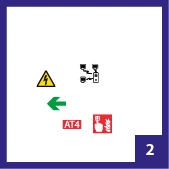
As you can see all my shapes have the same proportionnal sizewhen I run the script but I have a problem with ONE specific shape...
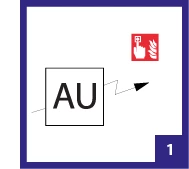
When I want to resize my shape "AU" in order to have the same height here is the result..↓
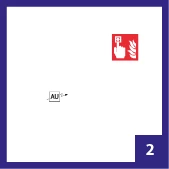
I would like to adjust the script in order to adjust my "AU" lat the same height than my other shapes when runing the script.
I've attached a file with the shapes that I want to resize.
Thank you,
PM
 AdChoices