
Known Participant
December 14, 2022
Answered

resize, proportionally from the center, text object 1 depending on the content of text objet2

  • December 14, 2022
  • 1 reply
  • 699 views

Hello everyone,

i'm making a script to resize, proportionally from the center, a text object depending on the content of another text object.


This is what i made so far


var text1 = activeDocument.textFrames.getByName("TEXT1");
var text2 = activeDocument.textFrames.getByName("TEXT2");
if (text2.contents == "caseA") {
text1.resize(10, 10, AnchorPoint.MIDDLE_CENTER);
}


It looks like "AnchorPoint" it's not known, it's not the right way.

Does anyone know what's teh correct way to do it?


Cheers!
This topic has been closed for replies.
Correct answer Charu Rajput

Hi @Delresto , 

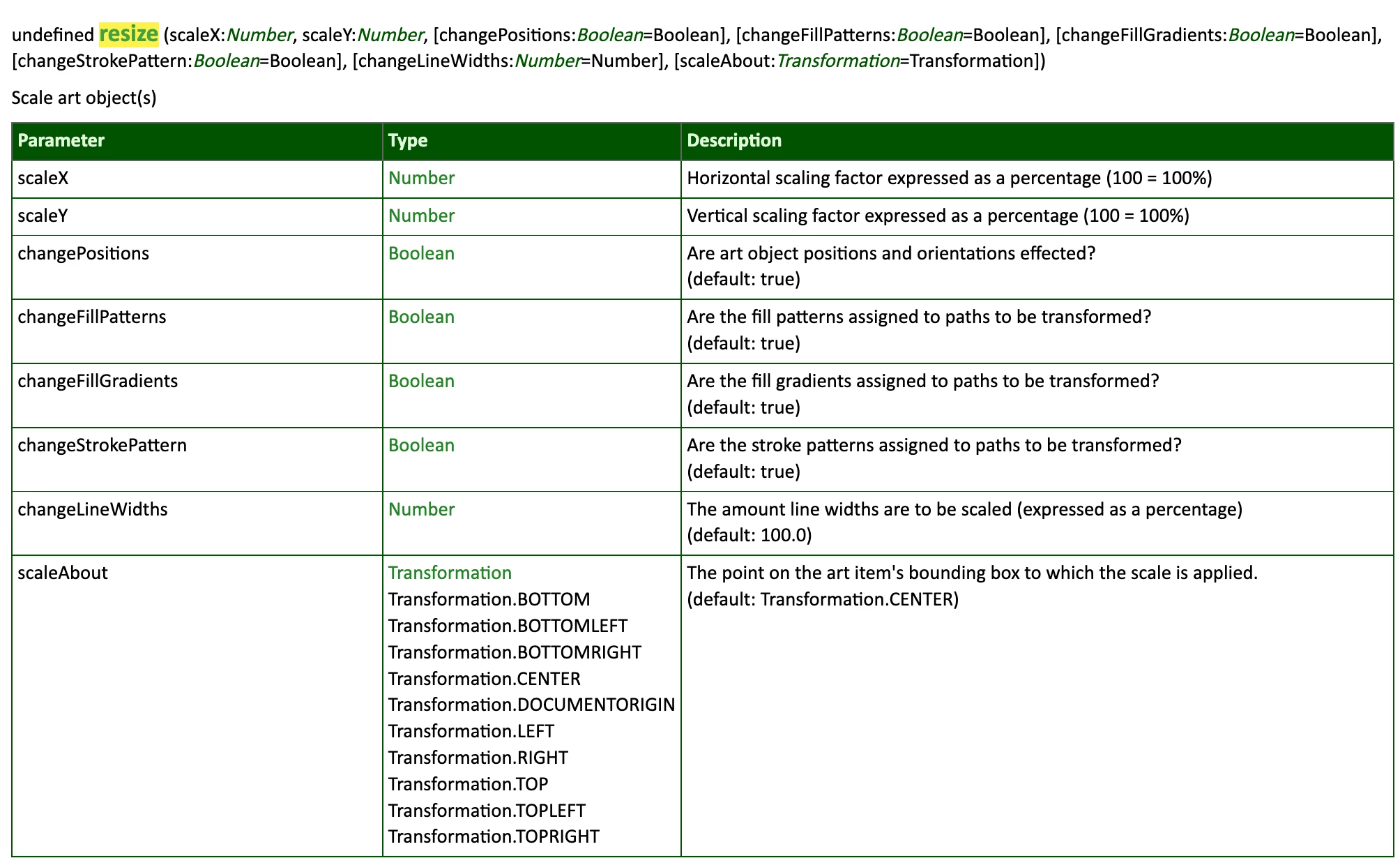
In Illustartor it is Transformation. Please see screenshot for resizeAPI what parameters are passed to the resize method and in which order.

Also, you can try the following code

var text1 = activeDocument.textFrames.getByName("TEXT1");
var text2 = activeDocument.textFrames.getByName("TEXT2");
if (text2.contents == "caseA") {
  text1.resize(10, 10, true, true, true, true, 100, Transformation.CENTER);
}


1 reply

Charu Rajput
Community Expert
Charu RajputCommunity ExpertCorrect answer
Community Expert
December 14, 2022

Hi @Delresto , 

In Illustartor it is Transformation. Please see screenshot for resizeAPI what parameters are passed to the resize method and in which order.

Also, you can try the following code

var text1 = activeDocument.textFrames.getByName("TEXT1");
var text2 = activeDocument.textFrames.getByName("TEXT2");
if (text2.contents == "caseA") {
  text1.resize(10, 10, true, true, true, true, 100, Transformation.CENTER);
}


Best regards
DelrestoAuthor
Known Participant
December 14, 2022

Hi @Charu Rajput  and thank you again! The script works just fine (obviously) and i really appreciate the expanation, really exhaustive. have a really good day!

Cheers


P.S. Where can i find info such those you shared?

Charu Rajput
Community Expert
Community Expert
December 14, 2022

Welcome @Delresto 🙂

Here is the link for the documentation that you can refer.

https://www.indesignjs.de/extendscriptAPI/illustrator-latest/#Application.html

Best regards