
lourdesbeard
Participant
May 22, 2018
Answered

Resizing image in Illustrator

  • May 22, 2018
  • 2 replies
  • 8689 views

I have been working in Illustrator on a MAC to create a logo. All was working fine, but then for some reason I was unable to resize images and type.

When I click on the image or type I do not get a box around it any longer. It only shows anchors and path on the imported image. And on the type, it only gives a line under the word.

Does anyone know why this may have started and no longer allows for resizing with the arrow tool by grabbing the corner of the image box?
Correct answer rcraighead

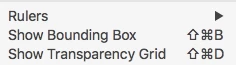
You've turned of "Bounding Boxes" (View Menu).

I actually prefer to work without bounding boxes. The traditional "Modifier" tools are, in most cases much more powerful than being constrained to a "bounding box". With Bounding Box turned off type "S" (scale), move cursor diagonally away from the object and start dragging in or out toward the center of the object. By holding "Shift" down you can constrain to horizontal, vertical proportional scaling, depending on the direction you drag. If you wish to scale from somewhere other than the center just click once, anywhere and start dragging again, the "center of rotation" has been reset and is identifiable by the small cyan crosshairs. These basic capabilities are transferable to the "Rotate" tool (R).

2 replies

Participant
May 31, 2018

How stupid is this idea.

Monika Gause
Community Expert
Community Expert
May 31, 2018

  schrieb

How stupid is this idea.

This often happens accidentally, because the shortcut is similar to another shortcut in a different software.

Participant
May 31, 2018

Thanks

Sorry to be so rude But these little changes can really slow down workflow if you are not a full time user

Dr Mike Howarth

MHMVR

rcraighead
rcraigheadCorrect answer
Legend
May 22, 2018

You've turned of "Bounding Boxes" (View Menu).

I actually prefer to work without bounding boxes. The traditional "Modifier" tools are, in most cases much more powerful than being constrained to a "bounding box". With Bounding Box turned off type "S" (scale), move cursor diagonally away from the object and start dragging in or out toward the center of the object. By holding "Shift" down you can constrain to horizontal, vertical proportional scaling, depending on the direction you drag. If you wish to scale from somewhere other than the center just click once, anywhere and start dragging again, the "center of rotation" has been reset and is identifiable by the small cyan crosshairs. These basic capabilities are transferable to the "Rotate" tool (R).

lourdesbeard
Participant
May 22, 2018

Thank you very much for helping me correct my error. I don't recall ticking the boundary box "off", but that fixed it. Appreciate your time.