
SC-Agency
Inspiring
April 29, 2019
Answered

Restore Default Toolbar

  • April 29, 2019
  • 4 replies
  • 23069 views

One day it seems I dragged an icon off the toolbar because the order of the tools got shuffled.

How does one restore the default toolbar in Illustrator cc 23.01?

Thanks.

    This topic has been closed for replies.
    Correct answer barbara_a7746676

    Click the 3 dots at the bottom of the toolbar.

    Click the menu in the upper right and choose Reset.
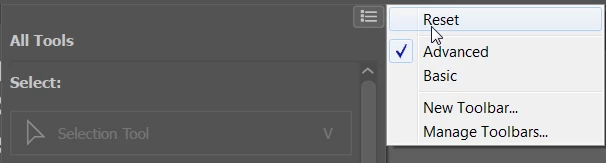
    If you want all the tools to show in the toolbar, which is my preference, choose Advanced.

    4 replies

    brettha
    Known Participant
    April 3, 2021

    Can I set the advanced toolbar as a default preset?

    Ton Frederiks
    Community Expert
    Community Expert
    April 3, 2021

    Yes, choose the Advanced Toolbar and create a new workspace with:  Window > Workspace > New Workspace...

    jane-e
    Community Expert
    Community Expert
    April 30, 2019

    SDAgency  wrote

    How does one restore the default toolbar in Illustrator cc 23.01?

    Hi

    In addition to Barbara’s solution, Adobe fixed this in the .0.2 patch. Version 23.0.3 was released in April 2019.

    Illustrator April 2019 (23.0.3) release notes

    Jane

    barbara_a7746676
    Community Expert
    barbara_a7746676Community ExpertCorrect answer
    Community Expert
    April 30, 2019

    Click the 3 dots at the bottom of the toolbar.

    Click the menu in the upper right and choose Reset.

    If you want all the tools to show in the toolbar, which is my preference, choose Advanced.

    SC-Agency
    SC-AgencyAuthor
    Inspiring
    April 30, 2019

    Thanks Barbara. Never noticed the three dots. I appreciate the step-by-step. Worked like a charm.

    barbara_a7746676
    Community Expert
    Community Expert
    April 30, 2019

    You're welcome!

    Monika Gause
    Community Expert
    Community Expert
    April 29, 2019

    Please see this about custom toolbars:How to work with tools in Illustrator