
August 8, 2012
Question

Results in Image Trace CS6 don't match Live Trace CS3 [2012]

  • August 8, 2012
  • 4 replies
  • 30619 views

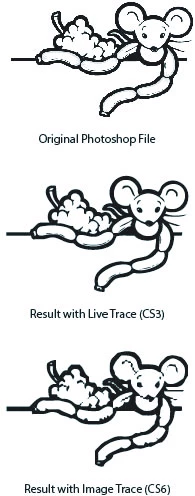
I just started using CS6, jumping from CS3. A major tool I use is Live Trace, and I have custom settings for that. I cannot find a way to make Image Trace behave the way Live Trace did for black and white line drawings. The results I get in CS6 are far inferior to those I got in CS3 in terms of retaining the look of the original raster image. Help would be greatly appreciated. Otherwise, I will have to leave CS3 installed just to do my Live Trace.


Here is a sample of what I mean. You can see the quality degredation in CS6 compared to CS3. (And it's much more obvious when it's full size and full resolution.)
 

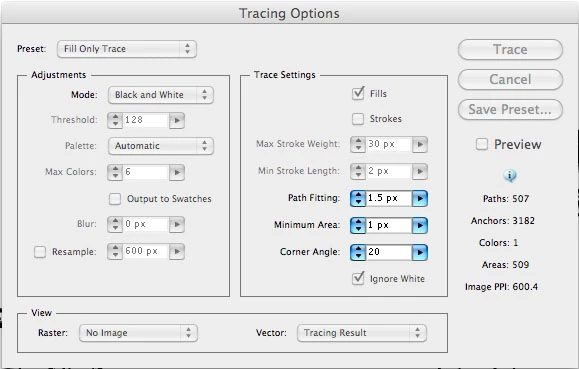
My settings used in Live Trace (CS3) were:
 

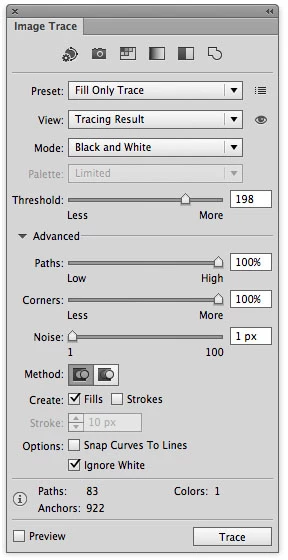
The settings I tried in CS6 that gave the above result were:
 

Thanks for the help!

This topic has been closed for replies.

4 replies

Participant
June 28, 2016

Does anyone at Adobe take note of these user experiences? This thread goes back to August 2012 and the underlying issue has emphatically still not been addressed.

I recently subscribed to Creative Cloud services, which involved a leap from Illustrator CS3 to the latest version. Along with many others, I am heavily dependent on the Live Trace feature, for converting black and white bitmap line illustrations, and its current iteration, Image Trace, produces very significantly inferior results. I have been obliged to regularly revert to Illustrator CS3, which still runs – after a fashion – under the Mac El Capitan OS, solely for its Live Trace facility.

Is there any way Live Trace could be reinstated in the next Illustrator upgrade? It seems to be widely agreed that Image Trace has been a step backwards in terms of performance. Failing that, how about a standalone app based on the original Streamline, which did the job of bitmap-to-vector conversion as efficiently and accurately as any subsequent iteration.

I would love to see this problem sorted out.

Cheers,

Geo

runninghead_design
Inspiring
August 1, 2016

Just a me too post really but I've been a fan of livetrace for my lineart since CS3 and I'm running a whole other Mac just to be able to continue to use it's live trace facility!!
CHOICE has been lost in the new Image Trace offered by CC and this needs to be resolved. I know what I'm doing here re: resolution, settings, etc and all comparisons fail to achieve the same elegant and precise results offered by CS3.

andyw94072450
Participant
August 10, 2016

me too...

I've just upgraded to CC from CS3 and am regretting it.

I trace my line art and got great results in the earlier version but now after hours of playing I still can't get anything that comes close. The new trace is clunky and inaccurate with loads of artefacts and cropping.

I screen print and registration is key, the new CC version even offsets the trace which makes it useless to me... WHY?

I'm now on the lookout for a specialised tool for turning line art into vector art like CS3 used to.

Any ideas?

Andy Wilx

Participant
November 17, 2014

Hi,

Thank god somebody else has this problem. I had CS3 on my last computer,  now that computer is dead and I got CS6 through school. Everything that I do depends on live tracing and I just can not...get the same results....

The way i used to live trace in CS3 was by using a photograph (.jpg) and live tracing it grayscale ...in about 20 layers

When I do the same in CS6 I just get horrible layer division and the image is very bulky.


Is there a solution this problem?

Ive been using my friends CS3 for awhile when I get the chance but now her computer is broken.
Is there eve a way to get your hands on CS3 anymore?  Ive tried to trace things manually in CS6, the only way I get close to detailed results is if i trace the image in like 180 layers.. and even then the quality is not at nice.
Please let me know.


Best,
Karen

Participant
November 4, 2012

I was very dissapointed to find out that CS6 is much inferior to CS5 or earlier versions when tracing black and white line drawings or comic art. By the way many users are of the same opinion. Here is a review of CS6 vs CS5 tracing results:

http://vector.tutsplus.com/tutorials/tools-tips/quick-tip-how-to-use-the-new-image-trace-in-adobe-illustrator-cs6/

And here is my own experience. Whatever settings I try in CS6 the result is just terrible. This one is the best I could get. Details are lost. Lines are very thick.

In comparison, here is how wonderfully the same work is done by CS5, not to mention that I didn't even have to tackle with any settings at all. Just clicked the button Live Trace and got saticfactory results with the default preset.

These are original unreduced files:

https://dl.dropbox.com/u/61392902/Illustrator%20Bugs/Traced_in_CS5.jpg

https://dl.dropbox.com/u/61392902/Illustrator%20Bugs/Traced_in_CS6.jpg

https://dl.dropbox.com/u/61392902/Illustrator%20Bugs/Original_Raster_Drawing.jpg

P.S. It is sometimes possible to get good results in CS6, if you take the big drawing apart into small separate drawings. However it means a lot of additional work: tens of extra hours in a year in fact. Which, of coarse, undoubtfully means that CS6 is a step backwards if compared with CS5.

Besides some big complex drawings with many details can not be devided into a smaller ones. And if you don't have an earlier version of the program, in this case there is no way to get a quality trace at all!

Frank Heller
Inspiring
November 4, 2012

This example, provided by unimpersonated, illustrates the deficiencies of CS6's tracing functionality perfectly.

I compared the results between CS6 and CS5 using the original raster jpg posted above. It's night and day. Right out of the box with default settings, CS5 made an incredibly accurate representation. The same results were impossible to acheive with CS6 no matter how much tweaking was involved. Even cutting the original .jpg into smaller segments could not approach the accuracy attained in CS5.

I have to agree, this  appears to be quite a step backwards for the tracing function in AI.

Participant
December 16, 2012

Just wanted to add my complete agreement. I have been tracing black and white images since the times of Adobe Streamline and with CS6 there are possibly the worst ever results.

Please Adobe please, take notice and do something about it. CS5 was excellent at it - just put that bit of code back.

Jeffcd19
Participant
August 8, 2012

My first thought is to reduce your "Threshold" settings. In CS 3 you have it at 128 but in CS6 you have 198. This might be forcing the trace to catch too much detail and thereby tracing all the pixels from the image.

You should also try reducing the Paths and Corners settings a bit see if that helps

And maybe you should try the Create "strokes" option too. I can't help much as I don't have a copy of CS 6 yet but those are my best guesses

Give it a try and good luck

Jeff

August 8, 2012

I tried all those things to no avail. When I lowered the threshold, it was leaving out large parts of the image altogether.

Even with the mouse, I was able to get it smoother by adjusting the corners, but it still lacks most of the detail that CS3 gave.

_scott__
Legend
August 8, 2012

I was able to get much closer than you're getting after just a few seconds. More time could be spent refining the trace than I spent.

My trace on top... your orignal from here on bottom.