Answered
RGB color mode but swatch is in CMYK
I've created a new document and selected RGB as my color mode. But when I look at my swatch it is CMYK. I am 100% sure my document is RGB. What am I missing?

I've created a new document and selected RGB as my color mode. But when I look at my swatch it is CMYK. I am 100% sure my document is RGB. What am I missing?
Sorry, I'm a bit of a newbie. I've always set up my documents the same way RGB color mode and the swatch is RGB. For some reason in the last couple days it's giving me CMYK when I hover over a swatch. I don't switch to any other color modes so I'm not sure why it's been doing this just recently. I'm thinking it's something I must have done but I just don't know what?
It looks like you used a CMYK document profile and just changed the color mode in the menu.
That is wrong.
If you want an RGB document, select an RGB document profile (from the "Web" section for example)
Your swatches are RGB though. Process swatches are always in the document color mode. Only their values will be not desirable. Especially the black one.
Do this:
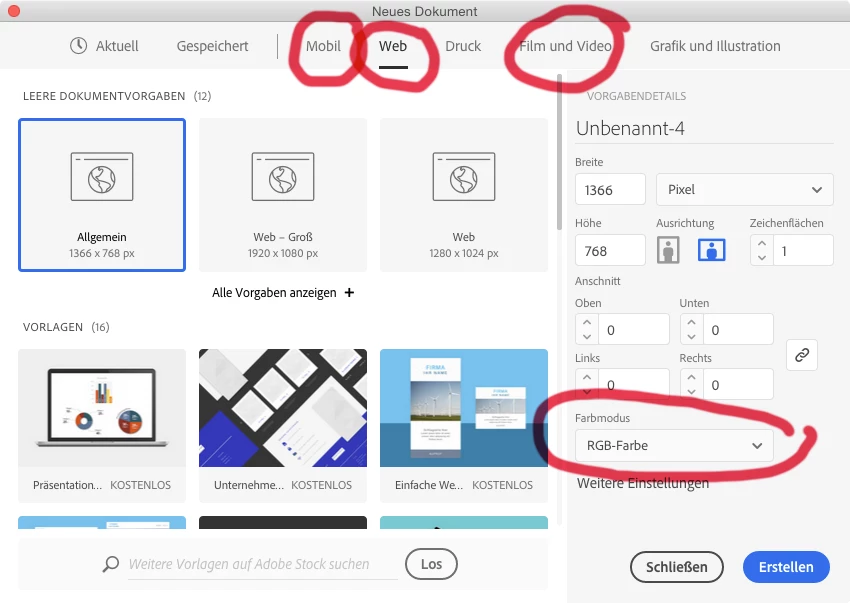
Don't do this:

Already have an account? Login
Enter your E-mail address. We'll send you an e-mail with instructions to reset your password.
 AdChoices