
schaubbie2004
Participant
January 20, 2017
Answered

Round direct selection option?

  • January 20, 2017
  • 2 replies
  • 450 views

Is there any way to make a round selection with the direct selection tool in Illustrator? I would find it extremely useful when trying to quickly edit a large group of points in a circular object like a flower or gear, etc. while leaving other points further out untouched.

If not, I would like to request you add this as a feature.

Thanks,

Dan Schaub
    This topic has been closed for replies.
    Correct answer Mike_Gondek10189183

    Hi Dan,

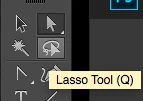
    Hit Q on your keyboard to switch to the often forgotten about Lasso Tool.

    The keyboard shortcut will work as long as you are not editing text.

    2 replies

    Jeff Witchel, ACI
    Community Expert
    Community Expert
    January 20, 2017

    You may want to take at the Lasso tool (Q). You click and drag around just the points you wish to select. It will allow you to make quite intricate selections.

    Mike_Gondek10189183
    Community Expert
    Mike_Gondek10189183Community ExpertCorrect answer
    Community Expert
    January 20, 2017

    Hi Dan,

    Hit Q on your keyboard to switch to the often forgotten about Lasso Tool.

    The keyboard shortcut will work as long as you are not editing text.