


Inspiring
August 25, 2022
Answered

Rounded corner option no longer in Rectangle tool

  • August 25, 2022
  • 1 reply
  • 9958 views

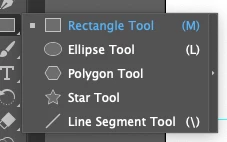
Ever since I first used Illustrator, I was able to select the Rectangle tool, click and hold, and change the shape of a border I was drawing - Rectangle, Elipse, Polygon, etc. That included a rectangle with Rounded Corners. But now, the Rounded Corner option is no longer available in the Rectangle tool. I've found out how to round the corners by going under Effect, Stylize, Round Corners, but that's very inconvenient. It was SO much easier when I could just choose a rounded corner shape from the same place as all the other shapes. Is there a way to fix this? Thank you!
This topic has been closed for replies.
Correct answer Ton Frederiks

You could try the Advanced Toolbar from Window menu > Toolbars > Advanced.

And View > Show Corner Widget to create them from straight rectangles.

1 reply

Ton Frederiks
Community Expert
Ton FrederiksCommunity ExpertCorrect answer
Community Expert
August 25, 2022

You could try the Advanced Toolbar from Window menu > Toolbars > Advanced.

And View > Show Corner Widget to create them from straight rectangles.

Inspiring
August 25, 2022

Thank you!!! I knew it had to be something simple, but I just couldn't find it LOL! And all the searches I tried resulted in just showing how to add rounded corners with the Effect option. This is so much better!

Ton Frederiks
Community Expert
Community Expert
August 25, 2022

Good to hear that helped.