


- Home
- Illustrator
- Discussions
- Safe Illustrator artboards to PDF as A4 pages
- Safe Illustrator artboards to PDF as A4 pages

Copy link to clipboard
Copied
Hi,
I would like to save my artboards in Illustrator to PDF in order to be able to print them as A4 afterwards.
I can't find an option for this. It always safe as whole artboards. I would like them to be saved "divided to A4".
I can print A4 directly from Illustrator, that is not the issue. I need to save into PDF so that you ould open it after as A4 printable pages...
I have been looking for this for hours now...
Thank you
Anna


 1 Correct answer

You can create multiple artboards overlapping one another in any combination. Just make the four artboards you require and when you save as a PDF, select the range you need.


Explore related tutorials & articles
 7
Replies
7
7
Replies
7


Copy link to clipboard
Copied
Can you please show a screenshot of what you want to do and of what you have now?
Copy link to clipboard
Copied
[image: image.png]
this is a an artboard 1, divided into different fields (as A4). However,
once I try to save as PDF it can be only saved as 1 artboard and not
divided into pages.
So I always have only 1 artboard.Iwould like to print after on A4 which is
not possible.
I don't know if I am clear.
Thank you
Anna Dlouhá
Tel: +420 775 081 181
Copy link to clipboard
Copied
Please upload images via the forum's web interface.
Copy link to clipboard
Copied
Hello Monika,
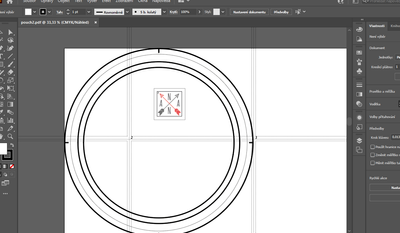
this is a an artboard 1, divided into different fields (as A4). However,
once I try to save as PDF it can be only saved as 1 artboard and not
divided into pages.
So I always have only 1 artboard.Iwould like to print after on A4 which is
not possible.
I don't know if I am clear.
Thank you
Anna
Copy link to clipboard
Copied
Print tiling is not sufficient for saving a PDF. You need to create artboards.
Copy link to clipboard
Copied
You can create multiple artboards overlapping one another in any combination. Just make the four artboards you require and when you save as a PDF, select the range you need.
Copy link to clipboard
Copied
Thank you,
It worked! Create other artboards (A4) and move the illustrations on it...


Get ready! An upgraded Adobe Community experience is coming in January.
Learn more
 AdChoices