
Dimitris Xydas
Participant
May 18, 2020
Answered

Same pantone color gets exported as two separate pantone colors

  • May 18, 2020
  • 2 replies
  • 869 views

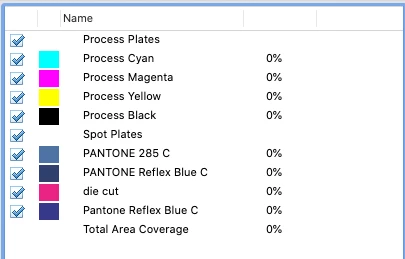
I use many pantone colors while working on various projects but sometimes some of them, while exporting as a pdf, get separated even if the original color worked on illustrator is the same/whole.

It happens randomly and don't know whats causing it...

What gives?
    This topic has been closed for replies.
    Correct answer marliton

    Hi. When the same color has different names is separated as a different color. Seems like that's "case-sensitive" so "PANTONE" and "Pantone" are different for Adobe. Sometimes that happens when you import content and this content has used the color with a different name.

    2 replies

    Ton Frederiks
    Community Expert
    Community Expert
    May 18, 2020

    In Acrobat you can use the Ink manager to map them to a single plate.

    marliton
    Community Expert
    marlitonCommunity ExpertCorrect answer
    Community Expert
    May 18, 2020

    Hi. When the same color has different names is separated as a different color. Seems like that's "case-sensitive" so "PANTONE" and "Pantone" are different for Adobe. Sometimes that happens when you import content and this content has used the color with a different name.

    Marlon Ceballos