LRockweiler
Participant
November 28, 2018
Answered

Same Pantone swatch showing as two completely different colors.

  • November 28, 2018
  • 2 replies
  • 3810 views

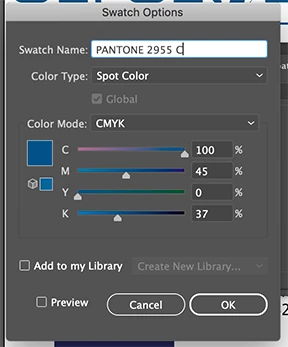
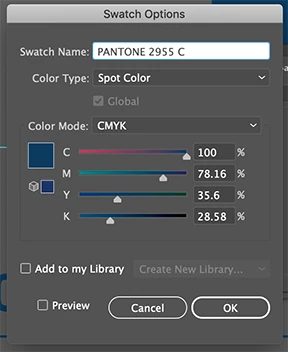
I have two open files and I am using the same logo in each but the Pantone is coming over as two different shades. I am NOT talking visually on the screen I am saying it is two different colors. When I open the color box the CMYK for each is completely different yet it is both the same Pantone. Secondly if I copy and past from one file to the other it converts it to the "shade"for that file. Any clue on what is wrong? I did not create these logo files the previous designer did and I can not figure out what they did to create this issue.
    This topic has been closed for replies.
    Correct answer Mike Sofa

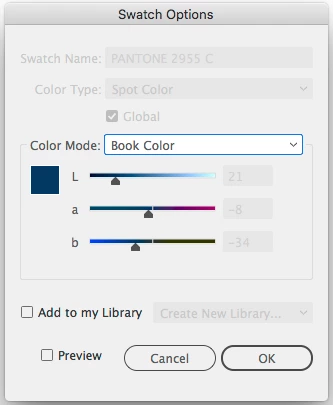
    Your Swatch Options for Pantone 2955 C (from Swatch Library: Color Books: PANTONE+ Coated) should look like this:

    What you have is 2 different CMYK colors that are both named "PANTONE 2955 C."

    2 replies

    Mike SofaCorrect answer
    Inspiring
    November 28, 2018

    Your Swatch Options for Pantone 2955 C (from Swatch Library: Color Books: PANTONE+ Coated) should look like this:

    What you have is 2 different CMYK colors that are both named "PANTONE 2955 C."

    ryan_edwards
    Inspiring
    November 28, 2018

    possibly the color space/profile for each document is a little different... and thats why it globally changes it once you 'paste' into the other document/file

    LRockweiler
    Participant
    November 28, 2018

    Thank you, where do I go to check that setting?

    ryan_edwards
    Inspiring
    November 28, 2018

    ...here's some more info if that doesn't show a difference
    Color settings in Photoshop