Hello shannons5998661,
Sorry to hear about this experience. I would request you try the following steps and share your observations:
• Close all Adobe applications
• Rename the UXP folder to UXP.old from the following locations:
/Library/Application Support/Adobe/UXP
~/Library/Application Support/Adobe/UXP
• Relaunch Creative Cloud and Illustrator
Note: Location starting with this "~" sign indicates the User Library, which is hidden. So, you need to copy & paste the exact path in spotlight search or from Finder Menu > Go > Go to Folder > Paste the location in the dialog box like this:
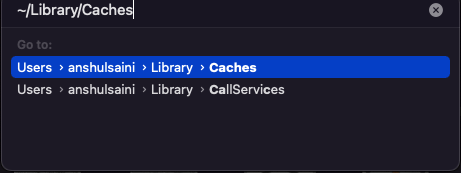
Looking forward to your response.
Thanks,
Anubhav


 AdChoices