
This topic has been closed for replies.
Correct answer AshutoshChaturvedi

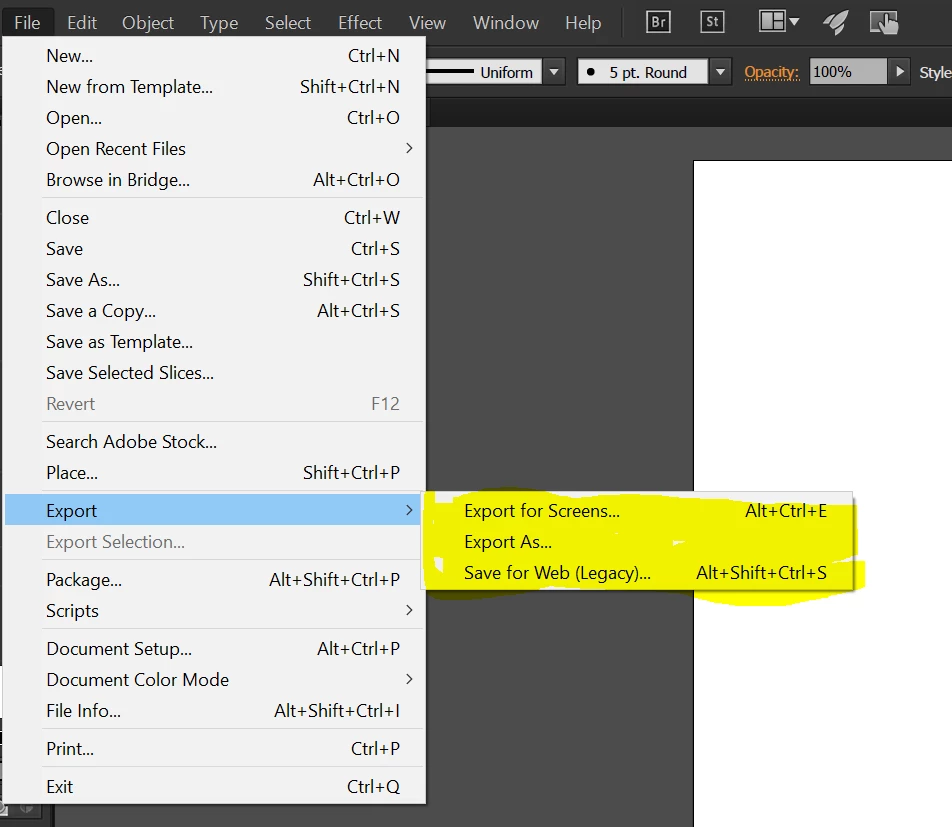
S4W has now a new home inside the export menu. Please see the snapshot.

We have also added a new export route. Please try the new fast export feature and let us know how you feel about it.
17 replies

Participant
July 14, 2016

Save for Web was a really easy, effective tool with piles of value added functionality, yet intuitive too. Save for Screens, in contrast, is slow, clunky and forces me to rename files after saving. Poor decision, poor execution.

lauracandrews
Participant
July 13, 2016

I have tried the new "Export for Screens" and it is inferior to the old "Save for Web" in many ways for me.  The new "Export for Screens" doesn't do what I need it to do.  For example, I want to fully preview the file, as it will look, before I save it (I don't want a thumbnail of the artboards), I'd like all the options on one screen, and I want to see the file size before I export.

I'm fine with having both Export for Screens and Save for Web, as both have separate uses, but do not remove or downgrade Save for Web, please! That would be a major step backward and will affect my daily workflow significantly (for the worse).

Finally, Save for Web is important and it seems not to work as well as it used to (as others have pointed out, it doesn't remember prior settings and defaults to GIF now... which slows me down as I have to change it every time I use it.).  Please improve on the next Illustrator iteration (hopefully very soon).  Thanks.

(Side note -- since Illustrator's workspace no longer reliably renders fonts correctly for me, I've often used the Save for Web view to quickly preview what a font will actually look like in the finished product.  So, Save for Web is valuable in many ways!)

Participant
July 12, 2016

The thing that is annoying me about this update is the 'Save for Web' option constantly reverts to save as a GIF, it should stay the same as what you previously used like the old Illustrator. I am not too happy about this change as it has affected my flow and my actions.

July 11, 2016

...and Export for Screens doesn't seem to work correctly either.

When I drag a selected artwork into the Asset Export window it always creates an Asset the size of the artboard rather than just the size of the selected artwork.  Same with Export for Screens. When it exports I get an image file the size of the artboard with my artwork only a tiny part of it and the rest of the image transparent.

I can't find any way to export just the selected artwork at just the selected artwork size. Am I missing something?

Monika Gause
Community Expert
Community Expert
July 11, 2016

stephen--k schrieb:

I can't find any way to export just the selected artwork at just the selected artwork size. Am I missing something?

Don't use it via the panel, but use the menu command. There you find the option to export artboards.

July 11, 2016

I was talking about exporting selected artwork, nothing to do with artboards.

btw. I know I can selected the artwork, resize artboard to selected artwork and Save for Web...

What I want is what Adobe describe on their website:  Select artwork, export just that artwork (using Save Selection or Assets Export or Save for Screens).

but none of these work correctly for me, they all include the artboard...

Participant
June 30, 2016

This Adobe Illustrator update has destroyed my flow. The "Save for Web" revert to gif is a huge mistake. I loved it before, how it would understand the presets I made with a png or jpg and save them when saving out another artboard.

I then tried using "Save for Screens" and everyone of the artboard saveouts was given an extra pixel to the height and width. (IE. instead of being 640x920 it would save out 641x921). 

I've been using illustrator for 10 years and this update is already on the verge of affecting me the most...and NOT for the better.

marleena13963482
Participant
July 5, 2016

I'm not a web designer, but every few weeks I do have to make a web-ready jpg from my Illustrator file. I just needed to know that the jpg was no larger than 45kb. The Save for Web (now Legacy) told me that on each jpg setting immediately (lower left corner) before hitting Save. This Export for Screen doesn't let me know until after I hit Save. And then it doesn't seem to make a difference in the size of the generated jpg, whether I hit jpg80 ot jpg20. I don't need to collect assets, I just need to quickly make one web-ready little jpg.

AshutoshChaturvedi
Community Manager
AshutoshChaturvediCommunity ManagerCorrect answer
Community Manager
June 23, 2016

S4W has now a new home inside the export menu. Please see the snapshot.

We have also added a new export route. Please try the new fast export feature and let us know how you feel about it.

Inspiring
June 24, 2016

dont like!

Export for screens is too clunky and a slow down because of the way you have to name the files etc - sloooowwww!

Save for web has also spoilt my work flow as it always reverts to gif as a file type instead of the previously used file type so now I have to select jpg every time i use it and I use it at least 100 times a day. .....and then I forget to do it and have to redo the job - arrgghhh!

Make export for screens a bit more user friendly in the naming convention and it would be good and revert the file type to how it was and all will be well.

Inspiring
July 8, 2016

Agreed Tropical Soul. The new way of saving files for the web is 10 steps backwards. Little control of the export settings. I too use it multiple times on a file(s) every day and resetting all the settings is a major drag on my work. Totally sucks Adobe!


add me to the list of those who rely on 'save for web' and the headache of resetting all of the options settings each time you go to export.  i would at least like for it to remember the last settings i used, or allow to save a preset that can be saved as default per my profile.  

geshultz
geshultzAuthor
Participant
June 23, 2016

Save for Web in Illustrator CC 2015.3 is now located in: File->Export->Save for Web (Legacy)
