
Participant
June 27, 2019
Answered

Save glowing vectors to a PNG with a transparent background

  • June 27, 2019
  • 3 replies
  • 12624 views

Hi,

I have an .eps vector file with glowing sparks,

for some reason, which I have encountered many times before, the glowing vectors always have

black background, so you can't really save them as a transparent PNG image.

I was wondering if you can tell me if I'm doing something wrong, or how,

if it's even possible, can I export it as a transparent image?

An example of my vector file:
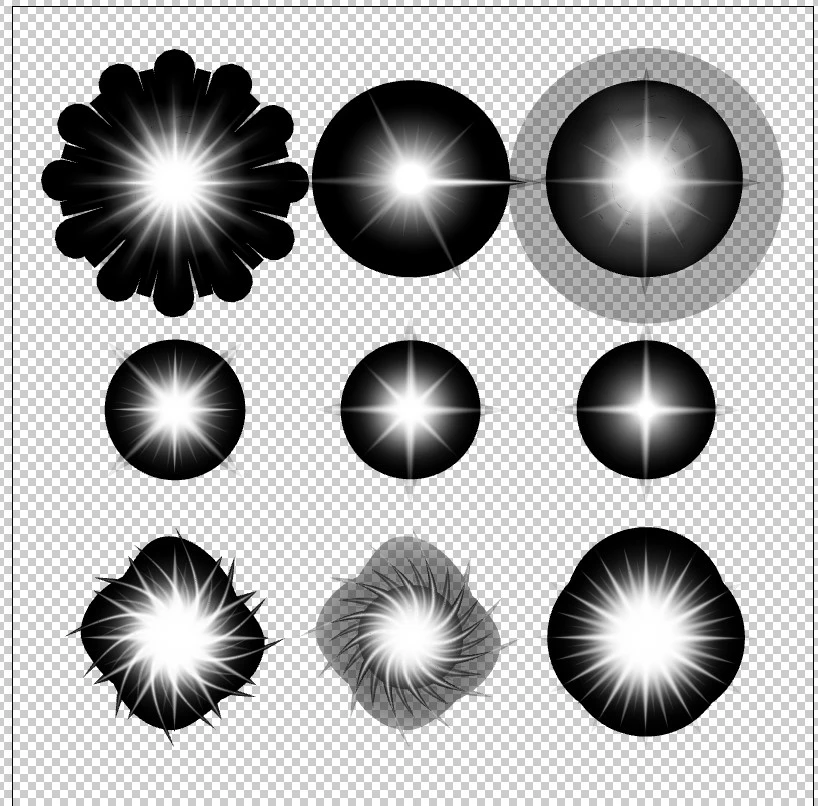
Thanks.

This topic has been closed for replies.
Correct answer Monika Gause


If it's not possible, how was this transparent png done?


It has just been painted in that color. 

But the files being discussed in this thread have been approached differently. 

If you want to start from scratch, you can totally do the second aproach, but you cannot switch approaches in the middle of a project. 

3 replies

rcraighead
Legend
June 27, 2019

Here's a video showing the process Monika has described.

yakirbuAuthor
Participant
June 27, 2019

Awesome! Thanks.

Monika Gause
Community Expert
Community Expert
June 27, 2019

Put a black background behind them and save that as any raster format, high resolution.

Then open in Photoshop and use it as an alpha channel:

1. Load the channel as a mask

2. Fill with white on a transparent layer

3. Export as PNG

Grant H
Community Expert
Community Expert
June 27, 2019

EPS does not support transparency... an ai EPS is a combination of an EPS and AI file (if that makes sense) so you would need to modify the objects first in AI and save as an AI file.

/G