Exit
  • Global community
    • Language:
      • Deutsch
      • English
      • Español
      • Français
      • Português
  • 日本語コミュニティ
  • 한국 커뮤니티
0

Saving 2021 to legacy?

Community Beginner ,
Jan 17, 2022 Jan 17, 2022

Simple question:

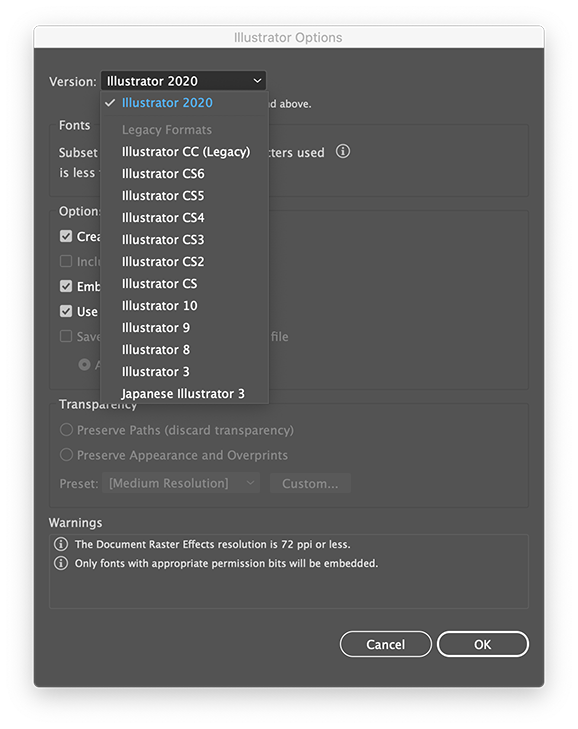
WHY is the save as Legacy missing in the Save, Save As or Eport options?

Is there a work around or fix for this?

TOPICS
Import and export
1.2K
Translate
Report
Community guidelines
Be kind and respectful, give credit to the original source of content, and search for duplicates before posting. Learn more
community guidelines

correct answers 1 Correct answer

Community Expert , Jan 18, 2022 Jan 18, 2022

Save as AI and choose the version in the options.

Translate
Adobe
Community Expert ,
Jan 17, 2022 Jan 17, 2022

Did you check the options?

Screenshot 2022-01-17 at 19.34.40.png

Translate
Report
Community guidelines
Be kind and respectful, give credit to the original source of content, and search for duplicates before posting. Learn more
community guidelines
Community Beginner ,
Jan 18, 2022 Jan 18, 2022

Where are you finding those options? You're on 2020, I'm on 2021 and I'll be hanged if I see any way in SAVE, SAVE AS or EXPORT. 

Translate
Report
Community guidelines
Be kind and respectful, give credit to the original source of content, and search for duplicates before posting. Learn more
community guidelines
Community Expert ,
Jan 18, 2022 Jan 18, 2022

There is only 2020. Just choose ai when saving,  click Save and choose the options.

Translate
Report
Community guidelines
Be kind and respectful, give credit to the original source of content, and search for duplicates before posting. Learn more
community guidelines
Community Expert ,
Jan 17, 2022 Jan 17, 2022

Save as and check the format. You have legacy as well.

Translate
Report
Community guidelines
Be kind and respectful, give credit to the original source of content, and search for duplicates before posting. Learn more
community guidelines
Community Beginner ,
Jan 18, 2022 Jan 18, 2022

I'm sorry, but there is no option to save Legacy under Save, Save As or Export in my copy AI 2021.

I'm not saying it's not buried somewhere but I'm not finding it.

A screen shot from 2021 showing it would be greatly appreciated.


Thank you.

Translate
Report
Community guidelines
Be kind and respectful, give credit to the original source of content, and search for duplicates before posting. Learn more
community guidelines
LEGEND ,
Jan 18, 2022 Jan 18, 2022

You clicked on the white arrow at the right side of the window and the option list doesn't reveal itself? 

Translate
Report
Community guidelines
Be kind and respectful, give credit to the original source of content, and search for duplicates before posting. Learn more
community guidelines
Community Beginner ,
Jan 18, 2022 Jan 18, 2022

This is my Save As options in 2021.


Screen Shot 2022-01-18 at 12.45.33 PM.png


Translate
Report
Community guidelines
Be kind and respectful, give credit to the original source of content, and search for duplicates before posting. Learn more
community guidelines
Community Expert ,
Jan 18, 2022 Jan 18, 2022

Save as AI and choose the version in the options.

Translate
Report
Community guidelines
Be kind and respectful, give credit to the original source of content, and search for duplicates before posting. Learn more
community guidelines
Community Beginner ,
Jan 18, 2022 Jan 18, 2022

Well, that's embarrassing.

Like me mum used to say "If it'd been a snake it'd bit ya'"

Thanks Ton.

Translate
Report
Community guidelines
Be kind and respectful, give credit to the original source of content, and search for duplicates before posting. Learn more
community guidelines
Participant ,
Apr 06, 2023 Apr 06, 2023
LATEST

Is there any way to automate that Legacy selection upon saving as AI, so it can't be missed by operator error?

Translate
Report
Community guidelines
Be kind and respectful, give credit to the original source of content, and search for duplicates before posting. Learn more
community guidelines