
Known Participant
June 23, 2011
Answered

Saving a PDF at a certain zoom level

  • June 23, 2011
  • 4 replies
  • 84771 views

I have an Illustrator file that I want to save at different zoom levels (100% & 200%). I have to save these out to PDF's but once I open them Acrobat opens them to a certain dimension. Is there a way to manipulate the zoom and save feature in the document of Illustrator without having my users do it in Acrobat?
    This topic has been closed for replies.
    Correct answer Larry G. Schneider

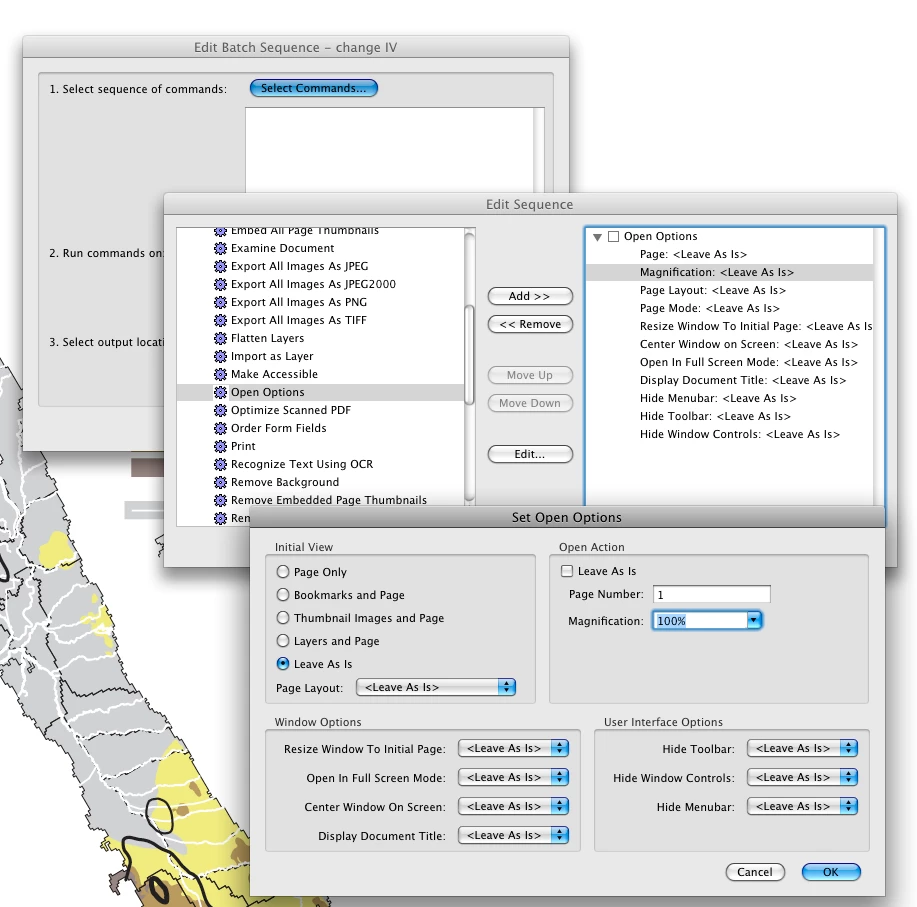
    Ahh OK thanks, I didn't know I had to do it in Acrobat. I'm trying to find an easy, automated way to do this so that some of my staff can do quickly and easily. No solutions inside of Illustrator that I can write a script or action?? Thanks again!


    You can do it with a Batch processing in Acrobat. In Acrobat 9 it would be from Advanced>Document Processing>Batch Processing as follows

    4 replies

    New Participant
    July 2, 2021

    I want to save entire pdf of 999pages in a certain zoom. 

    How Can i do it? 

    Known Participant
    July 12, 2011

    Is there a way to do this when you save from Illustrator. I have Illustrator but not Acrobat.

    Thanks if anyon can help.

    Larry G. Schneider
    Community Expert
    July 12, 2011

    Sorry, it's not in the PDF options on saving.

    mttorley
    New Participant
    March 18, 2021

    10 years later, still not a feature... Setting an initial magnification view from Illustrator PDF Export would be wonderful.

    Mylenium
    Brainiac
    June 23, 2011

    No. If that is critical, you explicitly must define an initial view in the PDF doc in Acrobat and save it again. However, since obeying it is a user setting in the prefs, there is no way you can force your users to view a specific zoom level. You are very much wasting your energy even going through the effort....

    Mylenium

    Larry G. Schneider
    Community Expert
    June 23, 2011

    You will have to set the initial view in Acrobat. Open the file in Acrobat and from the File>Properties>Initial View choose a zoom level (Magnification) that suits you. Then save the file. It will assume the new view.

    La_BestiaAuthor
    Known Participant
    June 23, 2011

    Keep in mind this is going to hit thousands of users is there a way I can do this type of thing inside illustrator rather than instructing my users: "Please do these steps" ? Thanks for your response.

    La_BestiaAuthor
    Known Participant
    June 23, 2011

    You need to do that before sending out the PDF. Once YOU set the initial view it will carry over when you send out the document.


    Ahh OK thanks, I didn't know I had to do it in Acrobat. I'm trying to find an easy, automated way to do this so that some of my staff can do quickly and easily. No solutions inside of Illustrator that I can write a script or action?? Thanks again!