

laurenh22769
Known Participant
March 21, 2017
Question

saving custom documents for continual use

  • March 21, 2017
  • 1 reply
  • 558 views

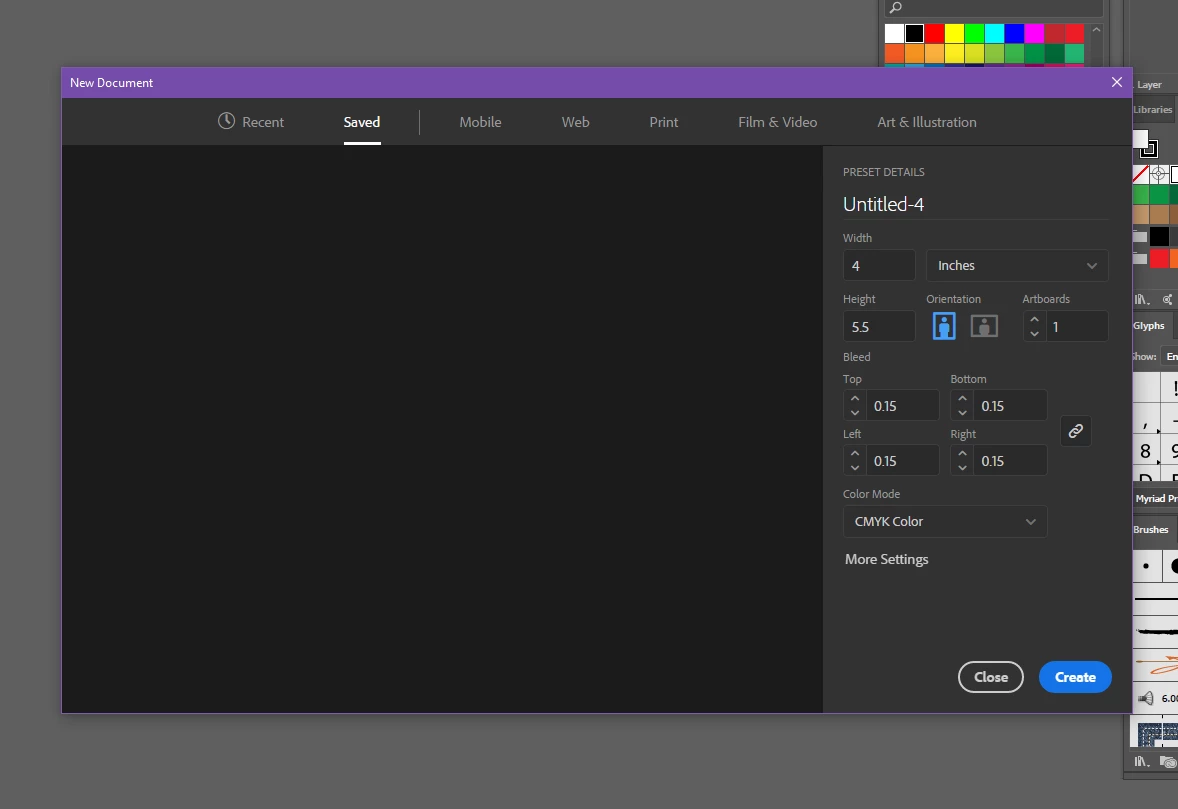
Hello...I am constantly using certain custom document sizes for printing. I need to save them so I'm not constantly trying to figure out which is which in the "recent" new doc section. Each has a different bleed margin depending on the printer but just lists the size w/o the bleed so it's a guessing game. I have not been able to figure out how to save them and have them visible in the dialogue box (see photo). I don't have the option to save that I can see. Any ideas? Or should I just save them all as templates?

Thank you!

Lauren
    This topic has been closed for replies.

    1 reply

    S_Gans
    Community Expert
    Community Expert
    March 22, 2017

    According to Adobe's notes, there should be a "save preset" button in this dialog - but I can't find one either (Create documents in Photoshop using templates and presets )

    I've already submitted a bug report at Feature Request/Bug Report Form  - I think the more of us who do so, the faster they may be to fix the problem...

    Adobe Community Expert / Adobe Certified Instructor
    Doug A Roberts
    Community Expert
    Community Expert
    March 22, 2017

    that's photoshop. the dialogue doesn't work like that in Illustrator. i wouldn't use document presets at all with the new window, it's buggy.

    S_Gans
    Community Expert
    Community Expert
    March 22, 2017

    You're right - I just noticed that it was a Photoshop referenced link. Sorry.

    I still think that it'd be a great feature to have in Illustrator, if you're always using the same setup. Perhaps I'll put it in as a feature request, instead of my previous bug report.

    Adobe Community Expert / Adobe Certified Instructor