
maddisonarnel
Participant
April 16, 2021
Question

Scaling for isometric design

  • April 16, 2021
  • 1 reply
  • 732 views

Hi all, 

It is my first time doing isometric design and I have been following a LinkedIn Learning tutorial 

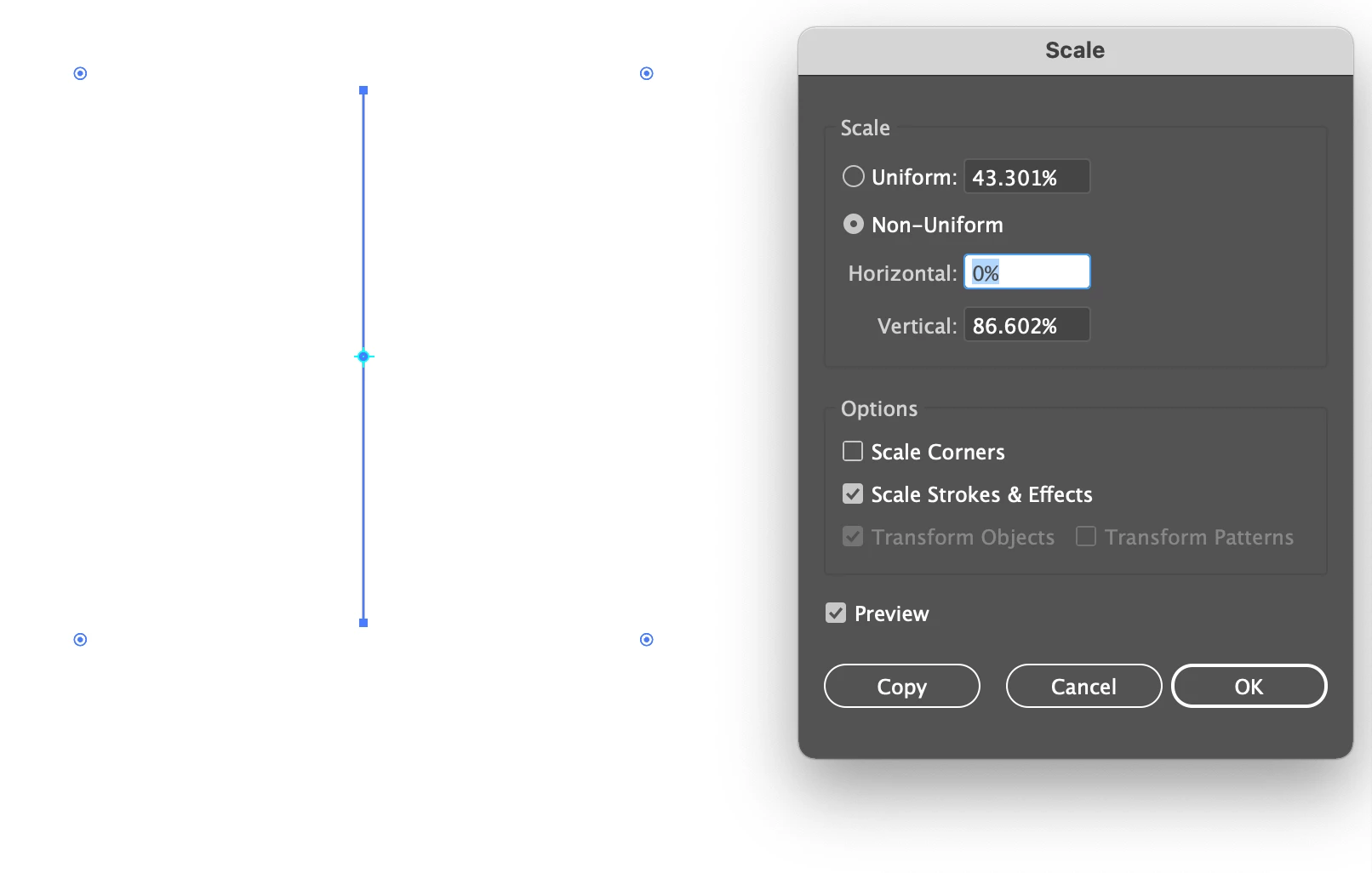
When I came to scale my shape to make the side of the box, I have found that my settings or something might be off because it doesn't scale right, I have also tried this with the grid and it does the same thing!

Can anyone help me fix it, please!


Also any tips on how I would create isometric road blocks and cones would be hugely appreaciated 
 

This topic has been closed for replies.

1 reply

Doug A Roberts
Community Expert
Community Expert
April 16, 2021

In that screenshot you have scaled the object to 0% horizontally, resulting in zero width. I think you intended to put the 43.301 in the 'horizontal' field rather than the 'uniform' field.

maddisonarnel
Participant
April 16, 2021

Thanks for that I actually added the wrong screenshot. This is what I meant. The top screenshot is my Illustrator and the bottom is the screenshot I'm following

The 

maddisonarnel
Participant
April 16, 2021

I just figured it out! I went Object- Scale rather than the scale tool and that worked for some reason 

Thanks though!