Answered
Scissors Greyed Out
I have exhausted all suggestions on finding out why the Scissors tool is greyed out. Any help is appreciated.
Windows 11

I have exhausted all suggestions on finding out why the Scissors tool is greyed out. Any help is appreciated.
Windows 11
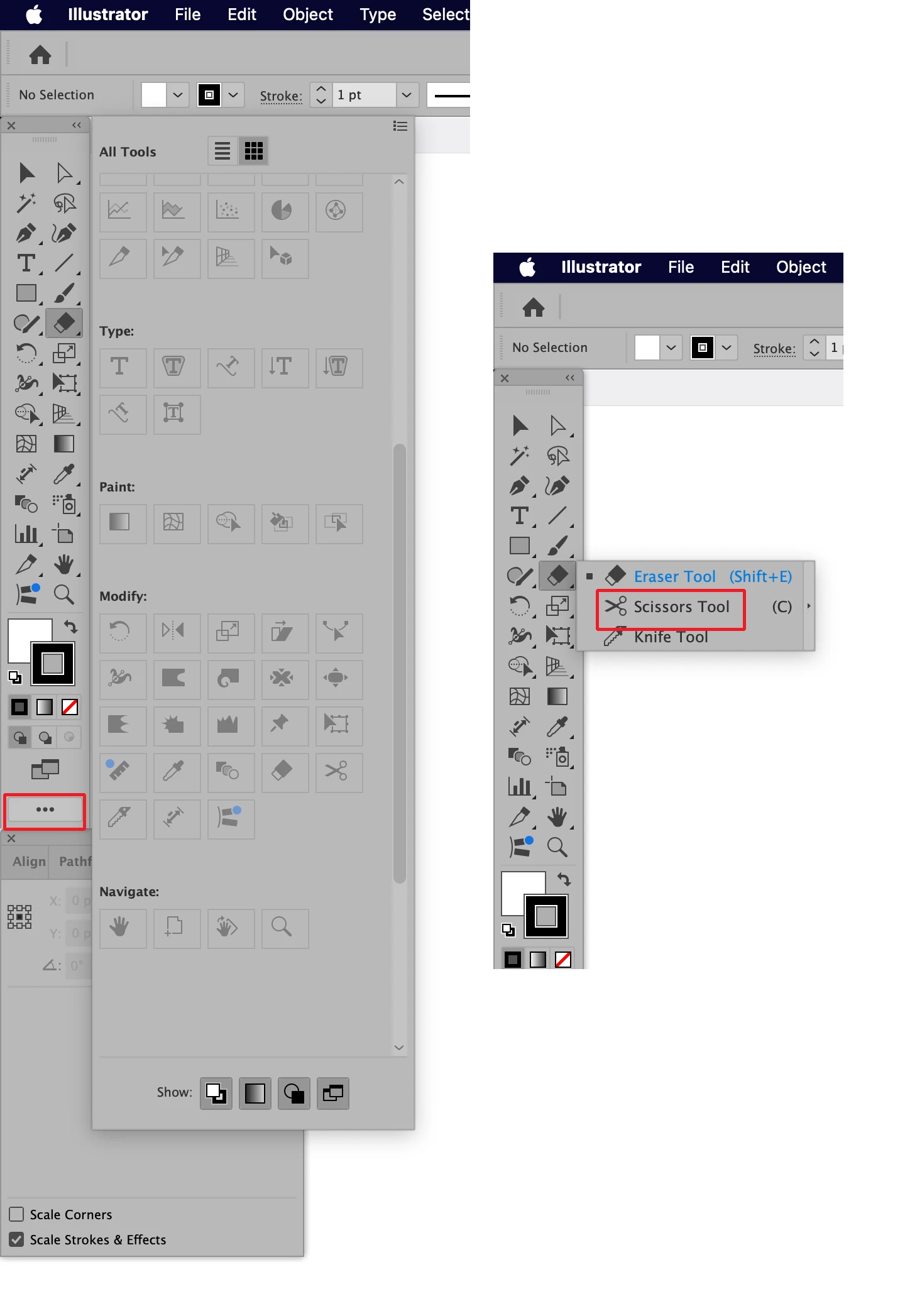
Are you trying to add the Scissors Tool to the Tool Panel using the Edit Tools function accessible by clicking on the three horizontal dots at the bottom of the Tool Panel? As shown in the left picture below all of the tools that are already in use are greyed out there. These greyed out tools are actually already in the Tool Panel. The ones that are not showing in the Tool Panel by default are grouped with other similarly functioned tools. In this case the Scissors tool is part of the group that is showing the Eraser tool. Click and hold the dot in the lower right corner of the Eraser tool icon and the pop-up menu will appear allowing you access to the Scissors Tool.
Already have an account? Login
Enter your E-mail address. We'll send you an e-mail with instructions to reset your password.
 AdChoices