Participant
November 23, 2024
Answered

Screen opacity doesn't work

  • November 23, 2024
  • 4 replies
  • 640 views

Hi, 

I'm trying to create light with screen opacity, but it doesn't seem to work:
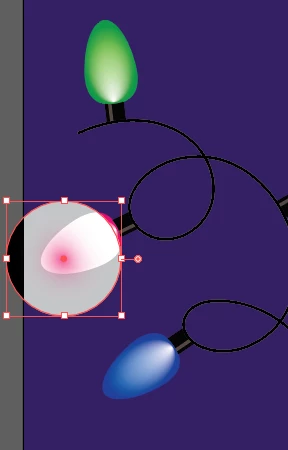
 

It should look like this:
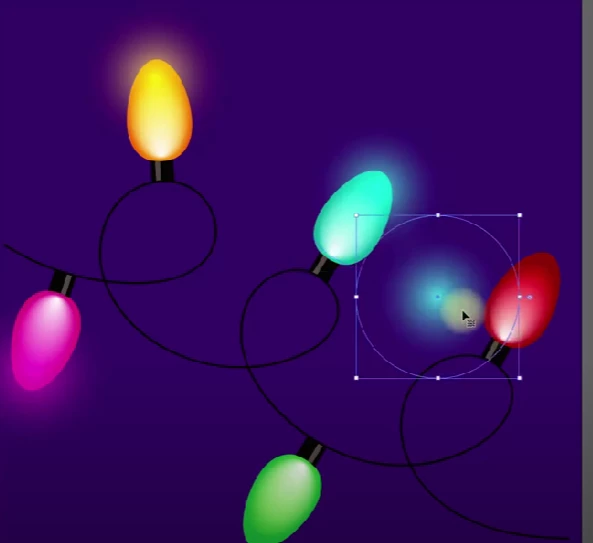
Could someone help me with this? Thank you.

This topic has been closed for replies.
Correct answer Monika Gause

It will only work in RGB document color mode.

4 replies

Participant
December 23, 2024

Thank for all the answers. I made it in RGB mode and it worked. 🙂

_scott__
Legend
November 24, 2024

I just tend to avoid all blend modes other than Multiply and Darken. Blend modes, really just change colors, that's all - sure they can be a quick, easy, way to change colors, especially for multiple objects - nonetheless, that's all they do.


You can create the same effect in CMYK file by merely using a color to transparent gradient with a "Normal" blend mode, rather than a white to transparent gradient set to "Screen".

Ton Frederiks
Community Expert
Community Expert
November 23, 2024

You could try if this works for you:

Create the objects with the screen effect in an RGB document.

Select them together with the background and choose: Object > Flatten Transparency with a High Ressolution preset.

Copy and paste the result in a CMYK document.

It may be useful to keep an unflattened copy of the RGB version, the flattened one will be partially uneditable.

Monika Gause
Community Expert
Community Expert
November 23, 2024

I would just rasterize it. There will be a huge amount of pixels in it anyway.

Ton Frederiks
Community Expert
Community Expert
November 23, 2024

That could be another option, as long as you keep a non-rasterized version as backup for eventual edits.

Monika Gause
Community Expert
Monika GauseCommunity ExpertCorrect answer
Community Expert
November 23, 2024

It will only work in RGB document color mode.

Participant
November 23, 2024

Aah ok, thank you for your help. 🙂