


- Home
- Illustrator
- Discussions
- Re: Screen printing & controlling size of dot patt...
- Re: Screen printing & controlling size of dot patt...
Screen printing & controlling size of dot pattern in gradient halftones gradien

Copy link to clipboard
Copied
I'm using A Mac OS 10.6.8, and Illustrator CS5.
I do garment screen printing.
In my designs I use a gradient, which needs to have the halftone dots controlled, and a certain size, to expose properly on my screens to then print.
I can't seem to figure out how to adjust the frequency or LPI, and the angle so that they work. It still prints out as a seen on screen
Thanks ahaead of time for your reply.
[ signature removed by forum host ]



Explore related tutorials & articles
 15
Replies
15
15
Replies
15



Copy link to clipboard
Copied
Did you try effect>pixelate>color halftone?
[ signature removed by forum host - advertising is not permitted ]


Copy link to clipboard
Copied
You can only do this when printing the file.
If you need to set the resolution in the bojects, you might try the halftone effect in the plug-in Phantasm CS
Copy link to clipboard
Copied
Thanks to both.
Michael,
Doing it that way leaves the dots pixelated, not sharp enuff to expose to my screen.
Monika,
I did purchase and have used Astute Graphics Phantasm CS, and that is my work around.
In Freehand I could set the Frequency (LPI) to 32, and the Angle at 12 degrees, and I was done.
I sincerely wish Adobe would have or will, take the best of Freehand and put it into Illustrator. How would they know what the 'best' is? Ask their user community with messages posted in Subject: Freehand users. Then elaborate.
1 or 2 clicks in Freehand that take me 4 and up in Illustrator.
So as not to sour this, I do very much appreciate the prompt response from Adobe via Michael, and you Monika.
[ signature removed by forum host ]
Copy link to clipboard
Copied
Hi Mick
Just 2 things,
1. neither Monika nor I represent Adobe, we're both just private citizens like you. Happy to help.
2. You can increase the resolution of Illustrator's halftone screen effect to whatever you desire. Admittedly that is not obvious, but since the halftone screen effect is a raster effect, you can go into the Effect>Document Raster Effects Settings and change the resolution that Illustrator will use to draw all of its borrowed raster effects. Bump it up to smooth out the look.
I don't know if that would have saved you any money, but maybe it will help the next person who reads this.
[ signature removed by forum host - advertising is not permitted ]

Copy link to clipboard
Copied
This might help - Open AI file in Photoshop, convert to grayscale, then convert to bitmap - Image / Mode / Bitmap. Under Method, choose Halftone Screen. Choose Frequency (Lines/Inch), Angle, and Shape.

Copy link to clipboard
Copied
Brilliant. Thanks
Screen printing & controlling size of dot pattern in gradient halftones gradien
I've been searching for ages in Photoshop for this.
nonnoumenon wrote:
This might help - Open AI file in Photoshop, convert to grayscale, then convert to bitmap - Image / Mode / Bitmap. Under Method, choose Halftone Screen. Choose Frequency (Lines/Inch), Angle, and Shape.
I have two further questions to add.
1. How do I set DPI when creating a grayscale image, as above. Or anywhere for that matter in Photoshop CS6 or CC.
2. Is there an Adobe Tutorial - I can't find one - on CMYK + Halftone for Screen Printing. I'm kind of making it up as I go along.

Copy link to clipboard
Copied
Go to image size and change the dpi there.
CMYK Separations for Process Printing in Photoshop - YouTube

Copy link to clipboard
Copied

Copy link to clipboard
Copied
In Freehand I could....
Correct. FreeHand provides for object-level halftone settings; an invaluable feature for screen printing, flexography, sign printing, and more.
Illustrator merely provides for halftone control at the printing separation level.
Just one of many practical things which FreeHand has always done better than Illustrator.
JET

Copy link to clipboard
Copied
Hi everybody,
I recently purchased Phantasm CS.
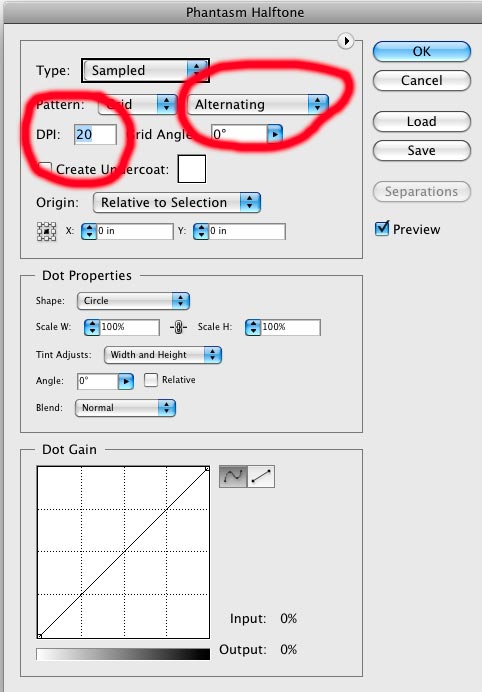
I am creating artwork using spot colors to be used for screen printing. I would like to use some of the colors at varying opacity levels, rather than use additional colors, the latter of which would increase the printing cost. I have read about lpi, but I'm not sure how the dpi setting within Phantasm will effect the final output. For example, when I create 4 different opacity levels of the same color, say 100%, 75%, 50% and 25%, as I increase the dpi the size of the halftone dots get smaller, which renders a more pleasant result on the screeen, but how will this efffect the printed version on the garment? Is this setting important or will the company printing the artwork override this setting when preparing the file for screen printing? As far as pattern is concerned, is regular or alternating better?
Thanks for whatever help you can provide. I'm just trying to understand the process the best I can before doing the artwork, I don't want to have to do it two or three times.
Thanks.
Mark
Copy link to clipboard
Copied
I would like to use some of the colors at varying opacity levels, rather than use additional colors, the latter of which would increase the printing cost.
No, you would like to use some of the colors at varying tints, not opacity levels.
...as I increase the dpi the size of the halftone dots get smaller...
Then you're increasing the LPI; the lines per inch.
...but how will this efffect the printed version on the garment?
The smaller the halftone dots (i.e.; the higher the LPI), the finer the screen fabric and the more controlled the process that will be needed in order to hold the smaller dots.
It's a mechanical process, and is subject to common sense. Your halftone dots will be holes in an emulsion film that is adhered to the printing screen fabric. If the thread count of the fabric is too course, it can't support a fine emulsion pattern, and you'll get plugging in higher tint regions and washout in lower tint regions.
"More controlled" means more repeatable; less subject to variation. For example, even using a high thread-count stainless steel screen, if the squeegee is being pulled by human hands, the pressure/speed will vary; whereas they are controllable and consistent if the squeegee is being pulled by a mechanical automation.
So bottom line is: You always need to know the capabilities of the particular screen printing shop you will be using. Ask them what is the maximum halftone LPI they can reliably hold.
...will the company printing the artwork override this setting when preparing the file for screen printing?
If the dots are being generated by a plug-in as actual paths, and visible on screen in Illustrator, then that's doubtful. The shop would have to be using the same plug-in you are; and that's assuming its results are even editable after being applied (i.e.; they are applied as a live effect). I don't know anything about the plug-in you mention. I avoid dependency upon third party plug-ins like the plague.
As far as pattern is concerned, is regular or alternating better?
Don't know what that means.
JET
Copy link to clipboard
Copied
Hi Jet,
Thanks for the response.
I'm attaching two pics, the first shows the dialog box that appears when using the Illustrator plug-in. It's from Astute Graphics and is called Phantasm CS. As you can see, you have the option of setting the DPI and Pattern. Honestly, you should take a look at their plug-ins, they're amazing!
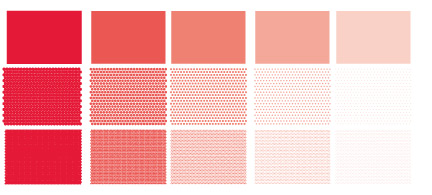
The second pic illustrates how the plug-in works. Using Pantone 186C, the top row has the tints set to 100%, 80%, 60%, 40% and 20%. The results in the second row are when I have the DPI set to 20, and in the third row the DPI is set to 50. As you can see, the dot size is much smaller as the DPI is increased. Once converted into halftone dots, just select > expand appearance, and dots become fully editable paths, so I can change the color, tint, etc.
So, I'm just trying to figure out the best way to approach this. I could always just prepare the artwork using a variety of different tints and let them handle it the best way they see fit, or I can create the halftones myself using this plugin, but if I do that I would prefer to know how to set the DPI and Pattern to acheive the best results.
If, based on what I've shown, could tell me exactly what to ask the printer that would also help, at least this way I could present the question(s) properly ensuring an adequate response.
Thanks so much for your time and effort.
Kind regards,
Mark
Copy link to clipboard
Copied
Hey Jet,
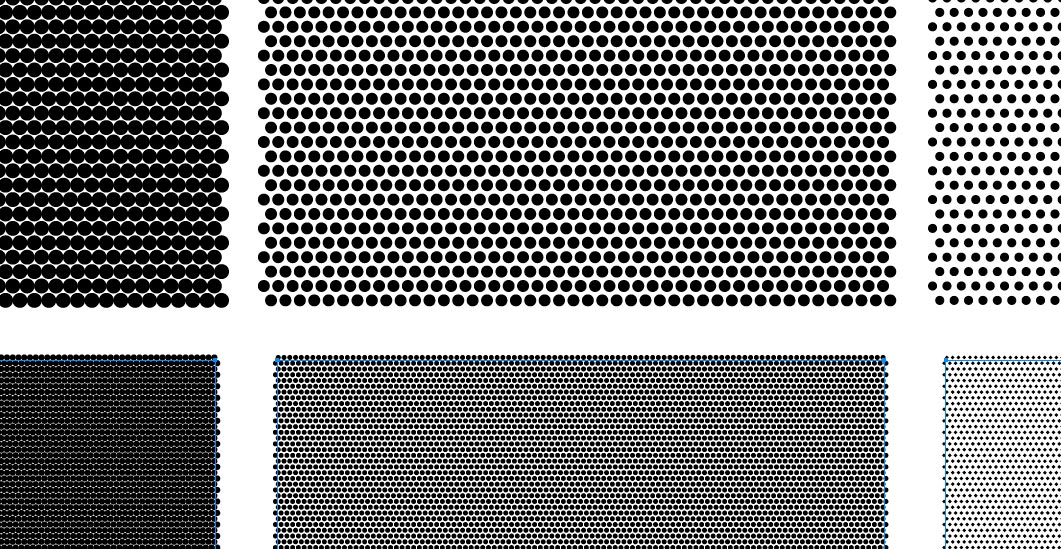
In case this image is too small and you can't see what I'm referring to, here's a snapshot of the same but in B&W. The top row was at a DPI of 20 and the bottom row @50 DPI.
Thanks.
Mark
Copy link to clipboard
Copied
Mark,
I answered your questions in my previous post.
As you can see, the dot size is much smaller as the DPI is increased.
Of course. As I explained, the higher the halftone frequency (the standard term for which is Lines Per Inch, not Dots Per Inch); the more halftone dots per measure; therefore the smaller the dots.
Once converted into halftone dots, just select > expand appearance...
As I explained in response to your question about the screen printer being able to edit the "halftone" settings: If the plug-in applies a live effect, the printing house would have to have the same plug-in to alter the effect settings. (He'd also have to have a sufficient proficiency in Illustrator, which you cannot assume.) If you expand the effect, it's then "nailed down" as non-live paths and the printer will not be able to change the LPI.
Honestly, you should take a look at their plug-ins, they're amazing!
It's not that amazing. I have my own scripts which do pretty much the same kind of faux halftone.
This is not actual halftoning. In a real halftone, the dots change shape as they cover more area. Look at a printed grayscale ramp with a loup and you'll see that as the tones cross the 50% range, they "morph" from black dots on a white field into white dots on a black field; they don't just become larger and larger black dots choking out the white areas.
Nor is this the same thing at all as a drawing program properly providing object-level halftone settings, as does FreeHand. FreeHand lets you assign actual PostScript halftone settings at the object level. The printer's RIP builds the halftone as true halftones at print time. For example, in FreeHand, you can set an object to print as a line halftone pattern at 30 LPI, and another object to print as a diamond halftone pattern at 50 LPI. Both halftones are applied by the printer, not by actually drawing a kazillion tiny paths in the FreeHand document. This is just one of those areas in which Illustrator is still decades-deficient in providing valuable functionality.
So, I'm just trying to figure out the best way to approach this.
Again: Assuming your concern is just to be able to print a halftone ruling that the printing house can hold, you need to find out from the printing house what that halftone ruling is. Just saying it's screen printing is not enough. Screen printing shops run the gamut from small mom & pop shops using an almost entirely manual process to high end large outfits running very large, elaborate, and expensive equipment--and everything in between.
As a general rule, halftoning really doesn't look very good on garments anyway--especially when done by small-to-medium shops--because of the course halftone rulings required. Talented and innovative screen-centric designers and screen print houses avoid actual halftones and actual process color, and instead utilize clever hatching or stippling techniques in the artwork, often involving multiple additional inks (several greens, for example). The result is vibrant, brilliant color, because it's really rendered as posterized solid line art. Next time you're at any mainstream department store, take a look at the most brilliant T-shirt pictorials--the ones of dinosaurs and colorful fantasy images. Study them up close and you'll see they are not ordinary process or ordinary halftoning.
If I were using Illustrator for something destined for T-shirt printing, and using tint screens not intended as a special effect, but just as an attempt to minimize ink count by overprinting a small set of opaque spot inks in a process kind of way, I would simply set the halftone settings for the ink at the document level at print time--which is all Illustrator can do.
...tell me exactly what to ask the printer...
Again: Ask the printer what is the highest halftone screen ruling he can reliably and consistently hold. Then it's up to you whether that's good enough for your satisfaction, or if you need to find a more capable screen printing shop, or whether you need to redo the artwork using a lineart method for suggesting tones.
JET
Copy link to clipboard
Copied
Fun Seeker wrote:
If, based on what I've shown, could tell me exactly what to ask the printer that would also help, at least this way I could present the question(s) properly ensuring an adequate response.
Why not just ask them for advice on your specific design. Show them and ask them how it could be done. They know their possbilities best, most of them are creative in the use of material and techniques and most are also eager to do a good job they are proud to show off to others.


Find more inspiration, events, and resources on the new Adobe Community
Explore Now
 AdChoices