
Inspiring
January 19, 2023
Question

Script Currently Unavailable Error

  • January 19, 2023
  • 2 replies
  • 860 views

Hello,

For the past several weeks I have randomly gotten an error that reads,
"The object "[script name]" is not currently available."
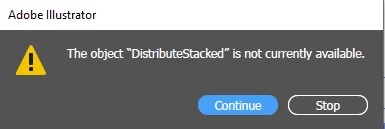

I am calling my scripts via a function key set up in my Actions Panel.  It just randomly happens and with different scripts.  Has anyone else had this issue or even better fixed this issue?

This topic has been closed for replies.

2 replies

Monika Gause
Community Expert
Community Expert
February 2, 2023

Could it be that you didn't create the document in a way that the script works? For some scripts you need to select something. And then it might also be something very speific. Such as: are your objects grouped? Which might be wrong.

Inspiring
February 2, 2023

@Monika Gause I had thought of that too... but that wasn't the case.  The scripts will give me the error then I hit the function key again and it works.

Met1
Legend
February 2, 2023

Are the location of your script(s) known to your action(s)?

Inspiring
February 2, 2023

@Met1I have them all saved here: C:\Program Files\Adobe\Adobe Illustrator 2023\Presets\en_US\Scripts
So they should be because I can call them up manually by going to File - Scripts

Met1
Legend
February 2, 2023

Did you just update recently? OS or Illy.