I can't get over the fact that using adobe products today is many times more annoying than using adobe products 10 years ago. It's been building up and in a way I feel bad because I rarely complain about things, but for 3+ years straight, using photoshop has been more and more of a pain in the a**.
Sincerely, at this point, I can't wait for the software that will dethrone this bloated piece of software that we depend on so much.
I can't get over the fact that using adobe products today is many times more annoying than using adobe products 10 years ago. It's been building up and in a way I feel bad because I rarely complain about things, but for 3+ years straight, using photoshop has been more and more of a pain in the a**.
This is the Illustrator forum. If you have issues with Photoshop, then please describe them in the Photoshop forum and someone might be able to help you.
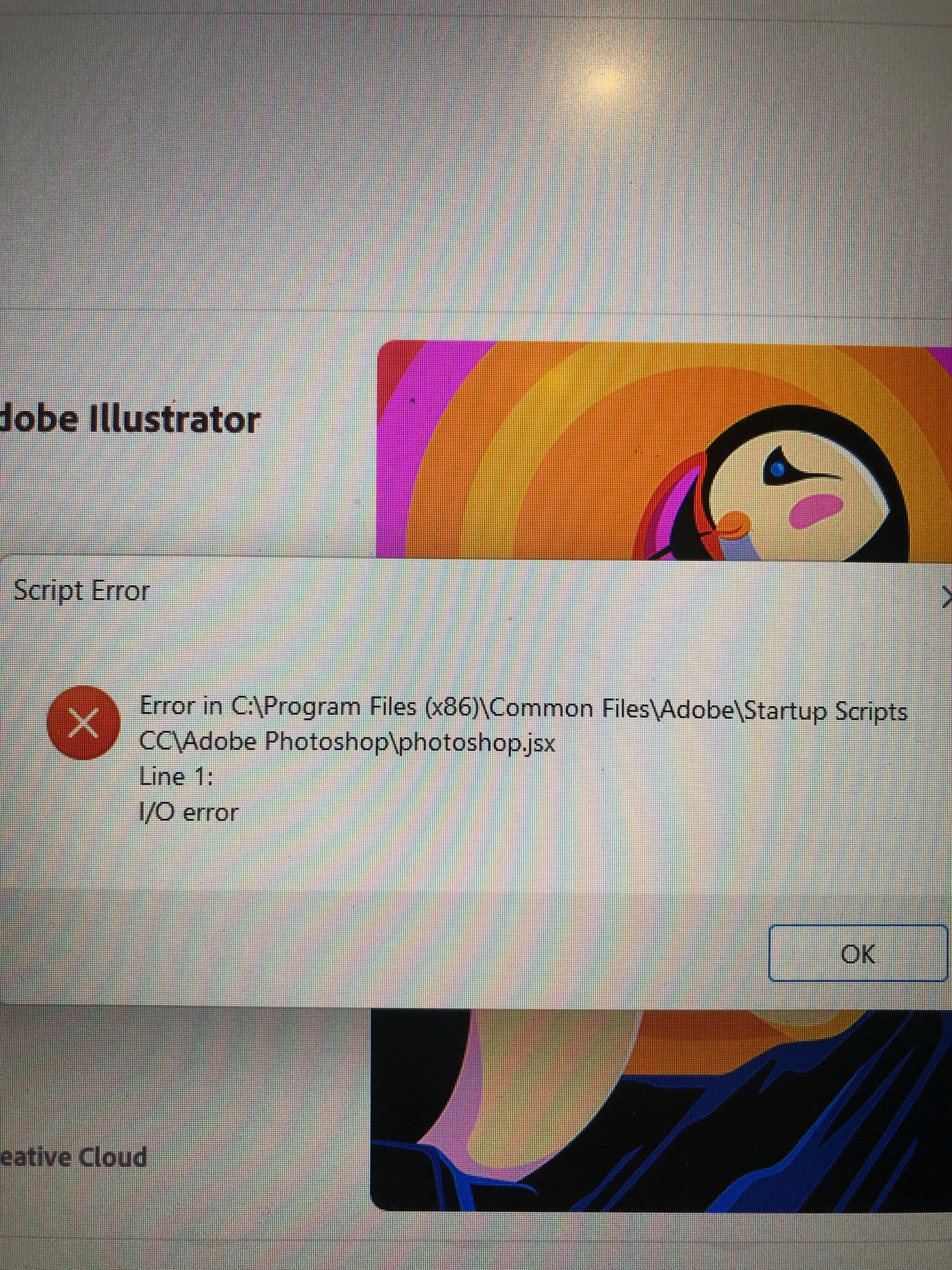
I'm sorry to hear that you're encountering a script error in Illustrator.
To troubleshoot this problem, I recommend trying the following steps:
Close Illustrator and other Adobe apps and, navigate to the "Startup Script CC" folder & delete it. This folder is located in the following directories:
C:\Program Files (x86)\Common Files\Adobe
C:\Program Files\Common Files\Adobe
Restart Illustrator and see if the error still persists. If the error no longer occurs, it's possible that the issue was resolved by deleting the folder.
I hope this helps, and please let me know if you have any other questions or concerns.
It's really frustrating that we're unable to use this platform that we're paying good money for. I think you really need to relook at the service support being provided.
So many users are living with this problem everyday and a solution hasn't been provided despite it being a bug for nearly 3 months now!
I'm sorry to hear that you're still experiencing the script error in Illustrator despite trying the previous steps. In this case, I recommend deleting the "Startup Script CC" folder from the following locations:
C:\Program Files (x86)\Common Files\Adobe
C:\Program Files\Common Files\Adobe
Deleting this folder can help resolve any issues related to scripts. After deleting the folder, please restart Illustrator and check if the error persists.
If you continue to encounter the same error or need further assistance, please update the discussion. We'll be glad to continue helping you troubleshoot the issue.
My Illustrator is doing the exact same thing, also with Photoshop.jsx I/O error. Started around mid-April 2022 and I've tried reinstalling Illustrator but to no avail.
We are sorry for the trouble. We are having debug sessions for this issue with the product team as we are unable to replicate the issue on our end. Would it be possible for you to have a debug session with us? If yes, please share your Adobe email ID, Phone number with country code, preferred time & day for the meeting, your timezone, and country & state you live in over the DM only.
However, if you don't want to do a debug session, you may try the following steps, which have worked for others:
1. Update Windows OS
2. Delete or move the "Startup Scripts CC" folder from the following location to the desktop:
Hi, I'm also having the same issue and it is preventing me from being able to use the asset exporter.
I did not write the photoshop.jsx script or install it from another source, and in the script it contains an adobe copywrite.
I'd be happy to help you try to replicate this issue, but I will be deleting this folder first as I have timelines that this issue is holding me up on.
We are sorry for the trouble. I would like to know if you are still facing the issue or not? If yes, I would request you to share a few details like:
The exact version of OS and its built number
The exact version of Illustrator
When did this start happening? Are there any recent changes made to your system? For example, any antivirus, system updates, plugins, or web extensions installed recently.
Would it be possible for you to compress the Startup Script folder in theZip filefrom the location mentioned in error and upload it to Creative Cloud/ Dropbox or any other similar service and share the download link here with us?
Also, when does this error pop up while launching the app or while using the app? Does the app close/ crash or start not responding after clicking on the "Ok" button?
We are here to help. We just need more information.
Seeing as you're not explaining anything, are you saying that when you start Illustrator the file photoshop.jsx tries to run? As you can see from your photo, the file photoshop.jsx is in a Photoshop directory - I have one in exactly the same place. If you open it in a text app is the first line "#target photoshop"?
We would need to see the script to know exactly what's going on. But based on what information i have in front of me, I suspect the startup script is attempting to access an active document (of which there is none during startup). Either that or it's trying to access some other object or property that is not yet defined.
edit to add that if you're trying to use a photoshop script in illustrator, you may run into issues. Some stuff is cross compaitible between Illustrator and Photoshop. But in general, scripts are built for one specific application.
What is your script "photoshop.jsx" supposed to do?

 AdChoices