
Participant
January 4, 2022
Answered

Script error starting Illustrator

  • January 4, 2022
  • 3 replies
  • 2454 views

Hi, I hope somebody can help me.


Everytime I start Illustrator (26.0.2) I get this error window:
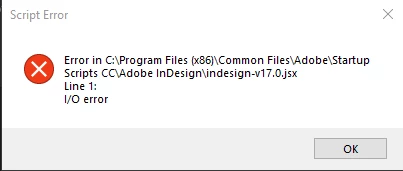
 

It appears again when I open a file.


The real problem comes when i tried to export via "export for screens" sometimes it says that is unable to export, I have to try several times until it finally let me export the images.


I call to the adobe support and recommended to use the adobe creative cloud cleaner tool. I reinstalled the whole CC suite but I have still the problem.


I reinstalled the 25.4.1 version of Illustrator version and works ok.


I work with and Intel Core i9 10th gen as CPU and an Nvidia P620 as GPU running over windows 10. All tdrivers updated.

Correct answer Everest Outfi34447283wnb6

Hi @sara2373309090hr,


Sorry for the trouble. Please try removing the "Startup Scripts CC" folder from the following location to resolve the issue:

C:\Program Files (x86)\Common Files\Adobe
C:\Program Files\Common Files\Adobe


Kindly update the discussion if you still need assistance with it. We'd be happy to help.


Thanks & Regards,

Anshul Saini


I got the same problem on my Illustrator, and when I delete the file from Program File(86) and move it to the desktop, it works, I don't have to delete the files from both just from the (86) one. 

3 replies

Participant
May 25, 2022

I still have the same problem. I have reinstalled the program many times, including reinstalling the whole Adobe Creative Suite. it brings up a Script/i/O error and then also does not allow me to export PNG. Can someone help, please? It's really frustrating for a paid service.

Anshul_Saini
Community Manager
Community Manager
May 25, 2022

Hi @Adetayo23659882f5pe,


We are sorry for the trouble. Currently, the product team is investigating this issue. Also, recently we had a debug session with a couple of users, and deleting the Startup Scripts CC folder or moving them to Desktop worked for them.

Please move the "Startup Scripts CC" folder to the Desktop or delete it from the following locations:

C:\Program Files (x86)\Common Files\Adobe
C:\Program Files\Common Files\Adobe


Let me know if it works for you.

I will be looking forward to your response.


Thanks & Regards,

Anshul Saini

Participant
May 27, 2022

Is there a solution to the problem because my work was interrupted because of it?

Anshul_Saini
Community Manager
Community Manager
March 24, 2022

Hi @Jose Bernal,


We are sorry for the trouble. I would like to know if you are still facing the issue or not? If yes, I would request you to share a few details like:

  • The exact version of OS and its built number
  • The exact version of Illustrator
  • When did this start happening? Are there any recent changes made to your system? For example, any antivirus, system updates, plugins, or web extensions installed recently.
  • Would it be possible for you to compress the Startup Script folder in the Zip file from the location mentioned in error and upload it to Creative Cloud/ Dropbox or any other similar service and share the download link here with us?


Also, when does this error pop up while launching the app or while using the app? Does the app close/ crash or start not responding after clicking on the "Ok" button?


We are here to help. We just need more information.


Thanks & Regards,

Anshul Saini

Charu Rajput
Community Expert
Community Expert
January 5, 2022

Hi,

The screen shot error says that there is some error in the Indesign Script.

Could you please try the following scripts.


1. Reinstall the Indesign. (if alreday installed)

2. Move the indesign-v17.0.jsx script at another location from the existsing location.

3. Try to clean prefrences both for Indesigna nd Illustartor.


Let us know if any of the above helps you.


Best regards