

Exit
  • Global community
    • Language:
      • Deutsch
      • English
      • Español
      • Français
      • Português
  • 日本語コミュニティ
  • 한국 커뮤니티
0

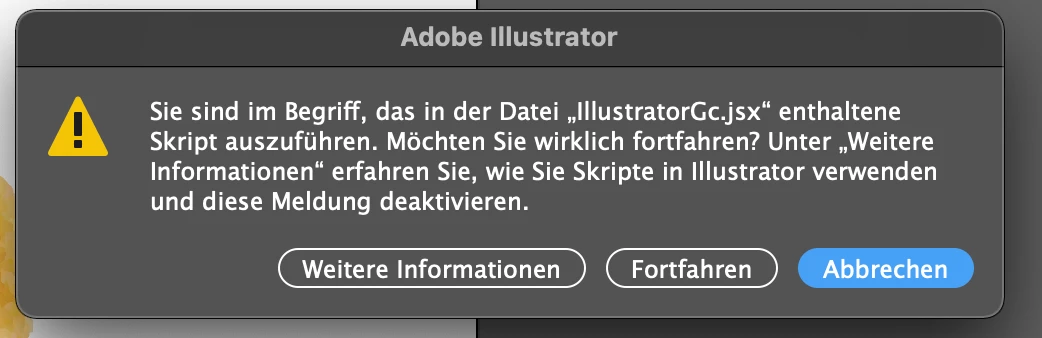
Script Error

New Here ,
Oct 05, 2021 Oct 05, 2021

Can anybody help me to get this permanently removed? 


I tried everything, nothing worked. Don#t even know where these came from.
 

Bildschirmfoto 2021-10-05 um 20.26.47.png


TOPICS
Bug , Performance , Tools
132
Translate
Report
Community guidelines
Be kind and respectful, give credit to the original source of content, and search for duplicates before posting. Learn more
community guidelines
Adobe
Community Expert ,
Oct 05, 2021 Oct 05, 2021
LATEST

As per the investigation done by Adobe this is due to some software issues with Logitech options app or Webcam. The permanent fix for this issue seems to be under works. In the meanwhile you can try a workaround shared by Adobe, see the instructions at the link below

https://community.adobe.com/t5/illustrator-discussions/illustratorgc-jsx-script-error-while-launchin...

Also do try updating your Logitech options app if there is an update. Details in the link below

https://helpx.adobe.com/illustrator/kb/fix-scripting-error.html

If none of the above works then contact support for troubleshooting on your machine.

-Manan

Translate
Report
Community guidelines
Be kind and respectful, give credit to the original source of content, and search for duplicates before posting. Learn more
community guidelines
