
Inspiring
May 10, 2024
Answered

script to pathitem convert to rectangle and expand appearance

  • May 10, 2024
  • 1 reply
  • 559 views

Hi there,


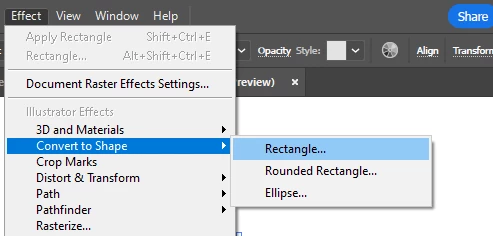
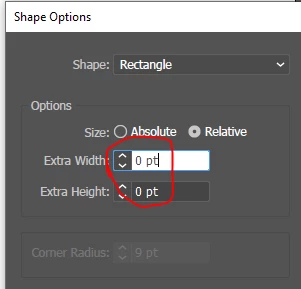
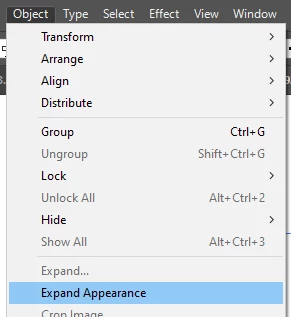
how to write script to below three steps for pathitem ,  thanks


pathitem .CONVERT_TO_RECTANGLE;

script to step2 and step3

artb.add(pathitem.geometricBounds);


step1,
step2
step3


This topic has been closed for replies.
Correct answer pixxxelschubser
  1. What ist your Illustrator version?
  2.  Why so complicated?


Please try it with a newer version (open document and one pathItem required)

var aDoc = app.activeDocument;
var pItBds = aDoc.pathItems[0].geometricBounds;

aDoc.artboards.add ([ pItBds[0], pItBds[1], pItBds[0]+(pItBds[2]-pItBds[0]), pItBds[1]+(pItBds[3]-pItBds[1]) ])


Does that makes sense for you?


1 reply

pixxxelschubser
Community Expert
pixxxelschubserCommunity ExpertCorrect answer
Community Expert
May 10, 2024
  1. What ist your Illustrator version?
  2.  Why so complicated?


Please try it with a newer version (open document and one pathItem required)

var aDoc = app.activeDocument;
var pItBds = aDoc.pathItems[0].geometricBounds;

aDoc.artboards.add ([ pItBds[0], pItBds[1], pItBds[0]+(pItBds[2]-pItBds[0]), pItBds[1]+(pItBds[3]-pItBds[1]) ])


Does that makes sense for you?


rui huangAuthor
Inspiring
May 12, 2024

You've been a great help. Thank you for sharing your knowledge and solving my problem.

pixxxelschubser
Community Expert
Community Expert
May 13, 2024

You're welcome.