Known Participant
February 1, 2022
Answered

Script to Toggle Group Visibility by Name (All Layers)

  • February 1, 2022
  • 1 reply
  • 2114 views

Hello everyone,


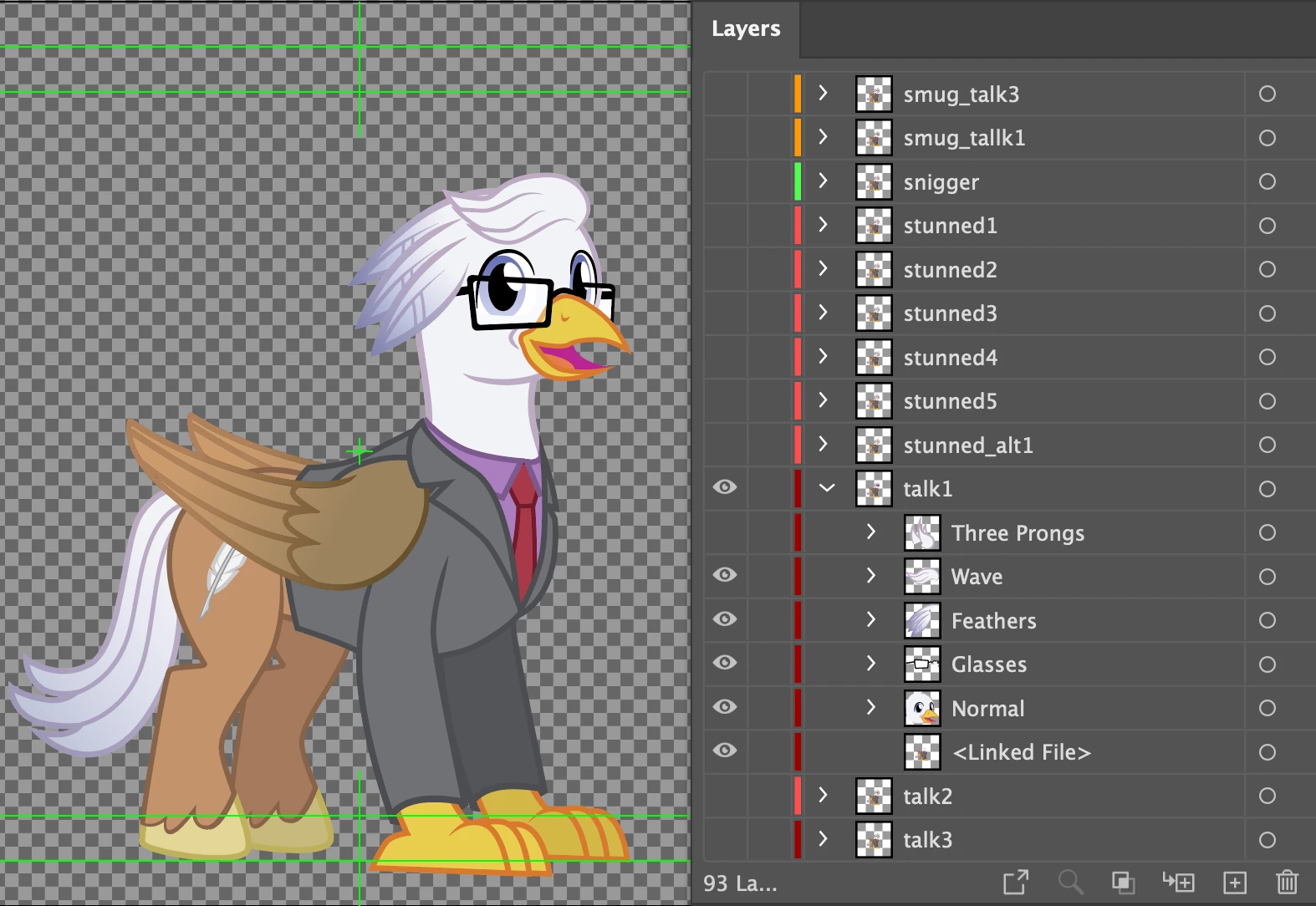
I have a project that features a character with multiple facial features in labeled groups (glasses, hair wave, ect.). These same groups are present on every layer. To save on time I'm looking for a script that can toggle the visibility of a group by referncing its name. Sadly, I have very little experience with scripting myself and anything I've found online has possessed a syntax error.


Does anyone know of a script that can achieve this?

Correct answer CarlosCanto

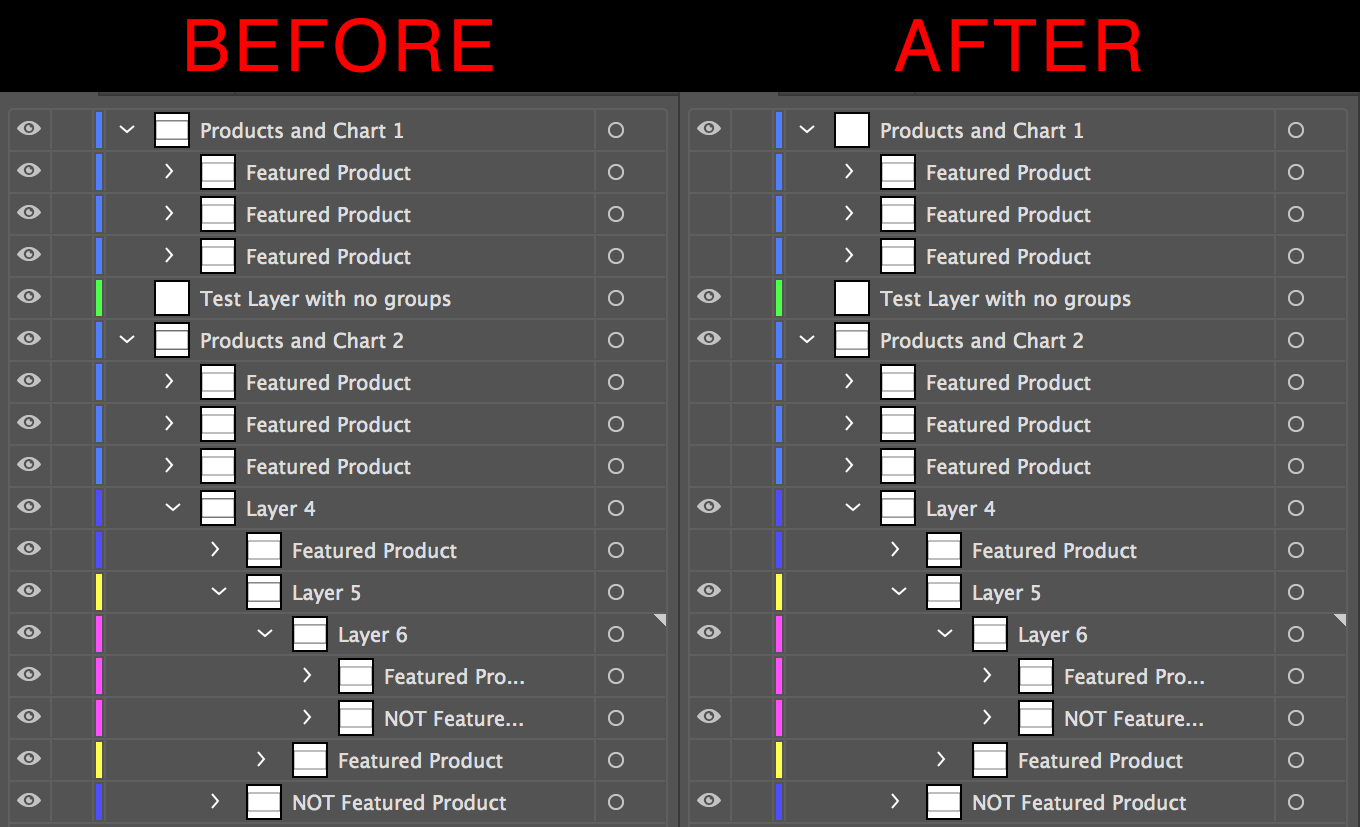
I'm not sure I'm doing a good job of explaining myself. This GIF comes from the same site where I found that code, but it's over five years old.


If the script registers the name "Featured Prdouct", it looks for any group with same name and toggles off the visibility. I don't know if running the script a second time would switch them back on.

the script you posted does exactly what you need, except it doesn't toggle all groups visibility on/off (meaning all on or all off). It toggles visibility per item. If an item is on, it will be turned off, but if some other item is off it will be turned on.


is it not working on your end?


try this version, it's the same script you posted, I just added a Window to enter the group name so you don't have to edit the script each time.


Also, yes, if you start with all on, running the script will turn them all off. Running the script a second time will turn them all on.


Group Name is Case Sensitive


// jshint -W118
// globals app

// jshint ignore:start
#target illustrator
// #targetengine main
// jshint ignore:end

function loop(flag, layers) {

    var groups, groupsCount;
    var subLayers, subLayersCount;
    var i1, i1l;
    var i2, i2l;

    // Loop over layers:
    for (i1 = 0, i1l = layers.length; i1 < i1l; i1++) {

        $.writeln('Layer: ', layers[i1].name);

        // Get layer groups:
        groups = layers[i1].groupItems;
        groupsCount = groups.length;

        // If there are nested groups:
        if (groupsCount) {

            for (i2 = 0, i2l = groups.length; i2 < i2l; i2++) {

                $.writeln('Group: ', groups[i2].name);

                // Does group match flag?
                if (groups[i2].name.toLowerCase() == flag) {

                    // Flag matched, so toggle hidden attribute:
                    groups[i2].hidden = (!groups[i2].hidden);

                }

            }

        }

        // Get layer layers:
        subLayers = layers[i1].layers;
        subLayersCount = layers.length;

        // If there are nested layers:
        if (subLayersCount) {

            // Call self and recurse:
            loop(flag, subLayers);

        }

    }

}

if (app.documents.length > 0) {

    // This script assumes you want to toggle visibility of “groups”
    // with a name that matches first argument passed below.
    loop(
        Window.prompt("Enter Name of Group to Toggle Visibility", "width", "Toggle Group Visibility"), // Group name used to toggle visibility.
        app.activeDocument.layers
    );

}



1 reply

CarlosCanto
Community Expert
Community Expert
February 1, 2022

that's a very particular request, I doubt existing scripts would exists for that.


how would the toggle work? can you elaborate?

Known Participant
February 1, 2022

At it's most basic, I think a script could run once to make all the similarly-named groups visible, and if run again it would toggle them to be off. Ideally, such a script could include a prompt for the name, but that's even more advanced.


Here's an example of a script I found online that comes close to the mark:


// jshint -W118
// globals app

// jshint ignore:start
#target illustrator
#targetengine main
// jshint ignore:end

function loop(flag, layers) {

    var groups, groupsCount;
    var subLayers, subLayersCount;
    var i1, i1l;
    var i2, i2l;

    // Loop over layers:
    for (i1 = 0, i1l = layers.length; i1 < i1l; i1++) {

        $.writeln('Layer: ', layers[i1].name);

        // Get layer groups:
        groups = layers[i1].groupItems;
        groupsCount = groups.length;

        // If there are nested groups:
        if (groupsCount) {

            for (i2 = 0, i2l = groups.length; i2 < i2l; i2++) {

                $.writeln('Group: ', groups[i2].name);

                // Does group match flag?
                if (groups[i2].name.toLowerCase() == flag) {

                    // Flag matched, so toggle hidden attribute:
                    groups[i2].hidden = ( ! groups[i2].hidden);

                }

            }

        }

        // Get layer layers:
        subLayers = layers[i1].layers;
        subLayersCount = layers.length;

        // If there are nested layers:
        if (subLayersCount) {

            // Call self and recurse:
            loop(flag, subLayers);

        }

    }

}

if (app.documents.length > 0) {

    // This script assumes you want to toggle visibility of “groups”
    // with a name that matches first argument passed below.
    loop(
        'featured product', // Group name used to toggle visibility.
        app.activeDocument.layers
    );

}
 

So using my own file as an example, I could change the script name to 'Wave' and Illustrator would know to change the visibility on any grouped object that shared that name.


I tried doing just that but Illustrator told me there was a Syntax Error on the first line. I don't know enough about coding to fix that.

Known Participant
February 1, 2022

I'm not sure I'm doing a good job of explaining myself. This GIF comes from the same site where I found that code, but it's over five years old.


If the script registers the name "Featured Prdouct", it looks for any group with same name and toggles off the visibility. I don't know if running the script a second time would switch them back on.