Exit
  • Global community
    • Language:
      • Deutsch
      • English
      • Español
      • Français
      • Português
  • 日本語コミュニティ
  • 한국 커뮤니티
1

Scriptopia - Easy to use CLI tool to setup Typescript for you, no Typescript know-how needed

Enthusiast ,
Dec 04, 2019 Dec 04, 2019

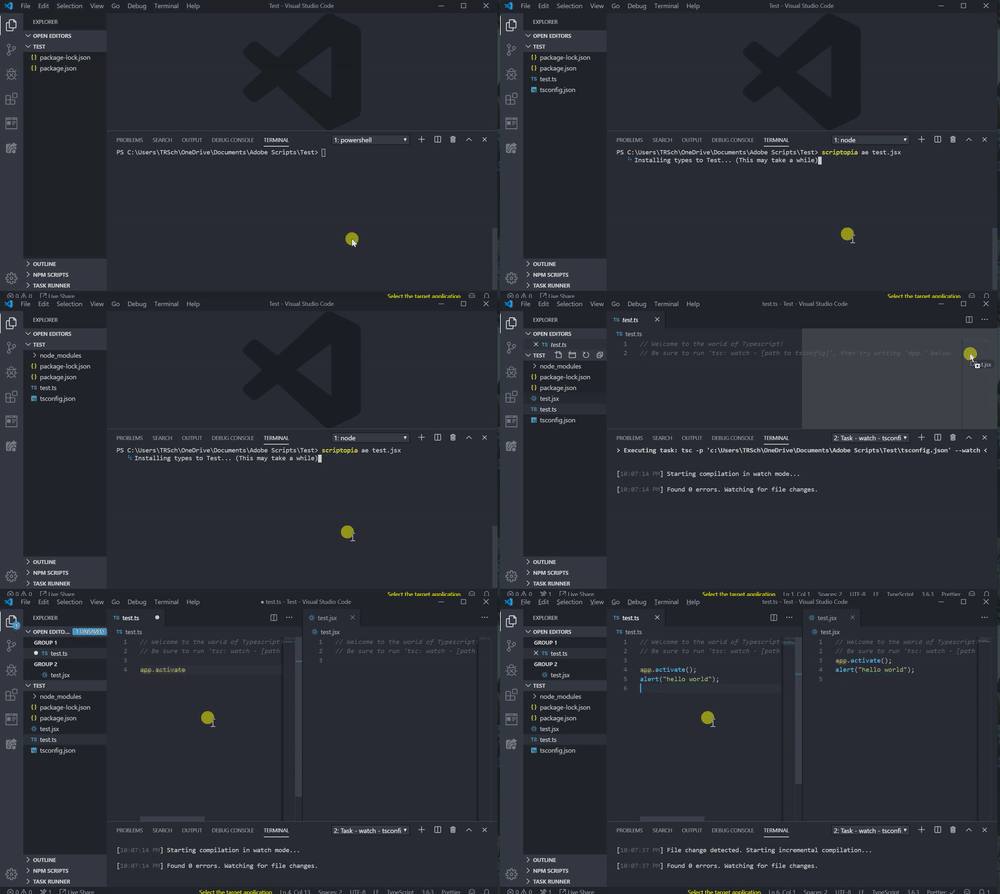
Hello all, I made a quick CLI generator to set up Typescript if you're interested:
 

UnconsciousCommonHarvestmouse-size_restricted


It does all the heavy lifting for you, and is very quick when the types are already installed at some folder in the parent. If you're unsure of what the advantage to Typescript is, notice that I can see the App DOM as I type below, a .jsx file is compiled every time I save, and I could even use more modern Javascript than scripting would typically allow:


CrispShorttermGermanspitz-size_restricted


To install, you'll need NodeJS:


npm install -g scriptopia


Usage can be any of the following:


// We need a package.json somewhere in our project, even if a few folders above. If you haven't made one already, you'll need to generate a package.json beforehand:
npm init -y

// With CLI prompts:
scriptopia

// With shorthands, no prompt:
scriptopia ai test.jsx
scriptopia ilst helloworld.ts
scriptopia illustrator myScript.js

// Detailed help message:
scriptopia help



TOPICS
Scripting
584
Translate
Report
Community guidelines
Be kind and respectful, give credit to the original source of content, and search for duplicates before posting. Learn more
community guidelines
Adobe
Community Expert ,
Dec 05, 2019 Dec 05, 2019

Thanks for sharing inventsable, it looks very interesting. It all sounds like Greek to me though, I need to give this a try.

Translate
Report
Community guidelines
Be kind and respectful, give credit to the original source of content, and search for duplicates before posting. Learn more
community guidelines
Enthusiast ,
Dec 05, 2019 Dec 05, 2019

Thanks Carlos!


Let me know if you need any help, I understand that it's confusing to try after being so used to doing things a certain way. But essentially, this lets you see the DOM as you type (exactly like the online editor I made) along with parameters of app methods -- can definitely be useful instead of constantly needing to stop and doublecheck the documentation.

Translate
Report
Community guidelines
Be kind and respectful, give credit to the original source of content, and search for duplicates before posting. Learn more
community guidelines
Community Expert ,
Dec 08, 2019 Dec 08, 2019
LATEST

thanks for the offer, I'm sure I will have lots of questions. I'll try when I have a chance.


thanks

Translate
Report
Community guidelines
Be kind and respectful, give credit to the original source of content, and search for duplicates before posting. Learn more
community guidelines