
Boeboi 1
Participant
October 24, 2018
Answered

Select and Direct Select Tools: Return to normal functions

  • October 24, 2018
  • 1 reply
  • 561 views

Hello,

I am relatively new to really using Illustrator, and I have just begun having an issue with the select/direct select tools.

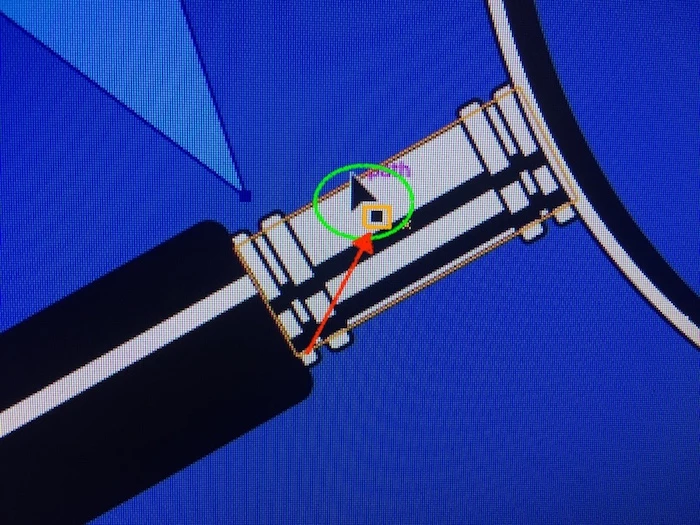
When using either the select or direct select tool in certain functions, the tool's cursor displays along with an additional icon directly offset right (see item in orange callout).

When the additional icon displays, functions are disabled within the tool.

I have done the following:

  • Restarted;
  • Deleted the file and started over;
  • An hour ago I uploaded the most recent version of Ai (Ver 23.0); and
  • The problem remains.

My Mac is running High Sierra 10.13.6 and I have a NVIDIAGeForce GT.

Can anyone instruct me on how to remove the additional icon and restore normal tool function?

Thank you.
This topic has been closed for replies.
Correct answer Boeboi 1

That additional icon is not new. It has always been an indicator that shows you that the Selection tool is ready to select object(s) by clicking on them.

I'm not quite sure what you actually mean at all. Can you elaborate a bit?


Kurt,

To be honest, a full-time illustrator clued me in on the process. It

appears I am watching training videos in which the instructor's select tool

has a tail AND the indicator. When he moves the cursor the tail and the

indicator vanish.

The bottom-line is I was trying to ensure ALL of my processes exactly

followed the instruction. I have since learned the select and direct select

tools in the newest version of Ai are sans the tail.

Again, thank you for your help and I promise any future questions will not

waste peoples' time.

1 reply

Kurt Gold
Community Expert
Community Expert
October 24, 2018

You are saying: "When the additional icon displays, functions are disabled within the tool."

What functions do you mean? What is your definition of "normal tool function"?

Boeboi 1
Boeboi 1Author
Participant
October 24, 2018

Hi Kurt,

Thank you for responding.

The best thing I can say with regard to normal is that I cannot use keyboard shortcuts to duplicate and move. Also, when the extra icon displays, if I press shift while holding down my mouse button, the solid black box vanishes.

When I let go of the shift key, the box returns. Also, while holding down the shift key and clicking the mouse, the icon changes to one that is similar to the Transform icon.

Kurt Gold
Community Expert
Community Expert
October 24, 2018

That additional icon is not new. It has always been an indicator that shows you that the Selection tool is ready to select object(s) by clicking on them.

I'm not quite sure what you actually mean at all. Can you elaborate a bit?