fl0645
Known Participant
August 15, 2020
Answered

selection layer problem

  • August 15, 2020
  • 2 replies
  • 1033 views

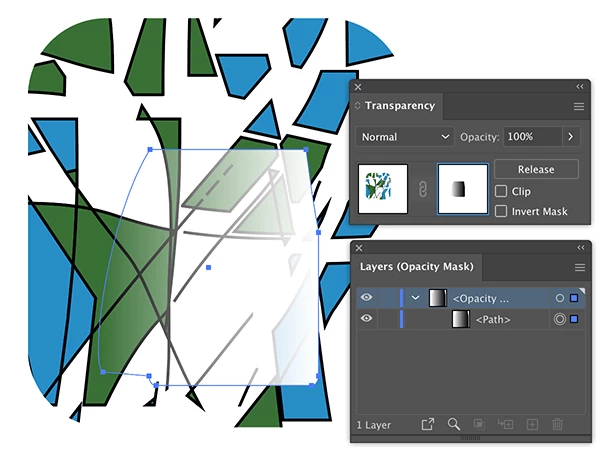
Hello, I have a selection problem, I added a frame with mask to my illustration test, and the other layers disappeared from the layers window, I can no longer select and reappear the layers " normal ", only the mask layer is present. Thank you in advance for your help.

This topic has been closed for replies.
Correct answer Ton Frederiks

I see one option in opacity panel (it's aspect panel i find it) but the real problem is for example that ctrl + Y see that the rectangle with white opacity in the center of the frame not exist, he has like desapear of the objects, it is the major problem i see, no possibilities to have access to option opacity for this rectangle because it's not more exist. But it's steel visible in the image on the center, it's a rectangle with part of it with a mask opacity created. I can try to repeat all the process to see if it's a bug or a mistake from me.


When you click the mask in the Transparency panel you can see it in the Layers panel.
2 replies

Ton Frederiks
Community Expert
Community Expert
August 15, 2020

Check the Transparency panel and try to click on the left icon. It look like you are selecting an Opacity mask.


fl0645
fl0645Author
Known Participant
August 16, 2020

I created a frame with mask and it disappeared from the layers, it is impossible to select it in the image ... Thanks in advance for your help !!


https://we.tl/t-4r8jOy1bCy


fl0645
fl0645Author
Known Participant
August 17, 2020

I don't understand what you try to show, but did you check the Transparency panel?


Hello, thank you for your answer, in fact I notice that a layer has disappeared on the list of layers but on the other hand it remains visible in the image (it is the frame with a white gradient because it was a rectangle with opacity and clipping). I can't make it visible anymore, is this a bug?, Thanks in advance.


https://we.tl/t-VcUMhiQQpx

fl0645
fl0645Author
Known Participant
August 15, 2020

I closed and saved the project. By opening Illustrator the problem is solved, so it was apparently a bug.

fl0645
fl0645Author
Known Participant
August 15, 2020

No, now the layer with mask as deseapear of the layers list but is present in the image, i don't understand, thanks
