
Known Participant
June 16, 2011
Answered

Selection tool is missing bounding box... show bounding box not available

  • June 16, 2011
  • 26 replies
  • 324182 views

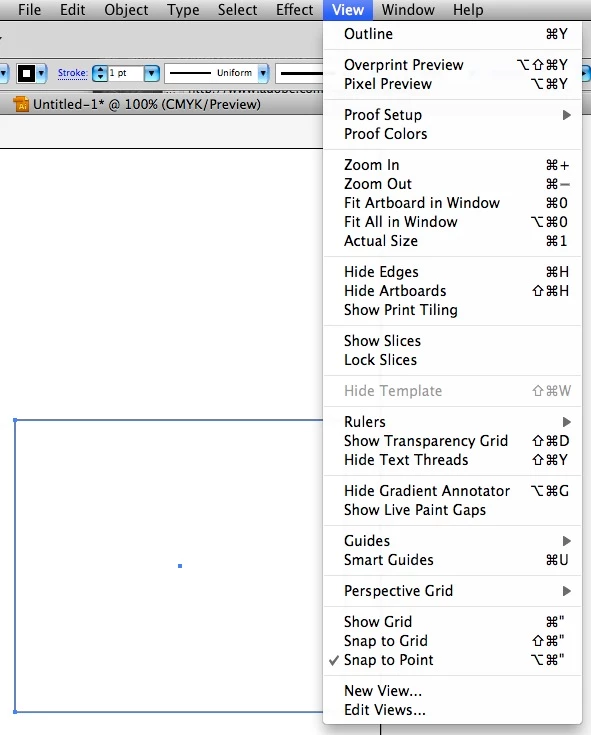
My selection tool is missing the bounding box, i am unable to transform anything.

under View where show bounding box is suppost to be it is not.

I am using CS5... and JUST installed it, i haven't done anything yet.

please help!
Correct answer askaboutnuel

It's ctrl+shift+b for PC

26 replies

Participant
May 16, 2024

Yeah, Adobe, you better create an AI to assist me when I switch of by mistake stuff. I searched online for an hour to find why the heck i cant resize my image. Because my bouding box dissapeared. jeeeezssss

askaboutnuelCorrect answer
Participant
November 14, 2022

It's ctrl+shift+b for PC

jasleena33550298
Participant
March 8, 2019

thank you, saved my day!!!

Participant
January 13, 2019

- I've got problem with (by "image trace") traced and expanded shapes. Tried forums for solutions, including this one.

I used "white arrow" and moved some nodes,

when returned to "black arrow" bounding box appeared wherever it's needed.

- I don't have GPU/CPU choice in Illustrator CC.

- Of course you can hide bounding box, as well as edges, by shortcuts or from menu.

Monika Gause
Community Expert
Community Expert
January 13, 2019

miljanp32883977  schrieb

- I've got problem with (by "image trace") traced and expanded shapes. Tried forums for solutions, including this one.

I used "white arrow" and moved some nodes,

when returned to "black arrow" bounding box appeared wherever it's needed.

- I don't have GPU/CPU choice in Illustrator CC.

- Of course you can hide bounding box, as well as edges, by shortcuts or from menu.

Can you please give us the complete picture?

Please describe your exact problem. Also we need to know xour version and system. Please create a new thread for that.

Participant
March 20, 2018

Command-Shift-B worked! Thanks! Such a weird issue to have with the new update

January 27, 2018

Guys I just found it!!! Having moved from CS6 to CC at work it was nagging the ass off me!!!!

goto

preferences / selection and anchor display /

then CHECK “show anchor points in Selection Tool and Shape Tools“

have a a nice day  

Participant
November 18, 2017

problem solved. Select the Transform tool. click on the button circled in red. that toggles the bounding box. Photoshop CC

Monika Gause
Community Expert
Community Expert
November 18, 2017

samc78566662  schrieb

problem solved. Select the Transform tool. click on the button circled in red. that toggles the bounding box. Photoshop CC

This is the Illustrator forum - Photoshop is not quite our focus of attention.

Participant
November 1, 2017

Thanks

Blender Master
Participant
October 16, 2017

I had the same issue, which really frustrated me. I tried everything written in this forum, and unfortunately nothing worked. However, I did find a solution (by mistake) which I hope everyone else facing the same situation finds useful. It was to simply uncheck then check the Toggle Mask and Shape Path Visibility button.

Hope it helps!

Monika Gause
Community Expert
Community Expert
October 16, 2017

https://forums.adobe.com/people/Blender+Master  schrieb

I had the same issue, which really frustrated me. I tried everything written in this forum, and unfortunately nothing worked. However, I did find a solution (by mistake) which I hope everyone else facing the same situation finds useful. It was to simply uncheck then check the Toggle Mask and Shape Path Visibility button.

Hope it helps!

This is an After Effects screenshot, but you have posted in the Illustrator forum. Of course this thread didn't help you.

Blender Master
Participant
October 16, 2017

Cheeeeese!

Tried to help in the wrong forum! Sorry for that.

lisat88026971
Participant
August 16, 2017

I had the same problem, on ai cs4. I fixed it by going to the top menu, select -> object -> direction handles or text object may also help