
Known Participant
June 16, 2011
Answered

Selection tool is missing bounding box... show bounding box not available

  • June 16, 2011
  • 26 replies
  • 324293 views

My selection tool is missing the bounding box, i am unable to transform anything.

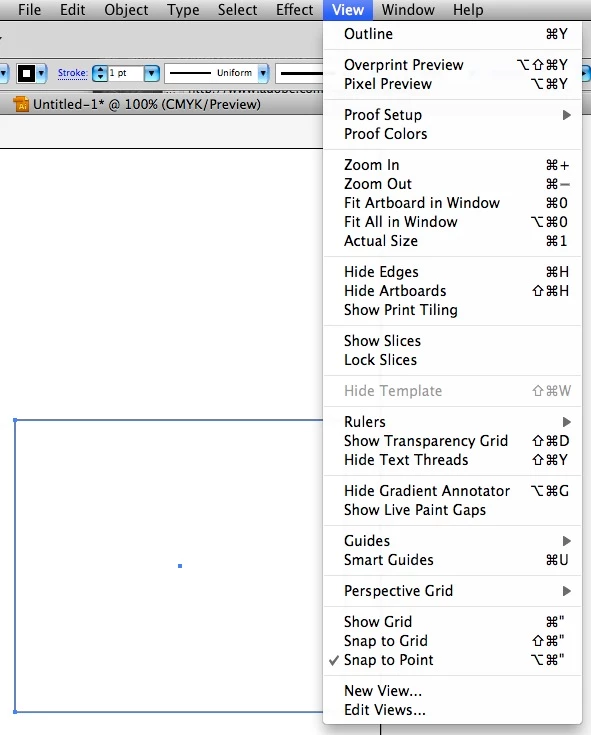
under View where show bounding box is suppost to be it is not.

I am using CS5... and JUST installed it, i haven't done anything yet.

please help!
Correct answer askaboutnuel

It's ctrl+shift+b for PC

26 replies

Inspiring
October 27, 2014

This has happened to me before but it's just here and there. Seems like a glitch but it's very annoying, indeed. I have had some luck with just quitting Illustrator and going back in again.

Participant
October 27, 2014

i just got this issue with Ilustrator this morning. I can't resize an object. I used to be able to just hold the command key and the shape would have handles appear. now it doesn't do anything, and i have to toggle to the transform tool in the tool menu.

any solution for this?

Participant
October 22, 2014

I'm having the same problem. I have tried all the above commands with no joy. The bounding box toggles appear when I want to scale an image but not when I want to scale a simple box.

Can anyone help?

wootang_clan
Participant
October 27, 2014

I'm having the same problem. It's only on a rectangle... other shapes shows a bounding box but square and rectangles, nothing.

armsdan
Participating Frequently
February 15, 2013

Had the same issue when working with classroom in a book chapter 3 trying to make the curtains wider. I was able to get tehe bounding box with the hot key but no option in the show menu to turn it on or off. We are using CS6.

Astroboy2000
Participating Frequently
March 15, 2013

It's command + shift + b on a Mac. Don't kow about PC. You just have to roll over your mouse back and then you see it.

DanielRomagnoli
Participant
June 22, 2017

Worked: cmd + shift + b

Participant
February 5, 2013

I am having the same problem. I've tried Cmd+Shift+B as well as going through the menu bar and manually selecting hide/show bounding box. The bounding box is still not there. I haven't touched the tool box as far as I know so I am up in arms as to the reason why it went away. If you have any insight please let me know!!

flossyfloss
Participant
January 29, 2016

ME TOO! This has been happening to me for 2 years, the when i turn the bounding box on and off, it makes no difference, the screen appears like the bounding box is turned off. I cant see all the blue selection dots. What ever it is, it turns itself on or off randomly.

Larry G. Schneider
Community Expert
Community Expert
February 4, 2016

The only way I can see those anchors is if I go into outline preview.  Then I'm ok.  The minute I go out of outline then the selected anchors are not showing that they are selected.  I'm in CC for the Mac.


You haven't accidentally hit the Cmd(Ctrl)-H keyboard shortcut have you?

Steve Fairbairn
Inspiring
June 16, 2011

The toggle for Bounding boxes is Cmd + Shift + B. See if it works.

If it doesn't it's no big deal. You've got tools for doing everything you need to do.

Personally I hate bounding boxes and am perfectly happy without them.

Known Participant
June 16, 2011

Found it

The bounding Box Tool in the tools plug in was missing.

Must have happened when when i removed the Barcoade Tool Box from there...

Barcode Toolbox doesn't work with CS5 any more.

Thanks for the help tho.

Now, if Adobe could make the barcode toolbox work again i'd be a happy camper.